How to Delete Your Siri Audio History and Opt Out of Siri Audio Sharing - MacRumors
Skip to Content

How to Delete Your Siri Audio History and Opt Out of Siri Audio Sharing

by

This article explains how to delete your Siri audio interaction history and opt out of sharing audio recordings with Apple on iPhone, iPad, and iPod touch.

siri iphone x
Earlier this year, it was discovered that Apple hired contractors to listen to a small percentage of anonymized ‌Siri‌ recordings to evaluate the virtual assistant's responses with the purpose of improving accuracy and reliability.

The Guardian revealed that Apple employees working on ‌Siri‌ often heard confidential details while listening to the audio recordings. Apple was subsequently criticized for not making it clear to customers that some of their ‌Siri‌ recordings were being used to improve the service.

Soon after the report, Apple suspended its ‌Siri‌ grading practices and promised users that it would introduce tools in a forthcoming update that would allow them to opt out of sharing their audio recordings.

With the release of iOS 13.2 in October, those new tools arrived. Apple now includes an option on iPhone and ‌iPad‌ that allows users to delete their ‌Siri‌ and Dictation history and opt out of sharing audio recordings. The following steps show you how to do both.

How to Opt Out of Siri Audio Sharing

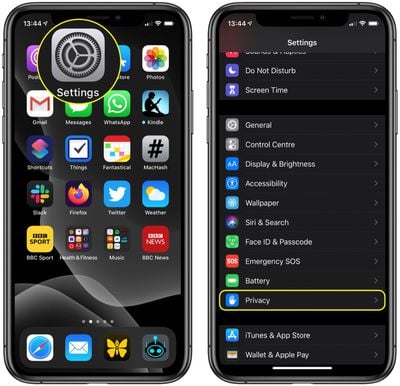
  1. Launch the Settings app on your iPhone, ‌iPad‌, or iPod touch.
  2. Scroll down and tap Privacy.
    settings

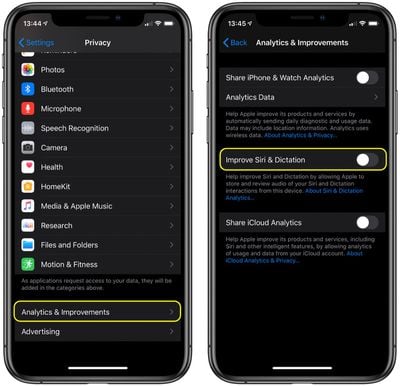
  3. Scroll to the bottom of the Privacy screen and tap Analytics & Improvements.
  4. If you don't want to let Apple review your recordings, toggle off the switch next to Improve Siri Dictation.
    settings

Note that you can tap the link under the toggle for more information relating to Apple's ‌Siri‌ analytics policy.

How to Delete Your Siri Audio History

  1. Launch the Settings app on your iPhone, ‌iPad‌, or iPod touch.
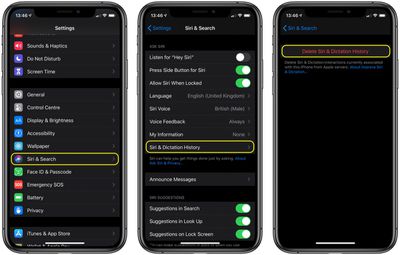
  2. Scroll down and tap Siri & Search.
    settings

  3. Tap Siri & Dictation History.
  4. Tap Delete Siri & Dictation History.

Apple will inform you that your request was received and that your ‌Siri‌ and dictation history will be deleted. That's all there is to it.

In addition to these new ‌Siri‌ and Dictation-related privacy features, Apple also says it is making further changes to its human grading process that will minimize the amount of data that reviewers have access to.


Related Forum: iOS 13

Top Rated Comments

jermwhl Avatar
88 months ago
I'd like to REVIEW my siri audio history. Is that possible? I'm curious what has been recorded, without my knowledge. Siri has, on a few occasions, butted herself into a conversation without the "Hey Siri" prompt. In addition, my cat's name is Stevie and whenever I call her, Siri thinks I'm talking to her.
Score: 5 Votes (Like | Disagree)
btrach144 Avatar
88 months ago
I would have considered opting in if it hadn’t taken a whistleblower to expose Apple. Since Apple can’t be trusted, I picked to opt out.
Score: 4 Votes (Like | Disagree)
OneInfiniteLooper Avatar
88 months ago
Here’s my take.. maybe an unpopular one. Have at it, Apple. I use your service to make things in my life easier, so why not use my Siri request recordings to make the service better for everyone else. It’s not like I’m sitting around spewing out my social security number, mothers maiden name and birthday all the time.
Listen to my recordings and “grade” them so it can improve that request next time. I realize that’s not the same for everyone, that’s just my scenario.

I trust them (as much as you can trust a huge company) with my Siri recordings because I’m not giving them any earth-shattering information... would it be nice to see Siri history, maybe, sure. But I really don’t care. If they let us see that I’d look at the first one, and then get bored and forget about it.

Score: 3 Votes (Like | Disagree)
DeepIn2U Avatar
88 months ago
In music signature there is a great quote from Netflix Anon “it’s not that I have anything to hide, it’s that I have nothing for you to see (or hear)!”

Apple is NOT being clear WHEN our individual requests will be deleted! @MacRumors this article while very helpful lacks the research your hundreds of thousands of regestieres users let alone visitors NEED & Expect from you - when will our requests be deleted?! Please follow up with Apple!!

Attachment Image
Score: 1 Votes (Like | Disagree)
88 months ago

I'd like to REVIEW my siri audio history. Is that possible? I'm curious what has been recorded, without my knowledge. Siri has, on a few occasions, butted herself into a conversation without the "Hey Siri" prompt. In addition, my cat's name is Stevie and whenever I call her, Siri thinks I'm talking to her.
Yes it is possible but it’s painfully challenging. I managed to get them to release what they had on me but I don’t fully trust it was the whole entirety. They tend to proof what they send to prevent you from seeing what they really collect. I terminated our contract with Apple last month for those reasons
Score: 1 Votes (Like | Disagree)

Popular Stories

Siri App

Apple Seemingly Killed Siri AI Waitlist Workaround in macOS 27 Beta 2

Wednesday June 24, 2026 5:00 am PDT by
Apple appears to have closed the loophole that let Mac users skip the Siri AI waitlist in the latest macOS 27 Golden Gate beta. As we covered earlier this month, beta 1 testers can switch on the enhanced version of Siri straight away using a single Terminal command, effectively sidestepping Apple's waitlist. However, many users who are running the second developer beta of macOS 27, which...
Siri AI

Tim Cook Holds 'Constructive' Talks With EU Over Siri AI Launch

Wednesday July 1, 2026 4:49 am PDT by
Apple CEO Tim Cook held "constructive" talks with EU tech chief Henna Virkkunen on Tuesday about releasing Siri AI in the bloc while complying with the bloc's digital rules, reports the Financial Times ($). An EU spokesperson told the publication the virtual meeting had involved a "constructive exchange on topics of common interest, on which the work continues." Siri AI will be available...
watchos 27

Siri AI Comes to Apple Watch in watchOS 27 Beta 3

Monday July 6, 2026 1:24 pm PDT by
With watchOS 27 beta 3, Apple added support for Siri AI and the Siri app, so Apple Watch users can now use the features right from their wrist. Apple said Siri AI would be coming to the watch back when watchOS 27 was first introduced, but the feature wasn't live until now. The Dynamic App Grid that pops up when the Digital Crown is pressed displays the Siri app in the center, and the...