iOS 15: How to Blur Your Background on a FaceTime Call - MacRumors
Skip to Content

iOS 15: How to Blur Your Background on a FaceTime Call

by

In iOS 15, Apple brings several enhancements to FaceTime, including new visual and audio effects to improve the video call experience.
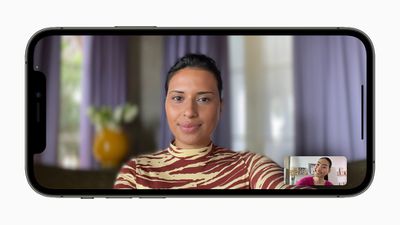
Apple iPhone12Pro iOS15 FaceTime portraitmode 060721 big
One of the new visual features is Portrait mode in calls. With this mode enabled, you can blur your background so that the focus is on you rather than what's behind you.

The feature is commonly used by other video conferencing apps like Zoom and Teams to obscure untidy domestic scenes and other sources of distraction or embarrassment. Here's how it works in ‌FaceTime‌ on iPhones and iPads running iOS 15.

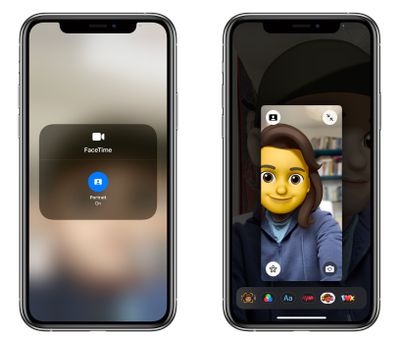
  1. Launch the FaceTime app and initiate a video call.
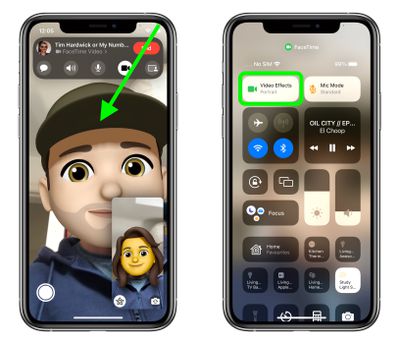
  2. Open Control Center with a diagonal swipe down from the top-right corner of your screen.
  3. Tap the Video Effects button.
    FaceTime

  4. Tap the Portrait button to enable it.
  5. Swipe up from the bottom of the screen to dismiss Control Center and return to the call.
    ios 15 facetime portrait 2

Unless you expand your view of yourself, you won't see too much difference in your appearance when Portrait mode is enabled, but the person on the other end of the call will see your environment faintly blurred, just like in a Portrait mode photo.


Related Forum: iOS 15

Popular Stories

iOS 27 and FaceTime Feature

iOS 27 Improves FaceTime in Three Ways, Including Dual Capture

Thursday June 11, 2026 6:27 am PDT by
iOS 27 includes three enhancements for FaceTime, with the most notable one being a dual camera feature on some newer iPhone models. On the iPhone 17, iPhone 17 Pro, iPhone 17 Pro Max, and iPhone Air, a Dual Capture feature allows you to record video of yourself and what is in front of you at the same time. Starting with iOS 27, this feature is now supported in the FaceTime app on these...
Chase Sapphire Reserve Apple Perk Feature

Chase Sapphire Preferred Card Introduces New Perk for Apple Customers

Monday June 15, 2026 12:07 pm PDT by
Chase this week announced new perks for its Sapphire Preferred credit card, and one of them is a complimentary one-year Apple TV streaming subscription. To get the free year of Apple TV, which typically costs $12.99 per month in the U.S., you must activate the card by December 31, 2026. If you are already subscribed to Apple TV directly through Apple, the complimentary subscription from...
iCloud iPhone 17 Pro

iPhone Users Who Pay for iCloud Storage Get Two New Perks on iOS 27

Tuesday June 9, 2026 11:29 am PDT by
If you pay for extra iCloud storage on your iPhone, beyond the 5GB included for free, you might receive two more perks on iOS 27 at no additional cost. First, Apple said there will be daily usage limits for some of the new and enhanced Apple Intelligence features on iOS 27, including image generation. However, the company noted that "increased access" is available with "most" iCloud+ storage ...