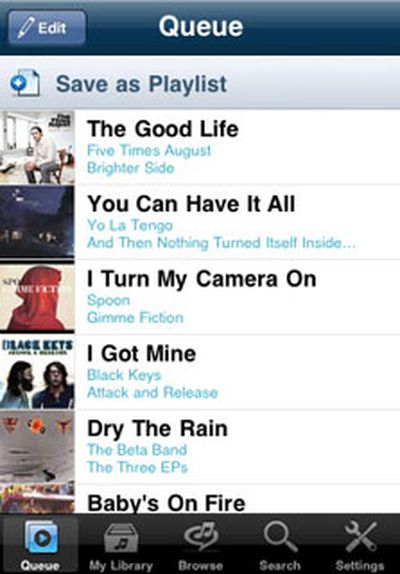
RealNetworks' Rhapsody app has been approved and is now in the App Store. The app, which provides on-demand streaming music, had reportedly been submitted to Apple just over two weeks ago.
The RealNetworks blog elaborates on how the app works for subscribers and those who wish to try out the service:
If you're already a Rhapsody To Go subscriber, all you need to do is download the app and sign in. If not, we invite you to try out the all-you-can-eat service for free! The app is yours to test out, and learn to love, for seven days (no credit card required). After that, you'll need to either subscribe or continue not hearing what you want, when you want.
When first opening the app after downloading it, Rhapsody subscribers can get started right away by entering their username and password. Those who want to use the free 7-day trial will be directed to a web page via Safari to sign up.
Initially, it appeared doubtful that Apple would approve an app that would provide competition to its own iTunes app and store. However, with the recently-approved Spotify app - another music streaming app that also requires a subscription - the approval of Rhapsody no longer seems out of the ordinary.
The Rhapsody app is free and can be found here in the App Store (link opens iTunes).
While many of the predictions for Wednesday's Apple Media event were spot on, one of the most prevalent rumors didn't come true. The new iPod touch did not get a camera. David Pogue interviewed Steve Jobs and asked him why they omitted a camera from the refresh:
Mr. Jobs reiterated what Phil Schiller, the marketing vice president, had said earlier in the onstage presentation: that Apple is really pitching the iPod Touch as a game machine these days. And to do that, you have to make it as inexpensive as possible.
Jobs explained that since marketing the iPod touch as a gaming machine, it's really taken off. Not adding new features such as a camera was seen as a way to drive the price down even further.
In further questioning, Jobs continued to downplay the importance of dedicated ebook readers and reported to Pogue that there shouldn't be any delays in new products due to Jobs' absence.
"There are some things that I'm focusing a lot of attention on right now -- to polish," he said. "No, I don't think we're going to miss a beat. We have some really good stuff coming up."
The interview concludes with Jobs reporting that he "feels great" and acknowledging that he needs to gain some weight and he'd been eating a lot of ice cream to accomplish that.
In addition to today's release of iTunes 9 and QuickTime 7.6.4, Apple also released two other software updates for enterprise iPhone users and MobileMe customers users running Windows.
- iPhone Configuration Utility 2.1 allows system administrators in enterprise settings to perform a variety of tasks related to administering iPhones.
iPhone Configuration Utility lets you easily create, maintain, encrypt, and push configuration profiles, track and install provisioning profiles and authorized applications, and capture device information including console logs.
iPhone Configuration Utility 2.1 is available in Mac OS X (7.17 MB, requires OS X 10.5.8) and Windows (31.11 MB, requires XP SP3 or Vista SP1 and .NET 3.5 SP1) versions, and system administrators are advised to refer to Apple's Enterprise Deployment Guide for more information.
- MobileMe Control Panel for Windows, which carries version number 1.5, brings several changes to the Windows software for setting up and managing MobileMe and iDisk settings.
This update enables you to choose which MobileMe calendar syncs with the default Outlook calendar, provides compatibility with Windows 7, and improves the reliability of bookmark syncing. This update is recommended for all Windows PCs that sync with MobileMe.
The update weighs in at 2.30 MB and is compatible with Windows 7, Vista, and XP.
The podcast video can also be directly downloaded through this link.
The event also marked Steve Jobs' return to the keynote stage after having received a liver transplant earlier this year. This clip shows him walking on stage at today's event:
Apple today released QuickTime 7.6.4 for Mac OS X Leopard and Tiger via Software Update and the QuickTime download page. A Windows version for XP and Vista is also available.
QuickTime 7.6.4 includes changes that increase reliability, improve compatibility and enhance security. This release is recommended for all QuickTime 7 users.
The update addresses four security vulnerabilities across all platforms that could permit maliciously-crafted H.264, MPEG-4, or FlashPix files to execute unauthorized code.
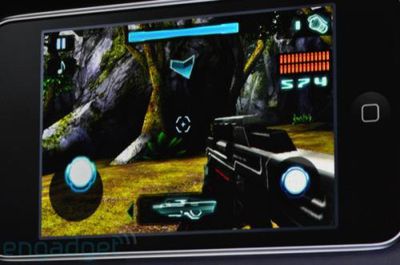
Upcoming Nova, a Halo-like shooter. Photo via Engadget
At today's "It's Only Rock and Roll" media event, Apple focused on games for a significant portion of the event. Apple's Phil Schiller even directly compared the iPod touch to the Sony PSP and Nintendo DS.
And people are starting to see what a great gaming device this is. When you think about the companies that came before us... when you played those other systems, they seemed so cool, but now when you look at them, they don't stack up against the iPod touch.
Schiller then invited developers on stage to demonstrate some new games that hadn't been seen before.
- Assassin's Creed 2 - simultaneous release with other platforms - Riddim Ribbon - a racing/music game - Nova - described as Halo-like first person shooter - Madden NFL 10 - detailed look and video at TouchArcade
The newly introduced iPod touch also shares the faster processor and improved 3D hardware of the iPhone 3GS, making it even more competitive. While some may doubt that the iPod touch would be a serious threat to dedicated handheld devices, Sony has already made several steps to better compete with the iPhone and iPod touch, and has even recruited popular iPhone developers to port their games to their new platform.
At today's "It's Only Rock and Roll" media event, Apple announced the availability of iPhone OS 3.1 for the iPhone and iPod touch. The new firmware will be able to take advantage of the new Genius feature for apps to help users find new apps that may be of interest based on past purchases and will also allow wireless downloading of new pre-cut ringtones. The full list of 3.1 features and updates includes the following:
- Improved syncing for music, movies, TV shows, podcasts, and photos - iTunes U content organization - Redeem iTunes Gift Cards, codes, and certificates in the App Store - Display available iTunes account credits in the App Store and iTunes Store - Save video from Mail and MMS into Camera Roll - Option to "Save as new clip" when trimming a video on iPhone 3GS - Better iPhone 3G Wi-Fi performance when Bluetooth is turned on - Remotely lock iPhone with a passcode via MobileMe - Use Voice Control on iPhone 3GS with Bluetooth headsets - Paste phone numbers into the keypad - Option to use Home button to turn on accessibility features on iPhone 3GS - Warn when visiting fraudulent websites in Safari (anti-phishing) - Improved Exchange calendar syncing and invitation handling - Fixes issue that cause some app icons to display incorrectly
iPhone OS 3.1 is available and is a free download for iPhone customers and iPod touch users already running iPhone OS 3.0. iPod touch users running earlier firmware versions can upgrade to iPhone OS 3.1 for $4.95.
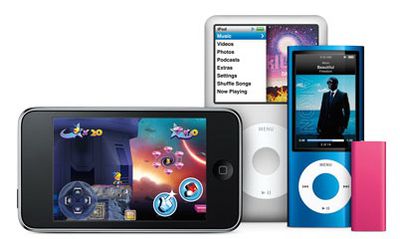
Apple announced new pricing and capacities for its iPod line of digital media players at today's "It's Only Rock and Roll" media event. Most notably, the new generation of the iPod nano line receives numerous upgrades, including a video camera and FM radio with live pausing and iTunes tagging capability.
The iPod touch gets a hardware upgrade for the high-capacity models and a price cut on the lowest-capacity model. The 8 GB iPod touch will be $199 (down from $249), while the 32 GB and 64 GB models will be $299 and $399, respectively.
The 32 GB and 64 GB iPod touch models are "50% faster" than previous models and will run OpenGL ES 2.0. iPod touch owners who already have the latest 3.0 firmware will also be able to download the new iPhone OS 3.1 firmware, which is available today, at no charge, while those running older firmware versions can upgrade for $4.95.
The only change to the iPod classic model is a capacity bump to 160GB, up from 120GB, at the same price point of $249.
The iPod shuffle also receives a refresh today, including new pink, green and blue colors in addition to the original black and silver. A new polished stainless steel special edition model available only through Apple online and retail stores also joins the mix. The new iPod shuffle will be available in two capacities - 2 GB and 4 GB. The 2 GB model will be priced at $59 and the 4 GB model will be $79, while the stainless steel special edition will be priced at $99. Also, Apple is working with third-party headphone manufacturers to release new headphones that will be compatible with the iPod shuffle's feature set.
The iPod nano receives the most noticeable feature changes with the addition of a video camera, an FM radio, Voice Over, and the new Genius Mix feature. The iPod nano will also have a slightly larger screen at 2.2 inches within the same form factor as the previous model and with a polished anodized aluminum casing. To support video recording, a microphone and speaker are also added, as well a built-in pedometer. Available today at $149 for the 8 GB version and $179 for the 16 GB version, the iPod nano will also be available in nine different colors.
The rumored iTunes 9 was announced today at Apple's "It's Only Rock and Roll" media event. iTunes 9 brings multiple new features, including iPhone app organization, "Genius Mixes", expanded media syncing options, and much more.
"iTunes 9 is a great iTunes release, with innovative features that make using iTunes better than ever and iTunes content richer than ever," said Steve Jobs, Apple's CEO. "iTunes LP, for example, lets artists share more of their creativity with fans and gives music lovers the feeling of being immersed in an entire album with art, lyrics, liner notes, photos and videos."
Genius Mixes is a new feature that leverages the Genius information gathered since the launch of this feature with iTunes 8 at last year's September media event. Genius Mixes can play an endless mix of songs from your iTunes library that "go great together." iTunes 9 will automatically generate 12 of these mixes by default, and more can be created by the user.
Device syncing has also improved in the latest version of iTunes. Genres and artists can be selectively synchronized along with playlists, and photos can now be synced by Faces and Events.
Home sharing is another new feature that allows iTunes media to be copied and shared among 5 authorized computers in the same household, with settings available to make copying new purchases automatically. All authorized computers are visible in iTunes in the Shared category in the Source list.
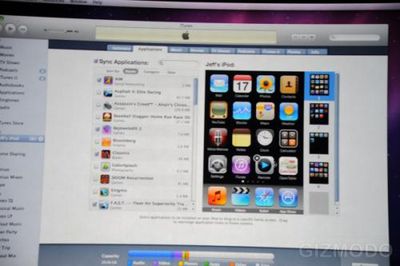
iTunes 9 includes the iPhone app organization feature that was previously rumored. Replicas of the home screen pages of a connected iPhone appear within the Applications tab where apps can be selected for syncing and removal and dragged and dropped to appear on the desired home screen page.
Image courtesy of Gizmodo
Additionally, the iTunes store interface has been re-designed to allow for easier browsing and now offers iTunes LPs - albums with additional content such as lyrics, photos, liner notes, and more. Movies also get a bump from extra content through iTunes Extras that include additional features, graphical chapter selection, and more. Finally, Apple is now offering 30,000 pre-cut ringtones from major music labels, priced at $1.29 each.
Apple's "It's Only Rock and Roll" media event is scheduled to start in just about 45 minutes, and a number of sites will be covering the event live with text and photo updates. We provide here a collection of links to a number of those sources, and we will update this story to summarize today's announcements. We'll also be providing Twitter updates @macrumors. Follow @toucharcade for iPhone game news.
The world's No. 1 music store just got a makeover. With the iTunes Store's beautiful new look, everything you love -- music, movies, TV shows, apps, games, podcasts, and audiobooks -- is even easier to explore.
- TouchArcade reports that Apple's iTunes is already showing a new list that addresses some of the concerns developers have had about Apple's Top App Lists. Now, there is a new list ranked by Revenue, not by Units Sold.
The visual experience of the record album returns with iTunes LP. Get a gorgeous, immersive digital version of select albums -- right in your iTunes library. So while you listen to your favorite songs by your favorite artists, you can also dive into beautifully animated lyrics and liner notes, performance videos, artist and band photos, and more.
- iLounge reports that they spotted Greg Grunberg of the TV show Heroes as well as representatives from both Nike and Pandora.
Summary of Event - Steve Jobs on stage for presentation and receiving a standing ovation. - Going to talk about music, but first iPhone. Over 30 million iPhones sold in 2 years. 1.8 billion apps sold. - New today: iPhone OS 3.1. Free. Brings "Genius" to apps. 30,000 ringtones for $1.29 each. - Now for music. 8.5 billion iTunes songs sold, 100 million accounts. #1 music retailer in the world. - Introducing iTunes 9: Genius database expanded to include "Genius Mixes", which automatically plays songs from your library that go together - New syncing options: artists, genres, etc. Also for photos and movies. Manage iPhone apps in iTunes: arrange home screens. - Home sharing to manage copying of songs, TV shows, apps, etc. to up to 5 computers in your house. - Cleaner layout for iTunes Store. - iTunes LP: Album packages with tons of bonus material - lyrics, photos, videos, etc. - Now showing a demo of iTunes 9. - iTunes Extras: Bonus material for movies. Similar to DVD bonus features, but also includes interactive material. - Schiller on stage to talk about iPods. - Over 220 million sold to date, 73.8% market share. iPod touch is fastest growing product. Over 20 million sold. Plus 30 million iPhones. - Fastest growing product is the iPod touch: sold 20 million of them. Going over why it's so great...music, video, apps, internet, etc. Great gaming device. - 21,178 games and entertainment apps on the iPhone/iPod touch. 3,680 for Nintendo DS, 607 for Sony PSP. Now showing video montage of games. - Developer demos: First up, Ubisoft to talk about Assassin's Creed II. Simultaneous release with other platforms. Put your own photos on wanted posters. - Tapulous: Previewing Riddim Ribbon, a racing/music game. - Gameloft: New FPS called "Nova". Very "Halo-like." - EA: Showing off Madden NFL 2010 to wrap up the demos. - Schiller back on stage. Talking about iPod touch...most affordable gateway to the App Store. Dropping price on 8 GB model from $229 to $199. - New iPod touch price points: $199 for 8 GB, $299 for 32 GB, $399 for 64 GB. - Also making the 32/64 GB versions faster, with ability run OpenGL|ES 2.0 like the iPhone 3GS. - iPod classic bumped from 120 GB to 160 GB. Same $249 price point. - iPod shuffle: New third-party headphones with iPod shuffle controls built-in. - Now five colors for the shuffle: $59 for 2 GB and $79 for 4 GB. - One more thing: video cameras in iPod nanos. Also includes a speaker. - Also adding an FM radio, and Genius Mixes. - Built-in pedometer for Nike+, larger display. - 8GB for $149, 16GB for $179. Bright, glossy colors. Available today. - Closing performance from Norah Jones.
AppleInsider reports on a tip from a reliable source detailing the forthcoming iPod model updates to be introduced today. The source, who has also provided reliable information to MacRumors in the past, reveals a list including updates to Apple's iPod nano, iPod classic, and iPod shuffle lines, but makes no mention of the iPod touch, an omission that may be related to last-minute production problems with camera modules.
The list includes iPod nano models in both 8 GB and 16 GB capacities, each available in the same nine colors currently available in existing models. Also included are 160 GB iPod classic models in the same silver and black colors found on existing models, but increased in capacity from the current 120 GB offerings. Finally, iPod shuffle models in 2 GB and 4 GB capacities are listed in several colors. It is unclear whether the new iPod shuffle models correspond to the latest version introduced in March in 4 GB capacities in silver and black or to earlier-generation models that have continued to be offered in 1 GB capacities in multiple colors.
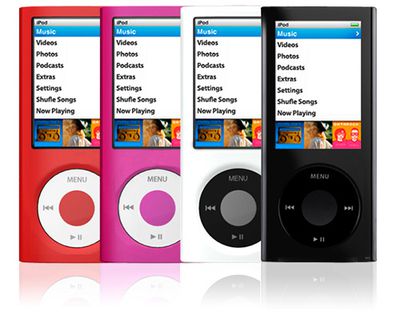
CNET Asia points to new case offerings for the next-generation iPod touch and iPod nano from Chinese firm Cygnett. While a number of third-party case manufacturers have been advertising cases for the next-generation iPod touch and iPod nano for the past several months, these latest images are notable because they depict iPods in the cases, complete with centered digital camera on the back of the iPod touch and wider-aspect screen on the iPod nano.
Cygnett "Form" case for unreleased third-generation iPod touch
A quick glance at the images, however, reveals that the devices are actually digitally-manipulated versions of existing Apple devices. The supposed iPod touch appears to actually be an iPhone, complete with earpiece receiver, ring/silent switch and an apparent thickness more in line with that of the iPhone than the current iPod touch.
Cygnett "Jellybean" case for unreleased fifth-generation iPod nano (Note "Shufle Songs" spelling error)
The iPod nano images similarly appear to be mockups, appearing stretched compared to standard iPod nano screen shots and using apparently different fonts than those used by Apple. In fact, in one image, "Shuffle" is even misspelled as "Shufle".
While the images are clearly not actual next-generation iPod models, they have gained some traction on the Internet today, so we post them for discussion purposes only.
AT&T today announced its plans for rolling out 7.2 Mbps 3G data service on its network. Deployment will begin in Charlotte, Chicago, Dallas, Houston, Los Angeles and Miami, with service in those cities beginning by the end of the year. Service will be extended over the following two years to cover approximately 90% of the current U.S. 3G network area.
AT&T plans to begin deployment of HSPA 7.2 in six major U.S. cities, including Charlotte, Chicago, Dallas, Houston, Los Angeles and Miami, with initial service availability expected in these markets by the end of the year. All told, the company plans to deploy HSPA 7.2 in 25 of the nation's 30 largest markets by the end of 2010, and to reach about 90 percent of its existing 3G network footprint with HSPA 7.2 by the end of 2011.
AT&T announced in late May that it would be deploying the technology, which doubles the theoretical speed of its existing 3G network as an interim step toward LTE (4G) offerings scheduled to begin rolling out in 2011.
Apple's iPhone 3GS, released in June, does support the faster 7.2 Mbps download speed being deployed, although it is apparently unable to support the faster upload speeds associated with the new standard.
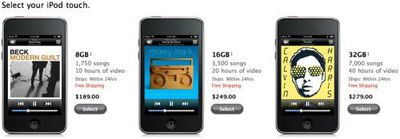
Ahead of today's "It's Only Rock and Roll" media event, Apple has reduced prices across the board on its iPod touch, iPod nano, and iPod classic lines.
iPod touch: - 8 GB now $189, down $40 - 16 GB now $249, down $50 - 32 GB now $279, down $120
iPod nano: - 8 GB now $129, down $20 - 16 GB now $149, down $50
As noted in our rumor roundup yesterday, Apple is expected to introduce new iPods at today's event, with the iPod touch, iPod nano, and possibly the iPod classic, gaining digital cameras. Last-minute production problems with the cameras, however, have been rumored to be delaying the launch of the new models.
It remains to be seen whether today's price reductions are an interim measure to offer the existing models at competitive pricing until the new models are ready for launch or if Apple will continue to offer these previous-generation iPods alongside the new models as a strategy to lower prices and boost demand. Microsoft's Zune HD launches next week at price points of $219.99 for 16 GB and $289.99 for 32 GB, exerting pressure on Apple to either reduce prices or add features to its iPod touch line.
MacRumors has received word that Apple has seeded a new version of Mac OS X 10.6.1, Build 10B504, to developers this evening. The new build, which has appeared approximately one week after the initial seed of OS X 10.6.1, carries only a single increment in build number over the previous build.
Build 10B504 reportedly addresses only two documented issues, one related to crashing of Desktop Services in Finder, and a second related to excessive "dyld shared cache" Console messages. The dyld Console entries issue was the only known issue detailed in the seed notes of the previous build, and no such known issues are documented in Build 10B504.
We took a first look at the TomTom U.S. & Canada turn-by-turn navigation app a short while ago, and have taken it through its paces over the past few weeks to complete our full review of this highly-anticipated app.
Navigation Guidance
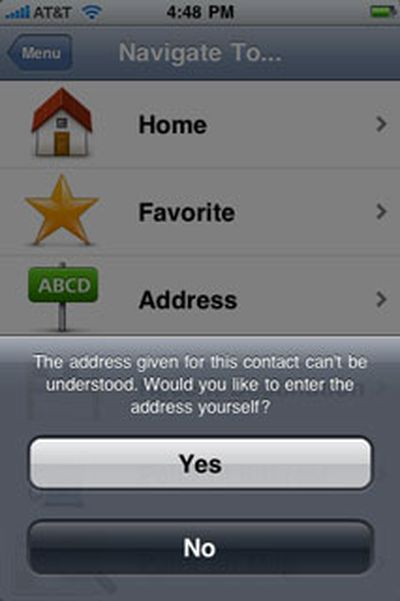
The TomTom app offers several options when choosing a destination. Contacts integration is built-in, so it's easy to select a contact as a destination, and we really like this ability. However, we found that we'd often get an address format error when selecting an existing contact, even with addresses that appeared to have nothing out-of-the-ordinary about them, containing a simple street address in a city that exists in the TomTom's map data with everything correctly spelled:
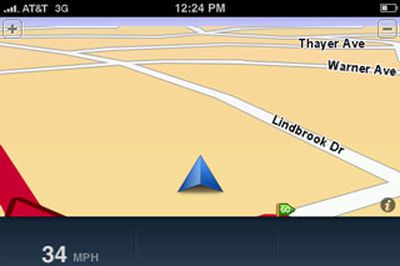
We found that navigation guidance showed us off the side of the current road more often than we would have liked, even under weather and set-up conditions where other GPS apps, such as Sygic's MobileMaps and Navigon's MobileNavigator, showed no such problems. We also noticed that it lagged somewhat behind our current location, often showing us slightly behind an intersection that we were actually passing through. This lag can be confusing, especially if you are in an unknown location, which is of course where you are most likely to use a navigation app. We switched to 2D view to see if this was still the case and found no change in this behavior. In switching to the 2D view, we noticed that the "2D Map North Up" setting is on by default, which can be a little disorienting when you switch from the 3D view, which has no such setting, to the 2D view on the fly.
Off-road excursions we never really took
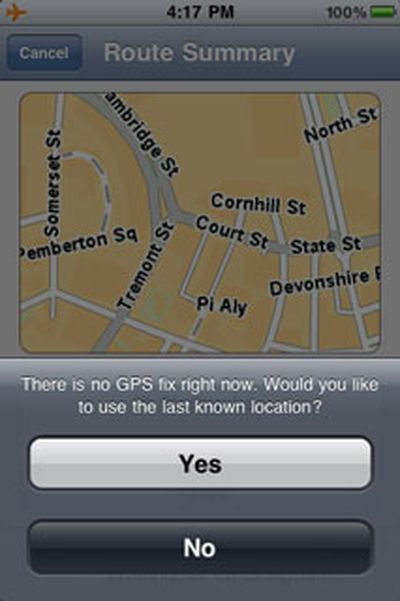
If you're starting out and try to select a destination before the app has obtained a GPS signal, you'll get a message asking if you'd like to start navigation from the last known location. While this is nice, particularly compared to Navigon's MobileNavigator's only option to view a simulation of the planned route from a starting point of its choosing, we'd prefer to see more options, such as the ability to start from your Home location or a previous destination if you're in a hurry to get going.
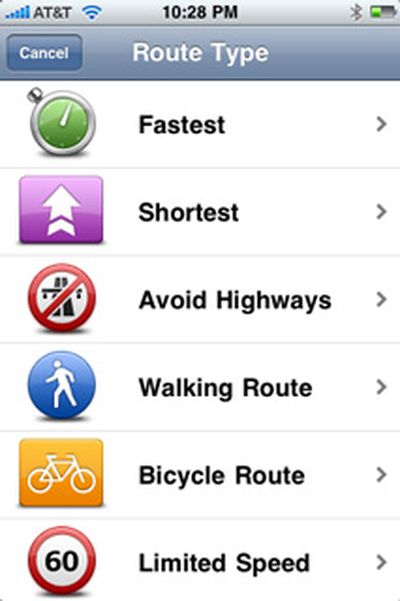
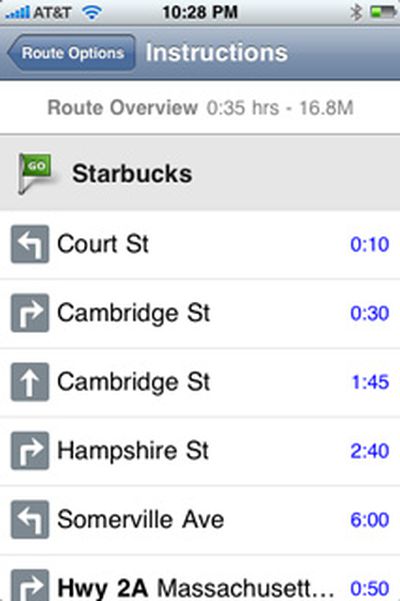
Once you've set a destination, you can also choose to generate a route for walking or riding a biycle. After the route has been generated, you can easily calculate an alternative to avoid a roadblock, travel via a certain road, and more. You can also see a demonstration of the route, read written route instructions, and browse the map of the route using the iPhone's standard pinch-to-zoom gestures.
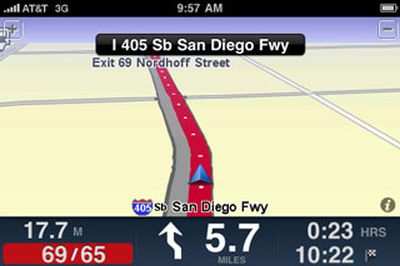
The app correctly identified all toll roads in all our tests and can let you know before you start out that you'll encounter one on your route. It also shows speed limits and indicates when you're traveling above the speed limit by changing the numbers displayed to red. There is no option to provide any audible alert when you are exceeding the speed limit. This speed limit information only appeared on interstate highways during our tests and showed current vehicle speed at all other times. Unlike competing apps, including MobileNavigator and MobileMaps, the TomTom app does not provide any on-screen lane guidance to help you identify the best lane to be in on a multi-lane road.
The speed limit notification
When traveling on an interstate highway, we noticed that the TomTom app gave potentially confusing information about upcoming exits. For example, it would announce that an exit we needed to take was coming up about 2 miles in advance of the exit by saying "Exit approaching on the right." This would prompt us to look at the next upcoming exits on the highway and then compare it to the next exit shown on the TomTom app to ensure we didn't need to exit right away. It would be less confusing if the app stated how many miles we needed to travel before exiting, such as "Exit approaching in 2 miles."
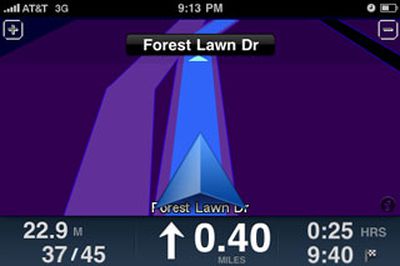
The maximum and minimum zoom levels during navigation
The app offers voice guidance in multiple languages, unlike Navigon's MobileNavigator app for North America that only offers guidance in English. However, TomTom's app does not provide any text-to-speech capabilities at all. Sygic's MobileMaps offers some text-to-speech capability for numerically-named streets, such as highways and interstates and has announced that complete text-to-speech capability is coming in future app updates, while Navigon's MobileNavigator was just updated to bring full text-to-speech capability to the app.
Perhaps our biggest issue with the TomTom app's navigation guidance is that it does not tell you which side of the road your destination is on. You can always pay attention to the street addresses and find it yourself, but driving, hunting for addresses on buildings, and paying attention to navigation guidance is not always the safest combination. Additionally, Navigon's MobileNavigator and Sygic's Mobile Maps provide this information and it's disappointing to see TomTom not matching its competitors here.
Written instructions of a route
The TomTom app also offers the company's signature IQ Routes feature, which promises to offer the "smartest, most efficient" route based on road data collected from millions of drivers. You probably won't notice it in action unless you are very familiar with an area and its traffic patterns already and repeatedly use the TomTom app to navigate the same route at various times of the day. IQ Routes was most evident for us when using the Advanced Planning feature. In the following screenshots, the same route was calculated with different starting times. The route planned with a starting time on a Sunday afternoon yielded a more direct route, while the one planned during rush hour on a weekday morning gave a different route that detoured around common congestion areas in downtown Boston. This feature will prove particularly useful to those who need to get around a busy metropolitan area at peak traffic times.
IQ routes: weekend route (left) vs. weekday rush hour route (right)
We found that the app's navigation guidance was more or less accurate and trustworthy enough for us to not feel the need to double-check it against another source. We did encounter a few hiccups, such as an incident where it wanted us to go around a block to get to a destination instead of continuing straight on and making a left turn to get there. We captured a screenshot of this situation where you can see the red line indicating the intended route and the edge of the finish line flag indicating the destination ahead of us on the current road:
No need to go around the block to get to our destination
While the TomTom app offers reliable guidance, we remain disappointed by the features that competing apps offer that TomTom's more pricey offering does not, IQ Routes notwithstanding.
Map Data and POI
TomTom acquired Tele Atlas, one of the major providers of map data, in 2008, ensuring a direct source of map data for its navigation products. The TomTom app includes the most recent version of Tele Atlas maps at this time at version 8.30. In its FAQ, TomTom has not provided specifics on how much updates will cost, noting the following:
"At the moment the app comes with the latest and most up-to-date map. In future we will provide regular updates and make it possible to update the existing map."
Another FAQ response indicates that several free updates to the app itself will be provided this year.
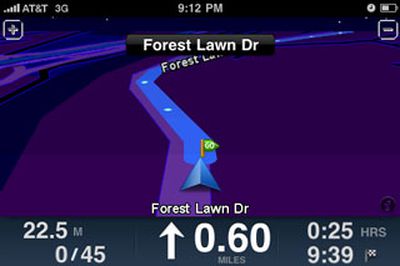
We found the app's POI database to be very good in most cases, allowing us to find popular retail chain stores as well as independent, non-chain stores all the way from Target and Lowes to a small Korean grocery store. We did have difficulty locating Forest Lawn Memorial Park in Los Angeles, one of the largest cemeteries in California, which could not be found in any POI category nor through a search of the entire POI database. We realize that a cemetery may not be a popular destination for many, but the size and prominence of this site makes its absence from the POI database feel like something is amiss.
We did encounter a glitch every now and then when performing a search of the entire POI database. When the search results appeared and we selected one, we would sometimes get an error indicating that no search results could be found. We would then need to repeat the search but could always select the desired POI without a problem the second time around.
Integration with iPhone Functions
As suspected in our First Look review, the TomTom app does not use the iPhone's ambient light sensor to automatically adjust the map color scheme between day and night modes, requiring you to switch between them manually. Also as previously noted, music playing through iPod app stops and starts abruptly before and after voice guidance a smoother approach here would be much appreciated.
One of the available night themes you'll need to switch to manually
Switching between landscape and portrait view is smooth. Incoming calls take you to the standard iPhone active call screen. For calls received during navigation, ending the call causes the app to open to open up again by itself, but we found it did not always return to navigation guidance on its own, requiring us to re-select the desired destination again from time to time. The app will automatically override your iPhone's auto-lock setting and will keep the iPhone's screen on during navigation at all times, though it does adhere to the screen brightness level set.
The option to call a POI directly from within the app
As expected, the TomTom app uses quite a bit of power, appearing to decrease battery capacity by about 5% for every 10 minutes of guidance (with Wi-Fi and Bluetooth on and screen brightness set to about 40% of its maximum level). Despite this level of power usage, an iPhone-approved Belkin car charger could still charge the iPhone while the TomTom app was being used, albeit at a slower rate than it does when the iPhone is in sleep mode.
We found that the TomTom app incorporates well the UI feel and gestures of the iPhone's stock apps and our only wish was for a 'Done' button in all screens to avoid the need to step back through multiple layers of nested menus to go back to navigation guidance.
We do want to note that the TomTom app was impressively stable through our testing, never once shutting down for no apparent reason in the middle of providing navigation guidance.
Summary
The iPhone GPS app market is turning into a heated one with apps from multiple providers, both all-in-one and subscription-based at a wide variety of price points. TomTom's app has been one of the most talked-about apps in this space following its announcement at the Worldwide Developer Conference in June, though it made it to the App Store later than many competitors. It also made its appearance in the App Store at a higher price point than many of those competing apps. At $99 for the North America version, it is $10 more than Navigon's comparable offering and $20 more than NNG Global Services' and Sygic's comparable offerings at the time of this review. Many of these apps offer more features now with more promised in the near future, as we've noted.
TomTom's app is a solid one that will suit the majority of users without any problems. However, it's not so stellar that we'd recommend it over all other competing apps hands-down, particularly at its $99 price point.
Note: TomTom's GPS Car Kit was not available at time of this review.
With Apple's "It's Only Rock and Roll" media event scheduled for tomorrow, months of rumors and speculation are coming together to generate a picture of what may be in store for the event.
New iPods with Camera
A report from mid-May was the first to suggest that the iPod touch and iPod nano would see the addition of digital cameras. Additional confirmation and mockup images of the next-generation iPod nano appeared shortly thereafter, and the new iPod nano is also rumored to carry a wider-aspect (1.5:1) screen ratio.
Over the past several months, a number of third-party case manufacturers have been advertising cases for the next-generation iPod touch and iPod nano designed to accommodate digital cameras on both models, as well as the new iPod nano screen size. Believable images claiming to be a prototype of the new iPod touch were also revealed last month:
Additional word appeared late last month that Apple has contracted for 3.2-megapixel cameras for not only the iPod touch and iPod nano, but also the iPod classic. Finally, iPod resellers have also reported dwindling stocks of existing iPod models and discontinuation of product codes for those models.
Last minute reports from multiple sources claim, however, that Apple has run into production problems with the cameras on the new models. While the issue may delay shipment of the new iPods, an introduction remains very likely for tomorrow's event.
iTunes Store - "Cocktail" and Pre-Cut Ringtones?
Apple has been rumored to be developing "digital album" packages of interactive content, code-named "Cocktail", that the music industry hopes will help spur sales of full albums via iTunes. Major record labels are also rumored to be developing their own competing format.
Another report last week also claimed that Apple has secured the necessary rights to distribute pre-cut ringtones via the iTunes Store as an alternative to the custom-designed ringtones currently available for many tracks in the store.
iTunes 9
A report from early last month suggested that iTunes 9, likely to be introduced at tomorrow's event, will offer support for Blu-ray media, as well the ability to organize iPhone and iPod touch applications within iTunes. Claims of social media integration also surfaced, along with several groups of questionable screenshots.
Other Rumors
- Beatles: While numerous observers have pointed to several Beatles-related product introductions tomorrow as something possibly more than a coincidence, AllThingsD reports that there will be no Beatles-iTunes announcements tomorrow.
- Tablet: Apple's much-rumored tablet computer has been the subject of significant attention in recent months, with Apple CEO Steve Jobs reportedly focusing nearly all of his attention on the project since his return from a medical leave of absence in late June. Despite some suggestion that the tablet could see an introduction as early as this month, the vast majority of reports claim that it will not be introduced until a later date, likely early in 2010.
- Apple TV: A recent slip in shipping times for the low-end Apple TV has led to speculation that an update to the device could be in store, but sources have indicated that no such announcement will be made at tomorrow's event.
Event Coverage
MacRumors will provide links to live coverage for the event and also provide Twitter updates @macrumors. For ongoing MacRumors news alerts, follow @macrumorsRSS.
Yahoo's Flickr service now has a native app available in the App Store. We recently reported that the iPhone had become the most popular cell phone camera used to upload photos to the image sharing site and it's likely this new native app will only increase its popularity among Flickr users.
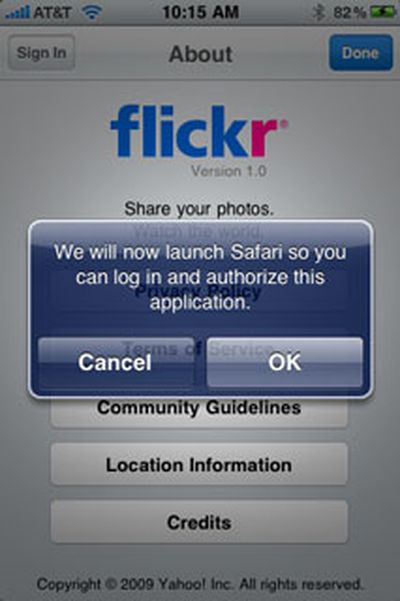
When you first sign in to the Flickr app, you are required to authorize the app to use your Flickr account, which is done through Safari on the iPhone. After this, uploads to your Flickr account will be handled directly through the app with no further authorization requests.
The app can geotag your photos and offers immediate access to your recent uploads, your entire Flickr stream, and those of your Flickr contacts.
The Flickr app is free and can be found here (link opens iTunes).