CES 2024: Mila Debuts HomeKit-Compatible Smart Air Purifier
Mila, a company that makes air purifiers and humidifiers, today announced the launch of the Mila Air 3, an air purifier that offers HomeKit integration.
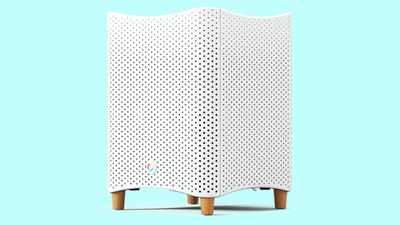
The Mila Air 3 is an upgrade over the first-generation Mila Air Purifier. Along with HomeKit support, the updated model includes a quieter, more energy efficient fan and more powerful performance thanks to an updated motor. An LCD display provides feedback on air quality, and capacitive buttons allow for on-device control.
With HomeKit integration, the Mila Air 3 will work with the Home app on the iPhone, iPad, and Mac, and it will allow the air purifier to be turned on or adjusted with Siri voice commands.
Mila Air Purifiers work with a new Mila Insights app, providing details on air quality alerts, air quality over time both indoors and outdoors, and the filtering performance of the Mila.
The Mila Air 3 is set to launch in the summer of 2024. Depending on the filter selection, pricing will be $408 to $448, though it will drop to $349 for users who subscribe to an auto-refill service for filters.
Popular Stories
Shortly after the iPhone Duo launched, a few users reported hinge issues that were causing cracks in the inner display. Apple has now responded to the reports in a statement to MacRumors, saying a small number of units are affected.
The response to iPhone Duo from early users has been incredibly positive, and we are seeing exciting things from developers who are rapidly updating their apps...
Apple today announced a new iPad mini with a larger 8.5-inch OLED display, a nano-texture display option, a thinner and lighter design, an A20 Pro chip, a new Acoustic Display audio system that eliminates speaker holes, IP67-rated water and dust resistance, a landscape front camera, Apple's N1 chip with Wi-Fi 7 and Bluetooth 6 support, and more. Altogether, Apple says this amounts to the iPad...
Apple today announced a new high-end MacBook Pro, which is available in 14-inch and 16-inch sizes. The new device has a PROLED XDR display that supports touch gestures, and a glowing rear Apple logo.
Pricing on the MacBook Pro starts at $2,899 for the 14-inch model and $3,399 for the 16-inch model.
Apple says the MacBook Pro has the "world's best display in a pro laptop." The PROLED...