

After a beta period that began in December, productivity and search app Alfred was today updated to version 2.0. Alfred, which is a Mac replacement for Spotlight, is now equipped with a new feature called Workflows.
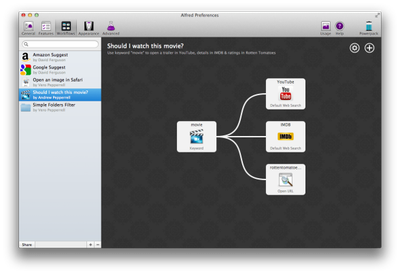 Workflows are designed to allow users to automate and execute multi-step tasks with a single keystroke, using a simple visual editor. The app offers support for launching AppleScript actions in addition to opening files, executing system commands, and accessing the iTunes library. Here's a full rundown on available templates:
-Essentials to connect hotkeys and keywords to script and AppleScript actions
-Show Alfred with pre-filled content
-Launch files and apps with hotkeys or keywords
-Web and URL templates to launch your favourite websites
-System Commands
-Clipboard templates
-iTunes Commands
The new version of the app also includes enhanced customization support via themes and improved contact search capabilities.
Themes are now more flexible to allow you to make Alfred as big or small as you need. Create a new theme, then choose the fonts, sizes, colours, corner shape and spacing you prefer. Make your theme as beautiful (or as wacky!) as you want.
Alfred 2.0 is not yet available through the Mac App Store, but Alfred users can get it immediately from the website.




















Top Rated Comments
They sent out new license numbers today for those eligible.
The basic version has always been free, but the Powerpack (http://www.alfredapp.com/powerpack/) is not free.
I don't recall Alfred 1 using a lot or RAM, but here is Alfred 2 on my system.
IMO the new workflows available alone make it worthwhile.
/sarcasm
Seriously though, very happy for this update