Got a tip for us? Share it...

Starbucks Apps Flow into App Store


Two Starbucks apps made an entrance into the App Store early this morning, one - myStarbucks - offering store location capabilities and menu browsing while the other, the Starbucks Mobile Card app, provides a variety of features to manage and reload Starbucks cards as well as a unique payment system that's being piloted in a handful of stores. The myStarbucks app takes advantage of the peer-to-peer connectivity over Bluetooth that debuted with the iPhone 3.0 firmware.

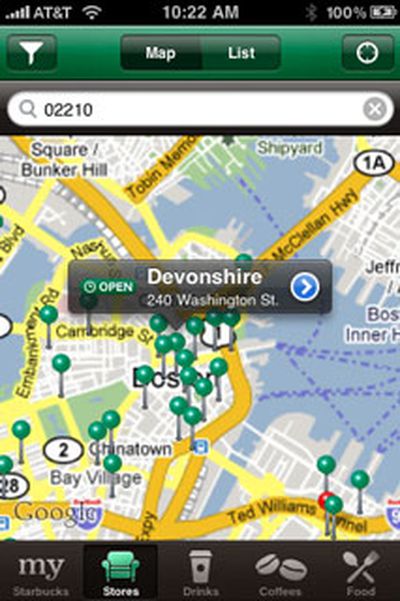
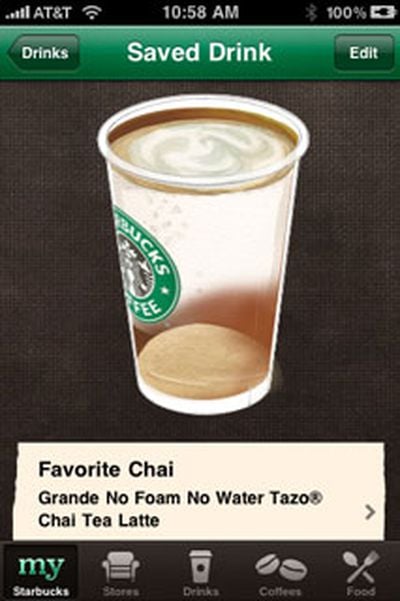
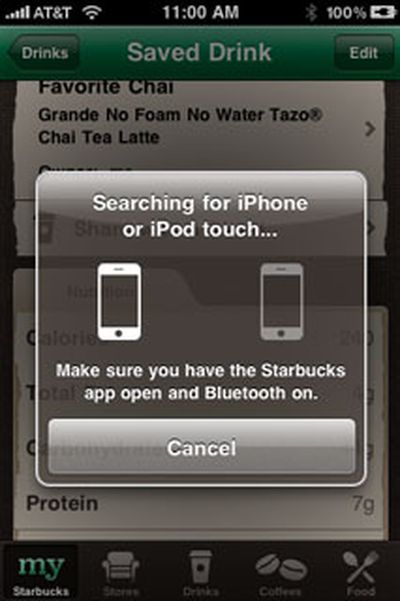
The myStarbucks app can use the iPhone's location to find the nearest Starbucks stores. The Starbucks food menu, along with nutritional information, can also be viewed. Favorite drinks can be customized, saved for future reference, and shared via email or directly with another iPhone or iPod touch user who has the myStarbucks app open and Bluetooth turned on.

The Starbucks Card Mobile app allows holders of Starbucks Cards to view card balance, reload a card, view transaction history information, and more. It also features a new payment system that's being piloted in 16 stores in the San Francisco Bay and Seattle areas that will allow users to make payments directly through an iPhone. To head off inevitable questions about the expansion of this program, a button labeled "When is it coming to my Starbucks?" reveals the following answer:

We are testing mobile payment in select stores in Seattle and Silicon Valley. In the coming months we will be evaluating additional locations and would love your input. To follow our process and share ideas on Starbucks Card Mobile, visit www.mystarbucks.com. Thanks for your interest in Starbucks Card Mobile.
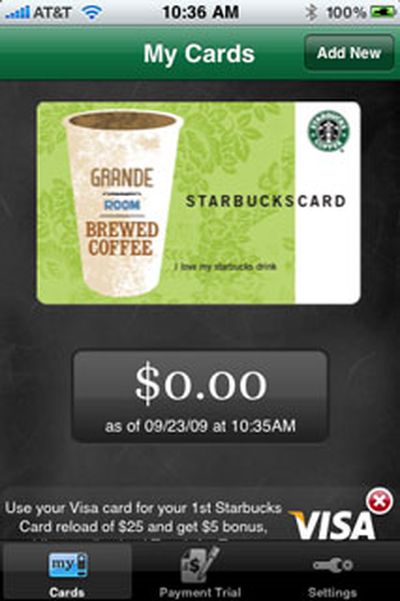


Starbucks is currently offering a $5 bonus on Starbucks Cards Mobile accounts the first time a card is reloaded with a Visa card through the Starbucks Card Mobile app.

Starbucks has partnered with Apple in other areas, including offering a music partnership that offers customers the ability to purchase currently playing songs in Starbucks locations directly on an iPhone, iPod touch, or computer with iTunes. iPhone and iPod touch users can also benefit from free Wi-Fi connectivity at Starbucks locations with AT&T hotspots.

The myStarbucks [App Store] and Starbucks Card Mobile app [App Store] are both free and available now.

Top Rated Comments

(View all)

Posted: 35 months ago
The Wall Street Journal reported on two new Starbucks apps. The first one is called myStarbucks that helps you find stores and provides menu information and lets you "design" a drink. They are testing another one in the Seattle area that lets you use your iPhone as your Starbucks card. It's called Starbucks Card Mobile. No ordering functionality mentioned.

Edit: I just tried this out and it's actually kind of fun to browse their coffees and drink options. I always feel so rushed when I'm in their store.

Here's the link to the article.

From the MyStarbucks iTunes description:

Finally, the official iPhone application from Starbucks! Want to find a store that’s open, with a drive through? Now you can do that and more with myStarbucks. Explore our whole bean coffees, find nutrition information, and build your own perfect drinks. Want to share? You can send your drink to friends by email, SMS, or directly to their iPhone or iPodĀ® touch.

FEATURES
• Store Locator: Display the closest stores, directions, store hours and amenities—find stores with a drive through, oven warmed food, and more!
• Drink Builder: Create and share your perfect StarbucksĀ® beverages
• Food Menu: Browse the menu and see detailed nutritional info and ingredients
• Coffee Menu: Explore every StarbucksĀ® whole bean coffee
• myStarbucks: Save all of your favorites for quick recall and sharing

And this is just version 1.0 – we will be adding new and exciting features in future releases. Want to join the conversation? Go to www.mystarbucksidea.com to contribute your opinion on what Starbucks should do next.

Would you like to keep track of your Starbucks Card balance on the go? Download the Starbucks Card Mobile app on the App Store. Just use the “Other Apps” link below.
Rating: 0 Positives / 0 Negatives
Posted: 35 months ago
I was just talking about this the other day with a friend on why Starbucks didnt have an app.
Rating: 0 Positives / 0 Negatives
Posted: 35 months ago
Ah, yes, iPhones/iPods making the world evermore anti-social.
Rating: 0 Positives / 0 Negatives
Posted: 35 months ago
Grrr if you hav e a duetto card it won't bring it into the app yet for some reason.
Rating: 0 Positives / 0 Negatives
Posted: 35 months ago
I'm curious as to why they didn't just release one app with the combined functionality of both?
Rating: 0 Positives / 0 Negatives
Posted: 35 months ago
i've used two of the unofficial apps, but now i'm using the Where app. It's nice that it supports a lot more features than just Starbucks and helps with app clutter. i've seen a few other apps that now combine what used to be multiple simple apps into one app
Rating: 0 Positives / 0 Negatives
Posted: 35 months ago
Neither of these are in the UK store :(
Rating: 0 Positives / 0 Negatives
Posted: 35 months ago
what is the point of ordering functionality? most of the NYC stores are like assembly lines and very fast
Rating: 0 Positives / 0 Negatives
Posted: 35 months ago
I think this is one of those things that sounds like a cool idea, but its just fueling the starbuck junkies, as well as making people anti social... Lets see how popular this app is?
Rating: 0 Positives / 0 Negatives
Posted: 35 months ago
I've had, and used, Starbucks in the past. They almost NEVER give out ANY added benefit for using the card.

So, WHY do you need to use a card. It's just for paying for you coffee. And you have the added trouble of reloading the card quite frequently since the price of the coffee will deplete your card very rapidly.

So, isn't it a lot easier to use your Debit card? DUH, Starbucks...
Rating: 0 Positives / 0 Negatives

[ Read All Comments ]