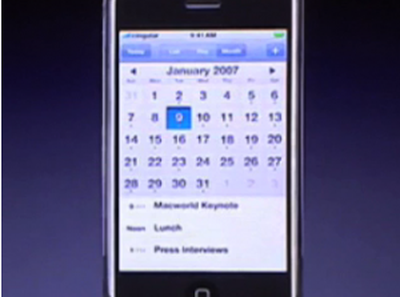
Hidden Details from iPhone Keynote Speech
Actioncorp TV posts an interesting video (Youtube) detailing some features of the iPhone which were glossed over during the keynote.

These "hidden" features include:
- Calendar screenshot, and interface
- Google maps traffic
- Letter tapping to "jump" in lists
- Ringtone syncing from iTunes
Actioncorp TV has also posted a higher quality version on their website.
Apple introduced the iPhone at Macworld San Francisco 2007 in January. The iPhone is expected to be released in June 2007, but a teaser ad is expected during the Academy Awards on Sunday Feb 25th, 2007.

These "hidden" features include:
- Calendar screenshot, and interface
- Google maps traffic
- Letter tapping to "jump" in lists
- Ringtone syncing from iTunes
Actioncorp TV has also posted a higher quality version on their website.
Apple introduced the iPhone at Macworld San Francisco 2007 in January. The iPhone is expected to be released in June 2007, but a teaser ad is expected during the Academy Awards on Sunday Feb 25th, 2007.
Top Rated Comments
(View all)65 months ago
The letter tapping to jump in lists may have not been in the Keynote but it was in the presentations at MWSF. For the record...
65 months ago
None of this was glossed over in my book. People that think it's just an apple branded smartphone need to go back and watch the Keynote. This thing is the most advance iPod to date. Amazing iPod! Can anyone's iPod do cover flow? And as far as a phone goes, how many of you can surf through your voicemails on the screen, in any order? Answer, none of you. Who has an actual web browser? Who has iPhoto basically built in? Have you folks looked at the split screen scrolling email? Same with the address book. People are just reading the specs and are like... uh, my treo has that or blackberry, or whatever. From what I've seen and used, they aren't the same. This thing is a sort of paradigm shift. Kinda like how the macintosh changed our way of thinking of computer interfaces and purposes, this thing may very well reshape our idea of a mobile phone/communication device. There were mp3 players before the iPod, but do they matter anymore? Not really. Even if it just sparks competitive innovation an copies (which it already has) then it's an important part of history.
65 months ago
I can't even see how you guys analyzed so poorly the google maps image
It's clear that the icon on the right relates to a sort of "Get directions" and the icon on the left surely relates to "Find Restaurant". Both are international symbols!
Clicking the following link, you can find some pics that i created so you can all see what i am talking about.
http://pwp.netcabo.pt/0251962501/iphone/directions.jpg
http://pwp.netcabo.pt/0251962501/iphone/restaurant.jpg
It's clear that the icon on the right relates to a sort of "Get directions" and the icon on the left surely relates to "Find Restaurant". Both are international symbols!
Clicking the following link, you can find some pics that i created so you can all see what i am talking about.
http://pwp.netcabo.pt/0251962501/iphone/directions.jpg
http://pwp.netcabo.pt/0251962501/iphone/restaurant.jpg
65 months ago
I can't even see how you guys analyzed so poorly the google maps image
It's clear that the icon on the right relates to a sort of "Get directions" and the icon on the left surely relates to "Find Restaurant". Both are international symbols!
Clicking the following link, you can find some pics that i created so you can all see what i am talking about.
http://pwp.netcabo.pt/0251962501/iphone/directions.jpg
http://pwp.netcabo.pt/0251962501/iphone/restaurant.jpg
You raise a very good point, regardless, it's good to find out some new-ish stuff on the iPhone, things were getting a little stale.
65 months ago
Yes! Keep em' coming! I love it when bits and pieces of info on the iPhone come rolling in! I CAN'T WAIT:apple:
65 months ago
It was strange that Steve showed the Washington Monument as a demo of what you can do with satellite maps... that's nothing compared to what you can do with just the featured he demonstrated:
Imagine you're in a downtown area of a city, but are disoriented as to where you need to walk to get to your destination.
All you have to do is look up the area you are in, zoom in on the satellite view, and look for the buildings around you.
Even if the phone doesn't have integrated GPS to the maps, you can still orient yourself very quickly. That is gonna be amazing.
Imagine you're in a downtown area of a city, but are disoriented as to where you need to walk to get to your destination.
All you have to do is look up the area you are in, zoom in on the satellite view, and look for the buildings around you.
Even if the phone doesn't have integrated GPS to the maps, you can still orient yourself very quickly. That is gonna be amazing.
65 months ago
You think that was Steve Jobs' actual phone number in the iTunes phone section? lol :p
[ Read All Comments ]

Analytics firm Chitika today released a report showing that by its metrics iOS has now surpassed OS X in overall web traffic share in the United States. Chitika's methodology involves an analysis...
One of the most frequent reasons for an iPhone to go on a trip to the Apple Store's Genius Bar is because of water damage. Typically, a water damaged iPhone can be replaced for a flat $199...
TheVerge's Joshua Topolsky summarizes the iPad 3 casing findings reported earlier today, but also adds his own sources regarding some details of the iPad 3.
Image from RepairLabs
As...
Last July, Apple discontinued the white MacBook from its consumer lineup, pushing consumers toward the company's popular MacBook Air line or the 13-inch MacBook Pro. The company didn't kill...
Popular iPhone Twitter client Tweetbot has finally arrived on the iPad, with a user interface instantly familiar to any current Tweetbot user. Designed for the Twitter power-user, Tweetbot packs a...