

How to Enable or Disable Apple Music's New Release Alerts in iOS - MacRumors
Skip to Content

How to Enable or Disable Apple Music's New Release Alerts in iOS

by

apple music icon for ios 100594580 origApple on Thursday began rolling out a new Apple Music feature on iPhone and iPad that alerts users to new albums, EPs, and videos from artists included in their music library.

The alerts show at the top of the Library tab in the Music app, and given that they relate to content that's available in Apple Music, they're likely to be welcomed by most subscribers to the streaming service.

But even if you don't subscribe to ‌Apple Music‌, these alerts are still pushed by default to your device's Lock Screen and Notification Center, and may quickly become a source of annoyance. Whatever your preference, the steps below show you how to enable or disable these new release alerts.

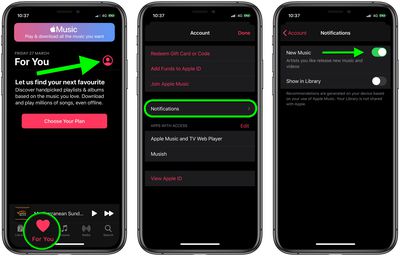
  1. Launch the Music app on your iPhone or ‌iPad‌.
  2. Select the For You tab.
  3. Tap Notifications.
  4. Toggle the switch next to New Music to suit your preference.
Apple Music
Alternatively, you can turn off all notifications from the Music app by launching the Settings app, selecting Notifications -> Music, and switching off the toggle next to Allow Notifications.

Top Rated Comments

baryon Avatar
84 months ago
I really don't like how Apple is pushing Apple Music. I already have all the music I want in my library. I don't want streaming. I don't want to pay a never-ending monthly charge for something that isn't absolutely necessary. Leave me alone.
Score: 3 Votes (Like | Disagree)
Oh-es-Ten Avatar
84 months ago

Is there a way I can also stop Apple Music from bugging me to start a subscription every time I just want to listen to my own audio tracks?
Head to Settings, Music, and turn off "Show Apple Music". It's a lifesaver to remove the nagging.
Score: 3 Votes (Like | Disagree)
Quu Avatar
84 months ago
Received one of these alerts yesterday I thought it was a bug because I don't subscribe to Apple Music. Seems kind of desperate of them to send these ads to us.

Score: 2 Votes (Like | Disagree)
macrlz9 Avatar
84 months ago
What does “Show in Library” do exactly?

Attachment Image
Score: 2 Votes (Like | Disagree)
otternonsense Avatar
84 months ago
Is there a way I can also stop Apple Music from bugging me to start a subscription every time I just want to listen to my own audio tracks?
Score: 2 Votes (Like | Disagree)
whsbuss Avatar
84 months ago
Problem is I have yet to see anything in the Library tab. Guess it’s not released to all

Score: 2 Votes (Like | Disagree)

Popular Stories

apple music

Apple Music to Label AI-Generated Songs

Thursday August 20, 2026 4:41 pm PDT by
Apple sent emails to its music industry partners about the upcoming launch of a Made With AI label that Apple will apply to AI-generated content (via The Hollywood Reporter). Content tagged as being "materially generated using AI" will have a label visible to all Apple Music users. In March, Apple announced Transparency Tags, a system that lets music creators disclose when AI has been...
Apple Event Logo

Apple Unveiled Four New Products Today

Tuesday August 25, 2026 8:39 am PDT by
Apple today unveiled a new Mac mini with M6 and M5 Pro chip options, a new Mac Studio with M5 Max and M5 Ultra chip options, a new version of the Polishing Cloth with a lower price, and updated Magic Keyboards for Macs. To learn more about these products, read our coverage below: Apple Announces New Mac Mini With M6 and M5 Pro Chips and More Apple Unveils New Mac Studio With M5 Max and M5...
iPhone 18 Pro Dark Cherry Feature

iPhone 18 Pro and iPhone Ultra: When Will Apple Event Be Announced?

Monday August 24, 2026 6:45 am PDT by
It is now late August, meaning that Apple's annual iPhone event is just around the corner. Below, we take a look at when the event might be held this year. This September, Apple is expected to unveil the iPhone 18 Pro, iPhone 18 Pro Max, and an all-new foldable iPhone that will reportedly be named the iPhone Ultra. The regular iPhone 18, a lower-end iPhone 18e, and the iPhone Air 2 are not...







































