

Skip to Content

Got a New iPhone 17? How to Use All the New Features

Apple's iPhone 17, iPhone Air, iPhone 17 Pro, and ‌iPhone 17 Pro‌ Max have been available to buy since September, and a fair few will have been gifted over the holidays. If you're the proud owner of one of Apple's latest models, then keep reading. Whether you're upgrading from an older iPhone or completely new to the devices, this article will help you get the most out your new iPhone.
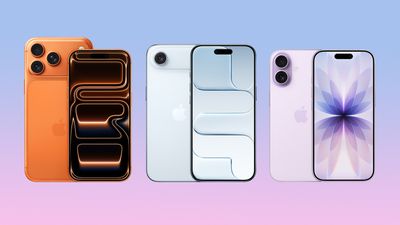
iphone 17 lineup
MacRumors has put together the following series of ‌iPhone 17‌ how-to articles explaining all the new features that can be found on Apple's newest models.

All iPhone 17 Models (Incl. iPhone Air)

iPhone 17 Pro and iPhone 17 Pro Max

iOS 26

Happy holidays!

Popular Stories

iOS 27 Mock Quick

iOS 27 Will Reportedly Be Like Mac OS X Snow Leopard

Sunday March 15, 2026 9:42 am PDT by
In his Power On newsletter today, Bloomberg's Mark Gurman reiterated that iOS 27 will be similar to 2009's Mac OS X Snow Leopard, in the sense that one of Apple's biggest priorities is bug fixes for improved performance and stability. During WWDC 2008's State of the Union, Apple showed a slide that said Mac OS X Snow Leopard had "0 new features," as it opted to focus on performance and...
AirPods Max 2 Feature

Apple Announces AirPods Max 2 With H2 Chip and More

Monday March 16, 2026 6:12 am PDT by
Apple today unveiled AirPods Max 2, with key upgrades including the H2 chip, increased active noise cancellation, improved sound quality, and features such as Adaptive Audio, Conversation Awareness, Voice Isolation, and Live Translation. The new AirPods Max have the same overall design as the previous generation, with most of the new features coming from the upgrade to the H2 chip:- Adaptive ...
Apple Logo Sketch Feature

Apple Unveiled a Surprise New Product Today

Monday March 16, 2026 10:50 am PDT by
Surprise! Apple today unveiled the AirPods Max 2, despite no rumors suggesting that a new version of Apple's over-ear headphones were imminent. Key upgrades compared to the previous AirPods Max include Apple's H2 chip, increased active noise cancellation, improved sound quality, and features such as Adaptive Audio, Conversation Awareness, Voice Isolation, and Live Translation. AirPods Max ...

Top Rated Comments

MakeAppleAwesomeAgain Avatar
12 weeks ago
I upgraded from a 12 to a 17, and it’s a wonderful phone (battery, screen, USB-C, Action Button). Plus, I don’t mind iOS 26. But the Camera Control button is terrible. I really tried, but it’s even annoying when I don’t try to use it and accidentally touch it, and it enables some crappy filter or weird setting. Really Apple-unworthy.
Score: 16 Votes (Like | Disagree)
Moukee Avatar
12 weeks ago

I upgraded from a 12 to a 17, and it’s a wonderful phone (battery, screen, USB-C, Action Button). Plus, I don’t mind iOS 26. But the Camera Control button is terrible. I really tried, but it’s even annoying when I don’t try to use it and accidentally touch it, and it enables some crappy filter or weird setting. Really Apple-unworthy.
Settings > Camera > Camera Control to disable features of the button. You can essentially just dumb it down to a physical button or even completely disable it.
Score: 9 Votes (Like | Disagree)
12 weeks ago

I upgraded from a 12 to a 17, and it’s a wonderful phone (battery, screen, USB-C, Action Button). Plus, I don’t mind iOS 26. But the Camera Control button is terrible. I really tried, but it’s even annoying when I don’t try to use it and accidentally touch it, and it enables some crappy filter or weird setting. Really Apple-unworthy.
You can adjust/disable various Camera Control functionality in the Settings app.
Score: 7 Votes (Like | Disagree)
12 weeks ago

I upgraded from a 12 to a 17, and it’s a wonderful phone (battery, screen, USB-C, Action Button). Plus, I don’t mind iOS 26. But the Camera Control button is terrible. I really tried, but it’s even annoying when I don’t try to use it and accidentally touch it, and it enables some crappy filter or weird setting. Really Apple-unworthy.
What a great upgrade, Merry Christmas!
Score: 6 Votes (Like | Disagree)
FILIPSN007 Avatar
12 weeks ago
What we REALLY need: "How to configure your iPhone to avoid all bugs and resprings"
Score: 5 Votes (Like | Disagree)
WarmWinterHat Avatar
12 weeks ago

I upgraded from a 12 to a 17, and it’s a wonderful phone (battery, screen, USB-C, Action Button). Plus, I don’t mind iOS 26. But the Camera Control button is terrible. I really tried, but it’s even annoying when I don’t try to use it and accidentally touch it, and it enables some crappy filter or weird setting. Really Apple-unworthy.
The camera control isn’t great. I disabled all the swipe and adjust features and now it’s just a shutter button. It works well for that.
Score: 4 Votes (Like | Disagree)












