

iPhone 17: Using the New Dual Capture Video Feature - MacRumors
Skip to Content

iPhone 17: Using the New Dual Capture Video Feature

by

The iPhone 17 lineup brings a new video feature that lets you record from both the front and rear cameras simultaneously. Dual Capture creates picture-in-picture recordings that should be perfect for reaction videos, tutorials, or any scenario where you want to capture both yourself and the action in front of you. Here's what you need to know about the feature.
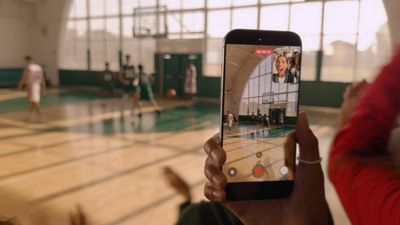
iphone 17 dual capture video
Dual Capture works across the iPhone 17 series, including the iPhone Air. Here's how to get up and running with the new feature.

iPhone 17: How to Enable Dual Capture Mode

  1. Open the Camera app on your iPhone.
  2. Tap Video at the bottom.
  3. Tap the icon made up of dots at the top right of the interface, or alternatively, tap again the selected video option in the carousel at the bottom of the interface.
  4. Select Dual Capture from the pop-up menu, then tap in the viewfinder.
  5. Tap the shutter to start recording via both front and rear cameras.
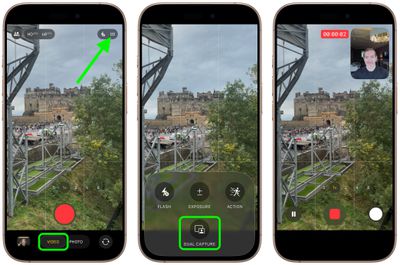
enable dual capture video iphone 17

Once you have used Dual Capture mode, for the rest of the app session the camera interface will show a handy new icon in the top-right corner, allowing you to turn it on and off without involving the pop-up menu.
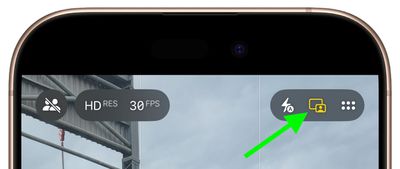
iphone 17 dual capture icon

What You Can Do While Recording

Once you start recording, you gain several useful controls. On iPhone 17 Pro and Pro Max models, you can switch between the 48MP main camera, 48MP ultrawide, and 48MP telephoto lenses for different perspectives without stopping your recording.

The smaller front camera window can also be moved around the screen by dragging it with your finger, which is handy if the preview window blocks something important in your shot. Bear in mind that any repositioning of the window gets saved in your final video, though.
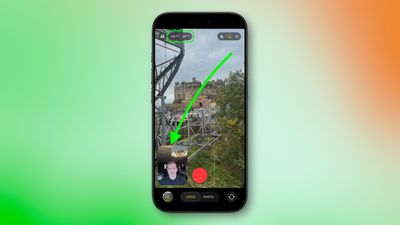
iphone 17 dual capture move camera window

Recording Quality and Limitations

Dual Capture records in either 1080p or 4K resolution at 24 or 30 fps. For maximum editing flexibility later, 4K at 30fps will likely deliver the best results.

The feature does come with some trade-offs. For one, you're locked into Apple's single layout design, where the rear camera takes up most of the frame while the front camera appears in a smaller window. Unlike Samsung's similar feature, you can't switch the feeds or choose a split-screen layout that shows both cameras equally.

Lastly, bear in mind that everything saves as one video file, not separate clips for each camera.
Related Roundups: iPhone 17, iPhone 17 Pro, iPhone Air
Related Forum: iPhone

Top Rated Comments

12 months ago
I'm not looking forward to more reaction videos
Score: 25 Votes (Like | Disagree)
mihighil Avatar
12 months ago

Understand & know this is new, but anyone know why it’s limited to the 17 series? Must be hardware requirements.

Use the rode capture app (usable on older models) its a arbitrary limitation on older models.
Score: 15 Votes (Like | Disagree)
12 months ago
Theres been apps doing this for years. I used to use DoubleTake when i was still doing Youtube. Hell of a good app. You could also record two seperate feeds though that and edit it how you like later on.
Score: 11 Votes (Like | Disagree)
Ralfi Avatar
12 months ago
This will result in very corny videos with non-genuine & staged reactions.

When the broadcasters script fans in the crowd to yell something when the camera pans to them, it’s fake, cringy & very off-putting.
Score: 7 Votes (Like | Disagree)
berrymetal Avatar
12 months ago
I wish the videos were non-destructive, in a way that you can reposition the selfie PiP later on when you edit the video (and resize it maybe). Perhaps that's something we will see in the future...
Score: 6 Votes (Like | Disagree)
mihighil Avatar
12 months ago
This was available through the Rode Capure app, great app and its free (no in app purchases)
Score: 6 Votes (Like | Disagree)

Popular Stories

5 Reasons to Buy the iPhone 17 Now Feature

5 Reasons to Buy the iPhone 17 Now Instead of Waiting for iPhone 18

Monday August 24, 2026 3:05 am PDT by
Apple's iPhone 18 Pro models and its first foldable are less than a month away from being unveiled. That may sound like a reason to sit tight if you're looking to upgrade from an iPhone 16 or older series, but between looming price hikes and Apple's new split-launch calendar, there's a decent case for grabbing an iPhone 17 series model right now. Here are five reasons in favor of putting your...
iphone 17 models

iPhone 17 Prices Could Rise as Soon as Monday, Rumor Claims

Saturday August 8, 2026 2:54 am PDT by
Apple could raise iPhone 17 prices as soon as Monday, August 10, according to a new rumor, well before the wider round of increases expected with next month's iPhone 18 Pro launch. Weibo leaker "Fixed Focus Digital" said in a post yesterday that rumors are circulating about an iPhone 17 price change taking effect on August 10. The leaker was noncommittal about whether prices will actually...
iPhone 17 Pro Cosmic Orange

Apple Could Raise iPhone 17 Prices When iPhone 18 Pro Debuts

Monday August 10, 2026 8:52 am PDT by
Apple may raise prices on iPhone models in its existing lineup when the new iPhone 18 Pro models launch, according to research firm TrendForce. The analytics firm suggests that Apple could revisit pricing for then-older iPhones in the iPhone 17 series and bring them up at the same time as the new generation arrives, as a way to partially offset rising memory costs. TrendForce estimates...









































