

In iOS 26, Apple has added a new feature to its Home screen customization options that can match the color of your app icons with the actual color of your iPhone's case. Keep reading to learn how it works.

iphone 17 beats cases
In iOS 18, Apple introduced Tinted app icons. The option applies a color filter over app icons, widgets, and even system UI elements. And with iOS 26, Apple has built on the theme with a new option that matches the color of your iPhone's removable case.

It's worth noting from the off that the color-matching feature only works with official Apple MagSafe cases that include a small NFC chip with color variant information. If you don't have such a case, you might want to consider trying another new tint option in iOS 26 that can match the color of your app icons with the actual color of your iPhone.

How to Tint App Icons to Match iPhone Case Color

This filter uses a base color taken from your iPhone's case color, then automatically adjusts brightness, saturation, and contrast so icons remain legible while still reflecting the case's tone. The following steps show you how it's done.

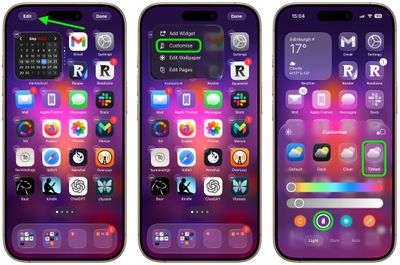
  1. On your iPhone's Home screen, long press a space between app icons.
  2. Tap Edit in the top-left corner, then select Customize from the popup menu.
  3. Choose Tinted from the options panel that appears, then tap the iPhone case button, second-to-left, under the two horizontal color sliders.
  4. Select Light, Dark, or Auto below that, based on your preferences.
home screen

Note that Tinted mode looks different in iOS 26 than it did in iOS 18. Rather than icons featuring a black background with colored graphics, icons adopt the full color that you select with white graphics in Light Mode. In ‌Dark Mode‌, backgrounds are a much darker shade of the color you choose, but aren't entirely black.

Top Rated Comments

Ru_C Avatar
19 weeks ago
Seriously. Does anyone care about this rubbish? Of all the things Apple can spend their time & resources on!

Score: 12 Votes (Like | Disagree)
Donkey Man Avatar
19 weeks ago
An absolutely useless and UI-destroying “feature” - one can barely discern an icon from the other.
Score: 7 Votes (Like | Disagree)
akbarali.ch Avatar
19 weeks ago
I seriously dont understand, who would want this? I tried tinting my icons, and in 2 seconds, i'm 100% sure i dont want this.All the icons looks same, its so hard to figure out which icons are which.

Maybe i'm missing something, are you guys using it and do feel its easier to look at all the icons identify them?
Score: 7 Votes (Like | Disagree)
NightFox Avatar
19 weeks ago
Amazing! I have a transparent case and lo and behold all my icons now have this sort of glassy-look to them! ;)
Score: 6 Votes (Like | Disagree)
Total Respray Avatar
19 weeks ago
And since the headline photo is of Beats cases (but there is no mention of them in the text), does it work with those too?
Score: 5 Votes (Like | Disagree)
turbineseaplane Avatar
19 weeks ago

This is a smart idea and would be a good use of  intelligence.
"Hey Siri, make my phone icons match my blue case"

"Here's what I found on the web for suitcase"
Score: 4 Votes (Like | Disagree)

Popular Stories

iOS 26

iOS 26.3 and iOS 26.4 Will Add These New Features to Your iPhone

Tuesday February 3, 2026 7:47 am PST by
While the iOS 26.3 Release Candidate is now available ahead of a public release, the first iOS 26.4 beta is likely still at least a week away. Following beta testing, iOS 26.4 will likely be released to the general public in March or April. Below, we have recapped known or rumored iOS 26.3 and iOS 26.4 features so far. iOS 26.3 iPhone to Android Transfer Tool iOS 26.3 makes it easier...
imac video apple feature

Apple Makes Its Second-Biggest Acquisition Ever

Tuesday February 3, 2026 12:45 pm PST by
Apple recently acquired Israeli startup Q.ai for close to $2 billion, according to Financial Times sources. That would make this Apple's second-biggest acquisition ever, after it paid $3 billion for the popular headphone maker Beats in 2014. This is also the largest known Apple acquisition since the company purchased Intel's smartphone modem business and patents for $1 billion in 2019....
iOS 26 Home Feature

Apple Gives Final Warning to Home App Users

Tuesday February 3, 2026 8:55 am PST by
In 2022, Apple introduced a new Apple Home architecture that is "more reliable and efficient," and the deadline to upgrade and avoid issues is fast approaching. In an email this week, Apple gave customers a final reminder to upgrade their Home app by February 10, 2026. Apple says users who do not upgrade may experience issues with accessories and automations, or lose access to their smart...
Apple Logo Zoomed

Tim Cook Teases Plans for Apple's Upcoming 50th Anniversary

Thursday February 5, 2026 12:54 pm PST by
Apple turns 50 this year, and its CEO Tim Cook has promised to celebrate the milestone. The big day falls on April 1, 2026. "I've been unusually reflective lately about Apple because we have been working on what do we do to mark this moment," Cook told employees today, according to Bloomberg's Mark Gurman. "When you really stop and pause and think about the last 50 years, it makes your heart ...
maxresdefault

M5 Pro and M5 Max MacBook Pro Launch Imminent as Reseller Stock Dwindles

Tuesday February 3, 2026 12:12 pm PST by
New M5 Pro and M5 Max MacBook Pro models are slated to launch in the near future, according to information shared with MacRumors by an Apple Premium Reseller. Subscribe to the MacRumors YouTube channel for more videos. The third-party Apple retailer said that MacBook Pro stock is very low currently because there is an imminent new product introduction. Apple typically coordinates supply with...










































