iPhone 17: Disable Center Stage Camera Auto-Zoom - MacRumors
Skip to Content

iPhone 17: Disable Center Stage Camera Auto-Zoom

by

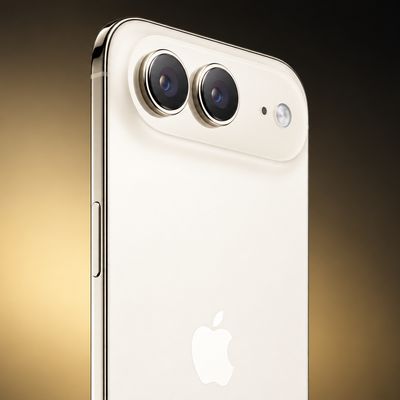
On the iPhone 17 series and iPhone Air, the new 18-megapixel Center Stage front camera features a square sensor that offers more flexibility in framing and composition. Center Stage will also auto-zoom to include everyone in a group selfie, but if you don't like it, you can turn it off.

iphone 17 center stage auto zoom
The Center Stage camera automatically adjusts its view depending on what's happening in front of it. If you're the only person in the shot, it keeps the frame tight for a more personal feel. As others join, the view zooms out to fit everyone in, with no need to adjust it yourself.

This dynamic feature reduces the chance of friends being cropped out in group photos. However, you may find that Center Stage is not zooming adequately for your particular needs, in which case you can disable the auto-zoom feature. The following steps show you how.

iPhone 17: How to Disable Center Stage Auto Zoom

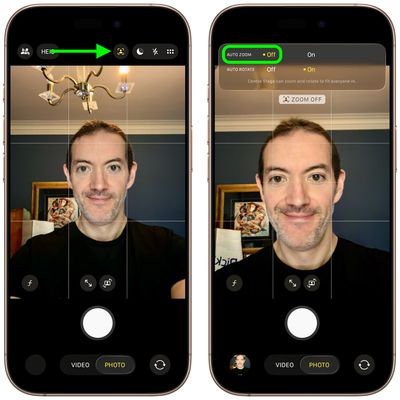
  1. Open the Camera app on your iPhone.
  2. Tap the circular arrows icon bottom-right to switch to the selfie camera.
  3. Tap the yellow Center Stage button (the icon with a person's profile within a frame).
  4. Tap Off next to Auto Zoom.
  5. Line up your shot and hit the shutter button to take a photo or start recording video.
iphone 17 disable auto zoom

That's all there is to it. Note that Center Stage also works during FaceTime calls, though it attempts to keep just your own face centered, similar to how it functions on iPads and MacBooks.

Related Roundups: iPhone 17, iPhone 17 Pro, iPhone Air
Related Forum: iPhone

Popular Stories

pixelmator pro

Apple's Pixelmator Pro Update Brings iPhone 17 Mockups, Keyboard Shortcuts, and Expanded Camera Support

Thursday April 9, 2026 11:05 am PDT by
Apple today updated Pixelmator Pro, the popular image editing app that it purchased in 2024. Pixelmator Pro includes RAW image support for more cameras, new templates, improved support for SVG file exports, new keyboard shortcuts, and more. Some of the features like the keyboard shortcuts are limited to the Creator Studio version of Pixelmator Pro. Pixelmator Pro has a template and mockup...
astropad fresh coat comparison 4 feature

MacRumors Giveaway: Win an iPhone 17 and Astropad Fresh Coat Anti-Reflective Screen Protector

Friday April 10, 2026 10:50 am PDT by
For this week's giveaway, we've teamed up with Astropad to offer MacRumors readers a chance to win one of Apple's iPhone 17 models and a Fresh Coat anti-reflective screen protector from Astropad to use with it. Fresh Coat is a screen protector with an optical-grade anti-reflective coating to minimize glare and provide a better iPhone viewing experience. The technology reduces reflections by ...
better iphone 17 lineup

iPhone 17 Is Apple's Most Popular Lineup Ever

Thursday April 30, 2026 2:01 pm PDT by
Apple's iPhone 17 models are its most popular iPhones to date, Apple CFO Kevan Parekh told the Financial Times. Both Parekh and Apple CEO Tim Cook attributed Apple's stellar Q2 2026 performance to iPhone sales. "The iPhone 17 family is now the most popular line-up in our history... we believe we gained market share during the quarter," said Parekh. Cook told Reuters that iPhone demand was...