iOS 26: Tint App Icons to Match Your New iPhone 17 Color - MacRumors
Skip to Content

iOS 26: Tint App Icons to Match Your New iPhone 17 Color

by

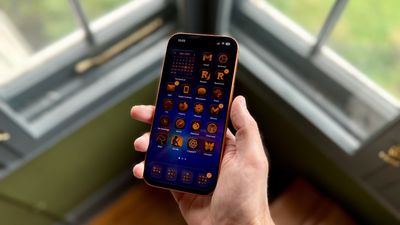
In iOS 26, Apple has added a new feature to its Home screen customization options that can match the color of your app icons with the actual color of your iPhone. The image below demonstrates the effect on the new iPhone 17 Pro in Cosmic Orange.

tinted app icons match iphone 17 cosmic orange
In iOS 18, Apple introduced Tinted app icons. The option applies a color filter over app icons, widgets, and even system UI elements, and with iOS 26, Apple has built on the theme with a new option that matches the color of your iPhone model.

iOS 26 knows the exact finish and color variant of your iPhone – Deep Blue, Sage, or Lavender, for example – because Apple has the device's SKU mapped at the firmware level (SKUs are a unique identifier that companies use to track and manage inventory). This allows iOS to identify your model and match a precise color profile.

This filter uses a base color taken from your iPhone's chassis color, then automatically adjusts brightness, saturation, and contrast so icons remain legible while still reflecting the hardware's tone. The following steps show you how it's done.

  1. On your iPhone's Home screen, long press a space between app icons.
  2. Tap Edit in the top-left corner, then select Customize from the popup menu.
  3. Choose Tinted from the options panel that appears, then tap the far-left iPhone button under the two horizontal color sliders.
  4. Select Light, Dark, or Auto, based on your preferences.
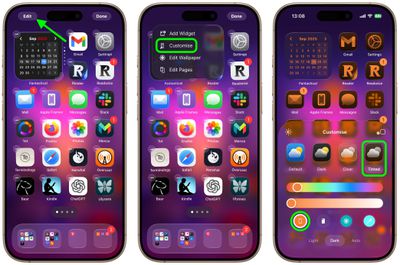
home screen

That's all there is to it. We've heard of the iPhone color matching option not working for some users who have updated older iPhone models to iOS 26. This is likely a bug that Apple will hopefully fix in a forthcoming update.

Match App Icons With Your iPhone's Case Color

If you press the button immediately right of the new iPhone color tint option, iOS 26 will even match app icon colors to your iPhone's case color. However, this only works with official Apple MagSafe cases that include a small NFC chip with color variant information.

Note that Tinted mode looks different in iOS 26 than it did in iOS 18. Rather than icons featuring a black background with colored graphics, icons adopt the full color that you select with white graphics in Light Mode. In ‌Dark Mode‌, backgrounds are a much darker shade of the color you choose, but aren't entirely black.
Top Rated Comments

turbineseaplane Avatar
8 months ago
This feature still has never appealed to me.

I guess I’m older or something, but I really like the color and personality of different icons.

It also makes it very easy to differentiate them and quickly find them visually.
Score: 38 Votes (Like | Disagree)
8 months ago
While you’re at it, take the opportunity to change your default iphone system language to Russian*. Now as well as finding it difficult to see and differentiate your icons, you will now also not be able to read or understand anything on your screen. Brilliant!

*Apologies to Russian readers.
Score: 14 Votes (Like | Disagree)
FSMBP Avatar
8 months ago

This feature still has never appealed to me.

I guess I’m older or something, but I really like the color and personality of different icons.

It also makes it very easy to differentiate them and quickly find them visually.
Exactly...this seems fun in theory but awful in practice. Basically, a basic human way of visual scanning for icons gets more difficult.
Score: 13 Votes (Like | Disagree)
bradman83 Avatar
8 months ago
I'm old enough to remember the days of Classic Mac OS when you could use extensions/control panels like Kaleidoscope to create a highly personalized, if not barely usable user interface experience for yourself. I'm glad to see Apple is inching back in that direction.


Attachment Image
Score: 12 Votes (Like | Disagree)
8 months ago
Thanks, I hate it.
Score: 10 Votes (Like | Disagree)
S.B.G Avatar
8 months ago
I think it looks cool to tint the icons to match the color of the device, but only for a minute or so. After that it gets difficult for me to tell apps apart. So I just leave the icons in normal color, with dark mode on.
Score: 9 Votes (Like | Disagree)

Popular Stories

iOS 27 on iPhone 17 1

iOS 27 Will Add These New Features to Your iPhone

Saturday May 2, 2026 8:43 am PDT by
Apple is expected to unveil iOS 27 during its WWDC 2026 keynote on June 8, and there are already many rumored features and changes for iPhones. The first developer beta of iOS 27 will likely be available immediately following the keynote, and a public beta typically follows in July. Following beta testing, the software update should be released to all users with a compatible iPhone in...
Apple MacBook Pro M4 hero

Why You Might Want to Wait to Buy a MacBook Pro

Friday May 1, 2026 3:43 pm PDT by
Apple refreshed the 14-inch and 16-inch MacBook Pro with M5 Pro and M5 Max models in March 2026, but depending on your needs and interests, you might want to skip this generation because there's something better in the works. The M5 Pro and M5 Max MacBook Pro models have faster chips, but the same design that Apple has used since 2021. An updated design with new display technology and faster ...
macOS 27 on MacBook Pro

Apple to Unveil macOS 27 Next Month With These New Features

Friday May 1, 2026 1:21 pm PDT by
Apple will unveil its latest software platforms during its WWDC 2026 keynote on Monday, June 8, and one of them will be macOS 27 for the Mac. The first developer beta of macOS 27 will likely be available immediately following the keynote, and a public beta typically follows in July. Following beta testing, the software update should be released to all users in September. macOS 26 is known ...