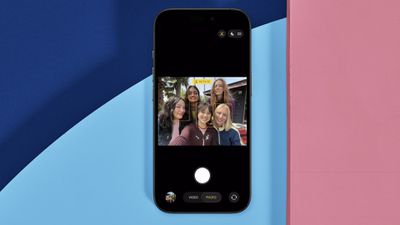
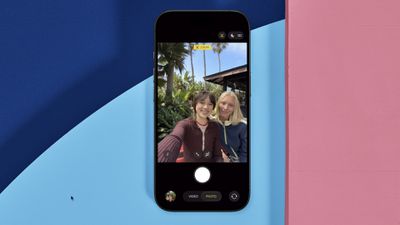
On all models in Apple's new iPhone 17 series as well as the iPhone Air, the new 18MP Center Stage front camera transforms mobile photography with its square sensor design and intelligent auto-adjustment features. Unlike traditional front cameras, the system automatically rotates and zooms to capture perfect selfie shots.

iphone 17 center stage camera
The square sensor also captures more image data than rectangular sensors, giving you unprecedented flexibility in framing and composition without sacrificing image quality.

Understanding Auto-Rotate and Auto-Zoom

Center Stage automatically switches between horizontal and vertical orientation when you're lining up a shot, meaning you don't need to physically rotate your iPhone. The camera also dynamically adjusts its field of view based on what's happening in front of it.

When you're taking a solo selfie, for example, Center Stage keeps the frame tight for a more personal feel. As friends join the shot, the view expands to include everyone without cropping anyone out.

Taking Photos with Center Stage
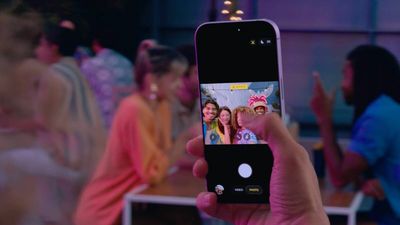
iphone 17 center stage camera shooting

  1. Open the Camera app on your iPhone.
  2. Tap the circular arrows icon at the bottom right to switch to the selfie camera.
  3. The Center Stage button (the icon of a person's profile within a frame) above the viewfinder should appear as yellow, indicating the feature is enabled.
  4. Line up your shot – Center Stage automatically adjusts orientation and zoom.
  5. Hit the shutter button to capture your photo or video.
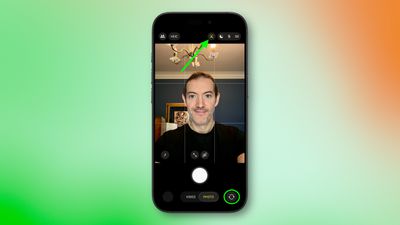
iphone 17 selfie center stage 1

Manual Camera Controls

You can override Center Stage's automatic functions when you need more control:

  • Manual rotation: Tap the orientation icon within the viewfinder to switch between portrait and landscape modes.
  • Manual zoom: Use the zoom icon (arrows pointing in/out) within the viewfinder to adjust the field of view yourself.
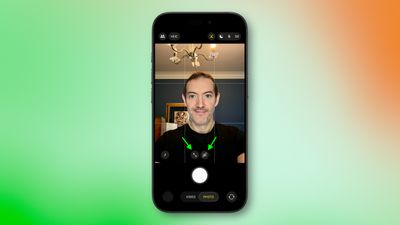
iphone 17 manual rotate zoom

How to Disable Auto-Rotate

iphone 17 center stage rotate
When the front camera is engaged, if Center Stage detects faces beside you or in the background and rotates to include them when you want a personal selfie:

  1. Tap the yellow Center Stage button.
  2. Tap Off next to "Auto Rotate."
  3. Take your photo normally – the camera will no longer auto-rotate. Alternatively, use the rotate orientation icon in the viewfinder to do so manually.
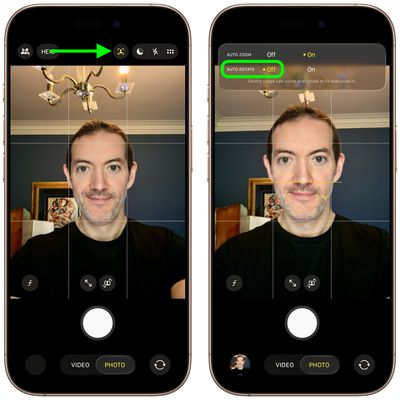
iphone 17 disable auto rotate

How to Disable Auto-Zoom

iphone 17 center stage auto zoom
When the front camera is engaged, if Center Stage's automatic zoom adjustments don't match your needs:

  1. Tap the yellow Center Stage button.
  2. Tap Off next to "Auto Zoom."
  3. Use the manual zoom button (with arrows pointing in/out) within the viewfinder to frame your shot exactly as desired.
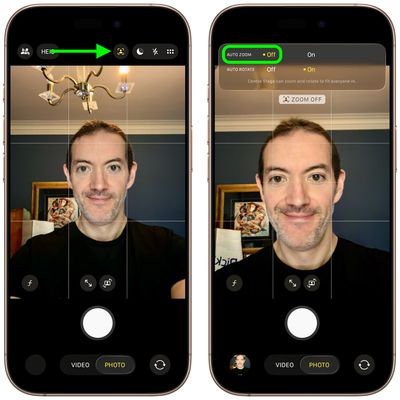
iphone 17 disable auto zoom

Center Stage works during FaceTime calls too, keeping your face centered, similar to how it functions on iPads and MacBooks. If you're interested to learn about dual capture video recording on iPhone 17, be sure to check out our dedicated how-to.
Related Roundups: iPhone 17, iPhone 17 Pro, iPhone Air
Related Forum: iPhone

Top Rated Comments

cbaca51 Avatar
21 weeks ago
Seriously such a great feature for the front camera. That with the upgrade in MP, cameras are a really nice upgrade this year!

Score: 13 Votes (Like | Disagree)
21 weeks ago

Funny how the photo at the top shows the camera on the wrong side of the phone.
On the Air (which is the model of the photo), the camera is on the left side.
Score: 6 Votes (Like | Disagree)
jz0309 Avatar
21 weeks ago
Thanks for the article, haven’t had a chance yet to use the cameras on my 17PM much so will give this a try too
Score: 5 Votes (Like | Disagree)
Ntombi Avatar
21 weeks ago
Used it for the first time today with two friends and it was great. We take a selfie almost every time we get together, and usually, at least one of us is looking at the wrong side and needs a retake. This turned out so well, and we all looked good.

For reference, I’m a medium-brown Black woman, and one of my friends is a super duper pale white woman, and the other is in between. So getting our skin to all look good in one is already a big accomplishment. Add the portrait/landscape issue, and whew boy.

This camera is a big step up.
Score: 5 Votes (Like | Disagree)
21 weeks ago

the auto rotate does not work on FaceTime. thanks Tim
FaceTime in iOS 26 has to be one of the worst “upgrades” in a while and it’s such a pain to use now, this doesn’t help it
Score: 4 Votes (Like | Disagree)
21 weeks ago
Even more icons in the camera app. You need a manual if you don’t use the app every day.
Score: 4 Votes (Like | Disagree)

Popular Stories

Apple Announces Special Event in New York Feature

Apple Announces Special Event in New York, London, and Shanghai on March 4

Monday February 16, 2026 6:05 am PST by
Apple today announced a "special Apple Experience" in New York, London, and Shanghai, taking place on March 4, 2026 at 9:00am ET. Apple invited select members of the media to the event in three major cities around the world. It is simply described as a "special Apple Experience," and there is no further information about what it may entail. The invitation features a 3D Apple logo design...
M3 iPad Air

Apple's Next Two Products Are Coming Soon

Thursday February 12, 2026 11:17 am PST by
Apple plans to release an iPhone 17e and an iPad Air with an M4 chip "in the coming weeks," according to the latest word from Bloomberg's Mark Gurman. "Apple retail employees say that inventory of the iPhone 16e has basically dried out and the iPad Air is seeing shortages as well," said Gurman. "I've been expecting new versions of both (iPhone 17e and M4 iPad Air) in the coming weeks."...
Apple Sales Coach App

Apple Launching New 'Sales Coach' App

Friday February 13, 2026 2:01 pm PST by
Apple plans to launch a rebranded "Sales Coach" app on the iPhone and iPad later this month, according to a source familiar with the matter. "Sales Coach" will arrive as an update to Apple's existing "SEED" app, and it will continue to provide sales tips and training resources to Apple Store and Apple Authorized Reseller employees around the world. For example, there are articles and videos...
Coffee Burgundy and Purple iPhone 18 Pro Mock

Five iPhone 18 Pro Features Revealed in New Report

Friday February 13, 2026 8:43 am PST by
While the iPhone 18 Pro and iPhone 18 Pro Max are still seven months away, an analyst has revealed five new features the devices will allegedly have. Rumored color options for the iPhone 18 Pro models In a research note with investment firm GF Securities on Thursday, analyst Jeff Pu outlined the following upgrades for the iPhone 18 Pro models: Smaller Dynamic Island: It has been rumored...
iOS 26 Home Feature

Three New Apple Home Products Rumored for 2026

Friday February 13, 2026 4:18 pm PST by
Apple has a long list of new products rumored for 2026, including a series of home products that will see the company establishing more of a presence in the smart home space. Robots are on the horizon for 2027, but the 2026 releases will be a little tamer. HomePod mini We're expecting a new HomePod mini 2 to launch at any time. Apple isn't going to update the device's design, but we could...