

iOS 26 was finally released on Monday, but the software train never stops, and the first developer beta of iOS 26.1 will likely be released soon.
iOS 18.1 was an anomaly, as the first developer beta of that version was released in late July last year, to allow for early testing of Apple Intelligence features. The first betas of iOS 15.1, iOS 16.1, and iOS 17.1 were all released in the second half of September, so it is likely the iOS 26.1 beta cycle will begin this month.
The following new features are expected to be added in future updates, ranging from iOS 26.1 to iOS 26.4. These are only the features that are known about so far, so there will obviously be many others added over the course of the next year.
Digital Passport
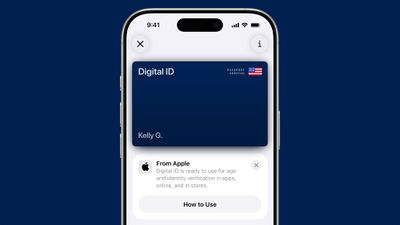
A future version of iOS 26 will let you add a digital version of your U.S. passport to Apple's Wallet app. Unfortunately, the feature has been delayed.
The so-called "Digital ID" feature for U.S. passports will be available in a "software update," according to Apple's fine print on its iOS 26 page. Apple did not mention a specific version, but hopefully it arrives in iOS 26.1 or iOS 26.2.
After creating a Digital ID in the Wallet app, you will be able to present it in person at TSA checkpoints in select U.S. airports for identity verification purposes during domestic travel. However, Apple says it is not a replacement for a physical passport, and it cannot be used for international travel and border crossing purposes.
Apple says the Digital ID feature is secure, private, and compliant with REAL ID.
It will also be possible to use the Digital ID feature for age and identity verification in apps, online, and in stores, according to Apple.
RCS Upgrades
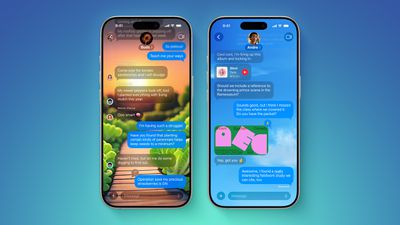
Earlier this year, Apple said it planned to add support for end-to-end encrypted RCS messages to the Messages app in future iOS, iPadOS, macOS, and watchOS software updates, and we are still waiting for that to happen. As of the first official version of iOS 26 released this week, the upgrade has yet to be implemented on iPhones.
End-to-end encryption for RCS was announced in March, as part of version 3.0 of the RCS Universal Profile, a global standard for RCS features and specifications. This means that Apple has indirectly confirmed that it will support RCS Universal Profile 3.0, which includes not only end-to-end encryption for RCS, but several other iMessage-like enhancements for RCS that were originally introduced in RCS Universal Profile 2.7.
Apple has to wait on carriers to implement RCS Universal Profile 3.0 too, so it is understandable why the process is taking time.
Here are five new capabilities to expect for RCS conversations on the iPhone, iPad, and Mac, once Apple rolls out support for RCS Universal Profile 3.0:
- End-to-end encryption, which will prevent Apple and any other third party from being able to read messages and attachments while they are being sent between devices, as has always been the case with iMessage
- In-line replies
- Edit messages
- Unsend messages
- Full-fledged Tapback support for RCS messages, with no special workarounds
RCS support as a whole was added to the iPhone with iOS 18, which supports RCS Universal Profile 2.4. It is effectively a modernized version of the SMS standard, which remains available as a fallback option for text messages over a cellular network.
RCS will be playing catch up with iMessage in many ways. iMessage conversations with blue bubbles have already supported end-to-end encryption by default since iOS 5. In addition, iMessage has supported in-line replies since iOS 14, while the options to edit and unsend iMessages were introduced with iOS 16.
It seems likely that Apple will roll out these RCS upgrades at some point during the iOS 26, iPadOS 26, macOS 26, and watchOS 26 software cycle.
Personalized Siri
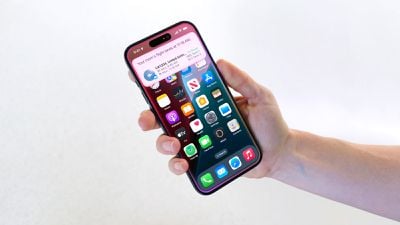
In late July, Apple CEO Tim Cook said his company was making "good progress" on a more personalized version of Siri, and he reiterated the features were on track to launch next year. Bloomberg's Mark Gurman expects the new Siri to launch in the U.S. in spring 2026, so Apple is likely aiming for an iOS 26.4 launch.
Apple first announced the personalized Siri features during its WWDC 2024 keynote, but in March it announced that they were delayed. The new capabilities will include better understanding of a user's personal context, on-screen awareness, and deeper per-app controls. For example, Apple showed an iPhone user asking Siri about their mother's flight and lunch reservation plans based on info from the Mail and Messages apps.
Weather via Satellite
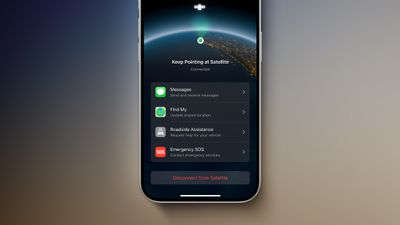
A little more than three months ago, MacRumors contributor Aaron Perris discovered references to an unreleased "Weather via satellite" feature in the code for the first iOS 26 developer beta. However, the feature has yet to be released or even announced by Apple, so it is unclear if it is still coming or if it was scrapped.
The references have not been removed from the code, as of the iOS 26 Release Candidate, so it is possible that Apple will introduce the feature eventually. Perhaps the feature will be added in a follow-up update, such as iOS 26.1 or iOS 26.2.
The feature would let you view the forecast and other weather information in the Weather app, in supported areas without Wi-Fi and cellular range. Apple's other satellite features include Emergency SOS via satellite, Messages via satellite, Find My via satellite, and Roadside Assistance via satellite, with availability varying by country.
Apple has yet to charge a fee for any of its satellite features. Last week, the company announced it is providing existing iPhone 14 and iPhone 15 users with an additional year of free access to the entire suite of satellite features on those devices.
New Emoji
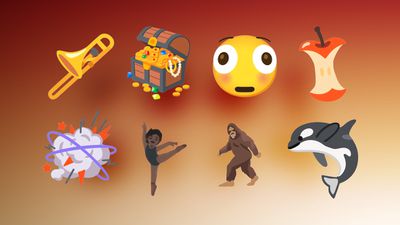
iOS 26.4 will likely add new built-in emoji to the iPhone.
In celebration of World Emoji Day on July 17, the Unicode Consortium previewed some of the new emoji that will be coming with Unicode 17.0.
Here are some of the new emoji:
- Trombone
- Treasure Chest
- Distorted Face
- Hairy Creature (Bigfoot/Sasquatch)
- Fight Cloud
- Apple Core
- Orca
- Ballet Dancers
- Landslide
Notably, Distorted Face is a popular emoji in Discord servers. It is essentially a distorted version of the embarassed face emoji, also known as Flushed Face.
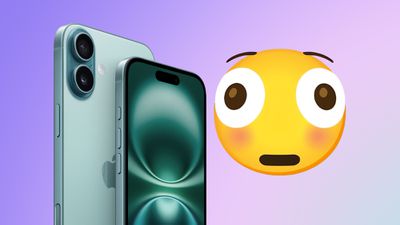
It typically takes Apple several months to design new emoji in its own style, so the emoji listed above will likely be added to the iPhone in iOS 26.4.
Apple most recently added new emoji to the iPhone with iOS 18.4, an update that came out in late March. iOS 17.4, iOS 16.4, and iOS 15.4 also introduced new emoji over the years, so the timing has become predictable by this point if it holds up.






















