Satechi Launches Thunderbolt 4 Multi-Display Docking Station - MacRumors
Skip to Content

Satechi Launches Thunderbolt 4 Multi-Display Docking Station

Satechi today announced the launch of its latest Mac accessory, the Thunderbolt 4 Multi-Display Docking Station. The Docking Station uses DisplayLink software technology to allow a Mac to connect to up to four external monitors, plus it offers 96W power delivery and Thunderbolt 4 transfer speeds.
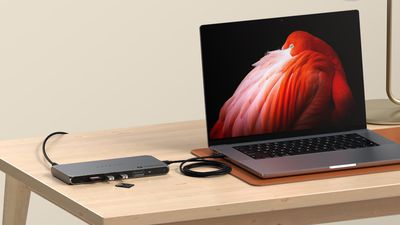
satechi thunderbolt dock
Made from a space gray aluminum that is meant to match Apple devices, the hub supports up to four extended monitors at 4K/60Hz resolution, or one display at 8K/60Hz. With four displays, two can be connected through Thunderbolt 4 and two through HDMI. Satechi says that this feature is designed to address the single display limit of M1, M2, and M3 chips. ‌M1‌, ‌M2‌, and M3 MacBook Pro models support up to three displays with Satechi's dock, while the M3 MacBook Air supports four when in clamshell mode. Machines with Pro and Max chips support up to four displays through the hub.

The hub provides 96W power delivery to the host machine, which is enough to charge even the 16-inch ‌MacBook Pro‌. Each of the three Thunderbolt 4 downstream ports also offer 15W for charging iPhones, Apple Watches, and other accessories, with two ports able to be used at one time for charging purposes. The Thunderbolt 4 ports facilitate data transfers at speeds up to 40Gb/s, and there are two USB-A ports that support transfer speeds up to 10Gb/s. a UHS-II SD card reader is available as well, and it is capable of transferring up to 312MB/s.

Satechi says the dock supports daisy-chaining up to six devices, providing 32Gb/s native PCIe support for external GPUs and Thunderbolt-based storage devices.

The Thunderbolt 4 Multi-Display Docking Station can be purchased from the Satechi website for $300.


Tag: Satechi

Popular Stories

satechi chargeview 240w

Satechi Launches 240W ChargeView Desktop Charger With Six USB-C Ports

Tuesday August 11, 2026 3:29 pm PDT by
Satechi today launched the ChargeView 240W Desktop Charger, a successor to the 140W ChargeView released last year. The ChargeView 240W can power multiple devices at one time, splitting 240W across six USB-C ports. The ChargeView 240W has an LCD display that shows the live wattage of all ports that are in use. The C1 and C2 ports offer up to 140W each, while ports C3 and C4 can deliver up to...

Apple Event Logo

Apple Unveiled Four New Products Today

Tuesday August 25, 2026 8:39 am PDT by
Apple today unveiled a new Mac mini with M6 and M5 Pro chip options, a new Mac Studio with M5 Max and M5 Ultra chip options, a new version of the Polishing Cloth with a lower price, and updated Magic Keyboards for Macs. To learn more about these products, read our coverage below: Apple Announces New Mac Mini With M6 and M5 Pro Chips and More Apple Unveils New Mac Studio With M5 Max and M5...
apple magic keyboard with glyphs 2026 refresh

Apple Quietly Refreshes Magic Keyboards

Tuesday August 25, 2026 7:22 am PDT by
Apple today quietly introduced updated Magic Keyboard models with revised U.S. English key labeling. On the new keyboards, the tab, caps lock, shift, return, and delete keycaps are labeled with glyphs rather than edge text. On the full-size models with a numeric keypad, the change goes further, with the home, page up, page down, end, clear, and enter keys also swapping their text labels for...

Top Rated Comments

bradman83 Avatar
29 months ago

Doubtful. Sounds like this dock is using DisplayLink (a software graphics solution) to get around the limitations of Apple's fairly weak GPUs.
It's less an issue of the GPUs being weak as it's an issue that the base M-series SoCs have a limited number of display controllers. The M1 MacBook Air/Pro and iMac all have two display controllers but one is hard-wired to the internal display, hence the one external display limitation (the Mac Mini has one controller hardwired to HDMI and the other to Thunderbolt). The display controllers themselves are apparently physically quite large and are built into the SoC; they take up the same silicon space as two performance cores, so Apple is limited in how many they can put into their chips. M3 SoCs allow the display controller to switch between the internal display or USB-C/Thunderbolt, hence the second display with the lid closed. Even the base M1 GPU would handle 3-4 external displays just fine if it had the controller support to do it.
Score: 12 Votes (Like | Disagree)
29 months ago
Sigh... yet another TB4 dock without 10GbE (or even 2.5GbE.)
Score: 7 Votes (Like | Disagree)
29 months ago
I've been liking the Dell Thunderbolt 4 docks, they're universal and work with everything - for less money than the Apple specific ones like this.
Score: 7 Votes (Like | Disagree)
29 months ago

It's less an issue of the GPUs being weak as it's an issue that the base M-series SoCs have a limited number of display controllers. The M1 MacBook Air/Pro and iMac all have two display controllers but one is hard-wired to the internal display, hence the one external display limitation (the Mac Mini has one controller hardwired to HDMI and the other to Thunderbolt). The display controllers themselves are apparently physically quite large and are built into the SoC; they take up the same silicon space as two performance cores, so Apple is limited in how many they can put into their chips. M3 SoCs allow the display controller to switch between the internal display or USB-C/Thunderbolt, hence the second display with the lid closed. Even the base M1 GPU would handle 3-4 external displays just fine if it had the controller support to do it.
Semantics - supports less external displays than the old Intel machines, and a $300 Chromebook without nasty software based solutions like DisplayLink - it's a problem.
Score: 3 Votes (Like | Disagree)
29 months ago
"providing 32Gb/s native PCIe support for external GPUs"

Not on a Mac with Apple Silicon.
Score: 3 Votes (Like | Disagree)
29 months ago

Pity there's no support for 4k120hz
It's using Displaylink , so 4K 60hz with a lot of latency is the best you can get
Score: 3 Votes (Like | Disagree)