Apple Says Vision Pro Syncs Data When Not in Use, Explains Battery Light Charge Indicator

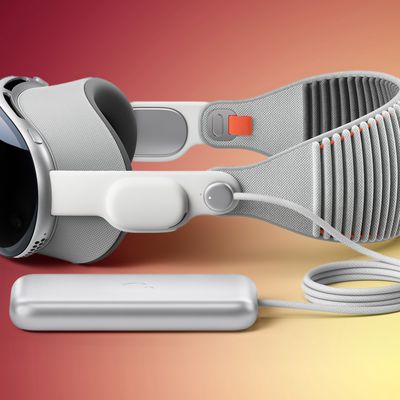
Now that Apple Vision Pro has launched in the U.S., Apple has released additional support documentation for the device, including how to connect and charge the Vision Pro battery.
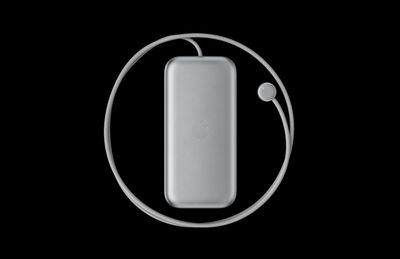
vision pro battery pack
Notably, Apple's document reveals that the external battery also powers ‌Apple Vision Pro‌ when you're not wearing it, allowing the device to sync your mail, photos, and more. If the headset isn't worn for 24 hours though, it turns off automatically.

To check if Apple Vision Pro is still powered on when you're not wearing it, pick up the device. If it's powered on, the light on the power cable will turn on briefly. If Apple Vision Pro has turned off, press and hold the top button for three seconds to turn it back on. After about a minute, Apple Vision Pro makes a tone that means it's ready to use, and the light on the power cable will be solid.

Apple recommends disconnecting the battery if you know in advance that you won't be using the headset for an extended length of time. To disconnect the battery from ‌Apple Vision Pro‌, users are advised to first save any open documents — since disconnecting the battery turns off the device — then turn the power cable counterclockwise until it detaches.

Additionally, Apple outlines what the battery's light tells users about its charge level when it is first connected to power, or moved or tapped while charging:

  • Green for several seconds: the battery is charged to capacity.
  • Amber for several seconds: the battery's charge level is less than 100%, but has enough charge for you to use ‌Apple Vision Pro‌.
  • Amber pulsing slowly: the battery's charge level is too low to power your ‌Apple Vision Pro‌. Keep charging the battery for 10 minutes, or until the light shows amber steadily (not pulsing) when you tap the battery.

Apple also explains what the battery light's color changes mean when users disconnect it from power, or moved or tapped when it's not charging:

  • Green for several seconds: the battery is charged to 50% or higher.
  • Amber for several seconds: the battery's charge level is between 1% and 49%.
  • Amber pulsing slowly: the battery's charge level is too low to power your ‌Apple Vision Pro‌. Charge the battery for 10 minutes, or until the light shows amber steadily (not pulsing) when you tap the battery.

Apple also cautions users not to sit down with the battery in their back pocket, pull the battery off a desk when standing up, or let it fall between seats on an airplane.

According to Apple, Vision Pro batteries can be used for up to 2 hours of general use or 2.5 hours of 2D video watching when fully charged, or all day when connected to power. Apple sells additional Vision Pro battery packs for $200 a piece, but they are not hot-swappable.
Related Roundup: Apple Vision Pro
Buyer's Guide: Vision Pro (Buy Now)

Related Forum: Apple Vision Pro

Popular Stories

Google maps feaure

Google Maps Quietly Added This Long-Overdue Feature for Drivers

Wednesday December 10, 2025 2:52 am PST by
Google Maps on iOS quietly gained a new feature recently that automatically recognizes where you've parked your vehicle and saves the location for you. Announced on LinkedIn by Rio Akasaka, Google Maps' senior product manager, the new feature auto-detects your parked location even if you don't use the parking pin function, saves it for up to 48 hours, and then automatically removes it once...
Foldable iPhone 2023 Feature 1

Apple to Make More Foldable iPhones Than Expected [Updated]

Tuesday December 9, 2025 9:59 am PST by
Apple has ordered 22 million OLED panels from Samsung Display for the first foldable iPhone, signaling a significantly larger production target than the display industry had previously anticipated, ET News reports. In the now-seemingly deleted report, ET News claimed that Samsung plans to mass-produce 11 million inward-folding OLED displays for Apple next year, as well as 11 million...
iOS 26

iOS 26.2 Coming Soon With These 8 New Features on Your iPhone

Thursday December 11, 2025 8:49 am PST by
Apple seeded the second iOS 26.2 Release Candidate to developers earlier this week, meaning the update will be released to the general public very soon. Apple confirmed iOS 26.2 would be released in December, but it did not provide a specific date. We expect the update to be released by early next week. iOS 26.2 includes a handful of new features and changes on the iPhone, such as a new...
iOS 26

15 New Things Your iPhone Can Do in iOS 26.2

Friday December 5, 2025 9:40 am PST by
Apple is about to release iOS 26.2, the second major point update for iPhones since iOS 26 was rolled out in September, and there are at least 15 notable changes and improvements worth checking out. We've rounded them up below. Apple is expected to roll out iOS 26.2 to compatible devices sometime between December 8 and December 16. When the update drops, you can check Apple's servers for the ...
AirPods Pro Firmware Feature

Apple Releases New Firmware for AirPods Pro 2 and AirPods Pro 3

Thursday December 11, 2025 11:28 am PST by
Apple today released new firmware designed for the AirPods Pro 3 and the prior-generation AirPods Pro 2. The AirPods Pro 3 firmware is 8B30, up from 8B25, while the AirPods Pro 2 firmware is 8B28, up from 8B21. There's no word on what's include in the updated firmware, but the AirPods Pro 2 and AirPods Pro 3 are getting expanded support for Live Translation in the European Union in iOS...
iOS 26

Apple Seeds Second iOS 26.2 Release Candidate to Developers and Public Beta Testers

Monday December 8, 2025 10:18 am PST by
Apple today seeded the second release candidate version of iOS 26.2 to developers and public beta testers, with the software coming one week after Apple seeded the first RC. The release candidate represents the final version iOS 26.2 that will be provided to the public if no further bugs are found. Registered developers and public beta testers can download the betas from the Settings app on...
iPhone 14 Pro Dynamic Island

iPhone 18 Pro Leak Adds New Evidence for Under-Display Face ID

Monday December 8, 2025 4:54 am PST by
Apple is actively testing under-screen Face ID for next year's iPhone 18 Pro models using a special "spliced micro-transparent glass" window built into the display, claims a Chinese leaker. According to "Smart Pikachu," a Weibo account that has previously shared accurate supply-chain details on Chinese Android hardware, Apple is testing the special glass as a way to let the TrueDepth...
ipad blue prime day

iPad 12 Rumored to Get iPhone 17's A19 Chip, Breaking Apple Tradition

Wednesday December 10, 2025 12:22 pm PST by
The next-generation low-cost iPad will use Apple's A19 chip, according to a report from Macworld. Macworld claims to have seen an "internal Apple code document" with information about the 2026 iPad lineup. Prior documentation discovered by MacRumors suggested that the iPad 12 would be equipped with an A18 chip, not an A19 chip. The A19 chip was just released this year in the iPhone 17, and...
AirTag 2 Mock Feature

Apple AirTag 2: Four New Features Found in iOS 26 Code

Thursday December 11, 2025 10:31 am PST by
The AirTag 2 will include a handful of new features that will improve tracking capabilities, according to a new report from Macworld. The site says that it was able to access an internal build of iOS 26, which includes references to multiple unreleased products. Here's what's supposedly coming: An improved pairing process, though no details were provided. AirTag pairing is already...
iPhone 17 Pro Cosmic Orange

10 Reasons to Wait for Next Year's iPhone 18 Pro

Monday December 1, 2025 2:40 am PST by
Apple's iPhone development roadmap runs several years into the future and the company is continually working with suppliers on several successive iPhone models at the same time, which is why we often get rumored features months ahead of launch. The iPhone 18 series is no different, and we already have a good idea of what to expect for the iPhone 18 Pro and iPhone 18 Pro Max. One thing worth...

Top Rated Comments

onenorth Avatar
24 months ago

Isn't "Vision Pro" distinct enough of a trademark?
Apparently not.

Search TESS ('https://tmsearch.uspto.gov/search/search-information')and see.


Attachment Image
Score: 4 Votes (Like | Disagree)
kevcube Avatar
24 months ago

having amber and green lights take on different meanings depending on if you are using it or not, taking it off or not, is just confusing. I would prefer they just put a battery icon on the outside screen.
yeah but AirPods Pro seemingly have the same LED indicator system but I never know what it means, except that green is good. I'll continue just checking the battery levels from my iPhone probably.
Score: 4 Votes (Like | Disagree)
erikkfi Avatar
24 months ago
I didn't notice until yesterday that they've made "Apple" part of the product name. I wonder why they did this. It made sense for the Watch because "Watch" is a generic word. Like if they called Vision Pro "Headset" instead, "Apple Headset" would be a terrible name but still make sense having "Apple" tacked on. Isn't "Vision Pro" distinct enough of a trademark?
Score: 1 Votes (Like | Disagree)
svish Avatar
24 months ago
Good to know about the various indicators on the battery.
Score: 1 Votes (Like | Disagree)
contacos Avatar
24 months ago
why does Apple hate power buttons?* so weird and yes, I turn off my MBP every evening

*this rings different in my head
Score: 1 Votes (Like | Disagree)