Everything New in iOS 17.2 Beta 1: Journal App, Translate Action, iMessage Sticker Reactions and More

Apple today released the first beta of an upcoming iOS 17.2 update, and it adds a whole slew of features. You can now access the Journal app that Apple has been working on, and share playlists with friends so they can add songs.
iOS 17
iOS 17.2 is limited to developers right now, but it should soon be coming to public beta testers. We're expecting to see iOS 17.2 released to the public around November or December.

Journal App

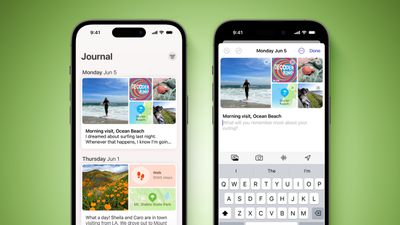
iOS 17.2 includes the Journal app that Apple announced as part of iOS 17. With the Journal app, users can record their daily activities and thoughts, with Apple providing optional prompts that can be used as inspiration.
Journal App iOS 17 Feature Green
A Journal entry can be added by tapping on the "+" button in the Journal app, and from there, users can choose a suggestion as the basis for their writing or just opt for "New Entry" to write anything at all.

Entries are automatically tagged with a date for organizational purposes, but there are options for bookmarking, too. Journal entries can include images, voice recordings, and location tags.

Messages App Sticker Tapback Reactions

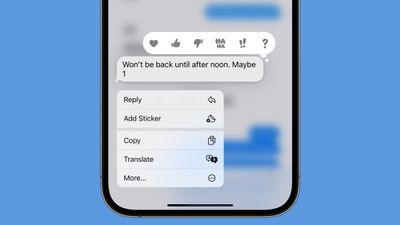
You can now long press on any chat bubble in the Messages app to add a sticker response that serves as an alternative to a tapback reaction. Tapping on "Add Sticker" lets you choose either a sticker or an emoji to apply to the corner of an iMessage.
ios 17 2 tapback reply sticker
There was already an option to drag a sticker or an emoji onto any message bubble, but this is a much quicker method of quickly responding to an incoming message with a quick graphic that is more expressive than a tapback reaction.

Collaborative Apple Music Playlists

There is now an option to create a playlist in Apple Music that multiple people can add to. In a playlist you have made, tap on the three dot icon in top right of the app.
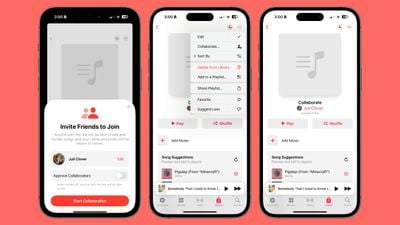
apple music collaborative playlists
From there, select the Collaborate option and choose "Start Collaboration." You'll be able to create a link to the playlist, and anyone who has access to that link can add to it. You can also invite people to join via QR code, and if you want, you can approve each person that asks to join.

Favorites Apple Music Playlist

Songs that you have favorited in the ‌Apple Music‌ app are now aggregated into a Favorites playlist.
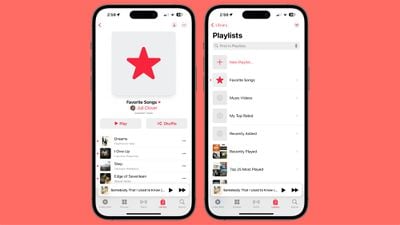
apple music favorite playlists

Apple Music Listening History Focus Filter

There is a Focus Filter for the ‌Apple Music‌ Listening History feature, so if you want to let someone else use your device to listen to music, you can activate this to turn off the Listening History so their song choices won't affect your recommendations.
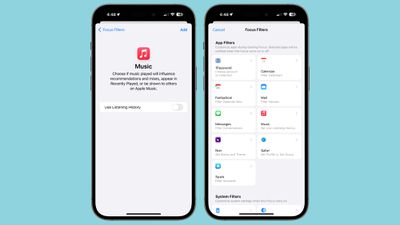
ios 17 2 focus filters

Action Button Translate

iPhone 15 Pro and ‌iPhone‌ 15 Pro Max users can now choose a new Translate option for the Action Button.
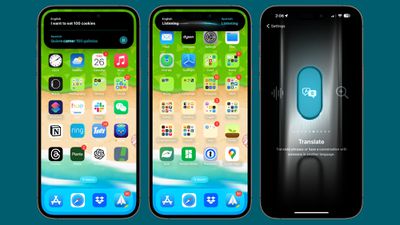
ios 17 translate
When the Action Button is set as Translate, pressing to hold causes the ‌iPhone‌ to pop up a Translate window that listens for spoken text. It is able to translate from one set language to another, using the languages that you have previously set up in the Translate app.

iMessage Contact Key Verification

First previewed in December 2022, iMessage Contact Key Verification is a feature designed for those who face "extraordinary digital threats," such as journalists, human rights activists, and government officials.
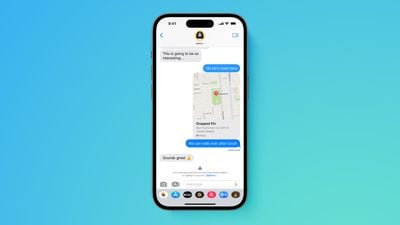
Apple advanced security iMessage Contact Key Verification screen Feature
Users can ensure that there is no "man in the middle" snooping on iMessage conversations, and there is a Contact Verification Code so that iMessage users can verify that they're speaking to the correct individual during in-person meetings or on FaceTime calls.

Messages in iCloud Syncing

The "Messages" section in iCloud in the Settings app has been renamed to "Messages in ‌iCloud‌." It shows the total amount of storage that messages are taking up, the number of messages synced to ‌iCloud‌, and the time of the last sync. There's also a "Sync Now" option to force an update.
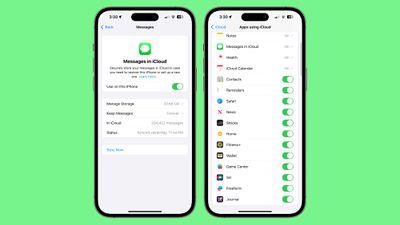
ios 17 2 messages in icloud
Apple previously said that additional settings would be synced through Messages in ‌iCloud‌ in iOS 17, like Text Message Forwarding, Send & Receive accounts, and SMS filters across devices, so this may see those additional settings syncing.

Apple TV App

Apple has removed the separate tabs for Movies and TV shows in the Store section of the Apple TV app on the ‌iPhone‌ and the iPad. Bloomberg's Mark Gurman has said that Apple also plans to remove the option to purchase TV shows and movies from the iTunes app as part of a TV app redesign, but that has not yet happened.
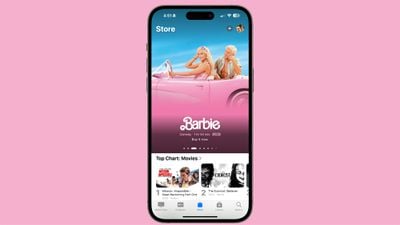
ios 17 2 tv app

Emergency Alerts Local Awareness

Under Notifications > Emergency Alerts in the Settings app, there is a new "Local Awareness" option that can be turned on. Apple says that Local Awareness uses your approximate location to improve the timeliness, accuracy, and reliability of emergency alerts.
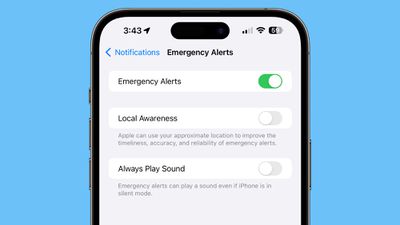
ios 17 2 emergency local awareness

Weather Widgets

There are new Details, Daily Forecast, and Sunrise/Sunset widgets. Detail shows information like precipitation chance, UV index, wind speed, and air quality, while Daily Forecast offers the weather for the next few days in a small widget size. Sunrise/Sunset shows the sunrise and sunset times for each day.
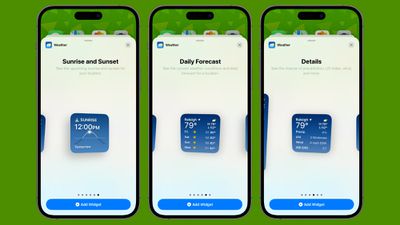
weather app widgets

Digital Clock Widget

There is a new Digital Clock widget that can be added to the Home Screen or Lock Screen.
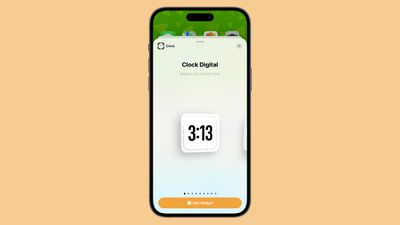
ios 17 2 clock widget

Contact Posters

You can now select a rainbow-colored text for your name when setting up a Contact Poster in the Contacts app.
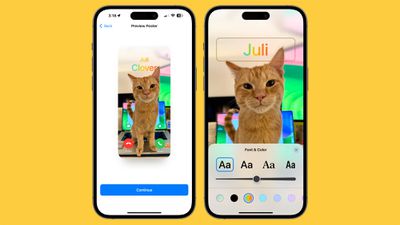
ios 17 2 contact poster rainbow

Books Page Turning Animation

There's a new "Fast Fade" option for the page turning animation in the Books app. Apple has also removed the icon that you could turn on to scroll through content quickly.
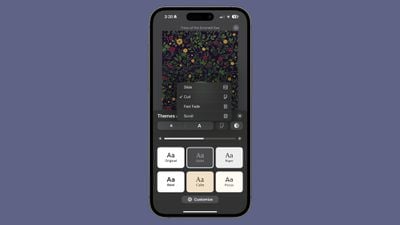
ios 17 2 page turn animation

AirPlay

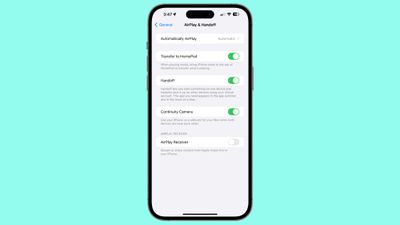
There's a new "AirPlay Receiver" setting that will allow the upcoming Apple Vision Pro headset to stream or share content to an ‌iPhone‌.

ios 17 2 airplay handoff
It also looks like the ‌AirPlay‌ feature for hotels that Apple announced earlier this year is live or will be live soon. It is designed to let you ‌AirPlay‌ content from your ‌iPhone‌ or ‌iPad‌ to an AirPlay-equipped smart TV.

Memoji

Apple added a "Body" section for Memoji where users can customize waist, bust, shoulders, and arms.
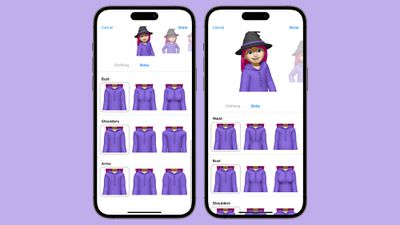
ios 17 2 memoji body

News App

The News app now supports Live Activities for following news-related events such as elections.
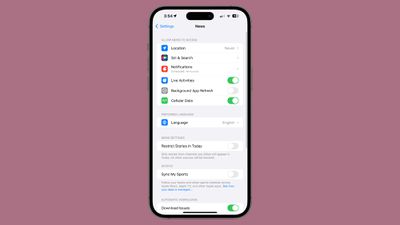
ios 17 2 apple news live activities

More iOS 17.2 Beta 1 Features

Know of a feature that we left out in this list? Let us know in the comments below.

Related Forums: iOS 17, iPadOS 17

Popular Stories

iOS 26

15 New Things Your iPhone Can Do in iOS 26.2

Friday December 5, 2025 9:40 am PST by
Apple is about to release iOS 26.2, the second major point update for iPhones since iOS 26 was rolled out in September, and there are at least 15 notable changes and improvements worth checking out. We've rounded them up below. Apple is expected to roll out iOS 26.2 to compatible devices sometime between December 8 and December 16. When the update drops, you can check Apple's servers for the ...
Intel Inside iPhone Feature

Apple's Return to Intel Rumored to Extend to iPhone

Friday December 5, 2025 10:08 am PST by
Intel is expected to begin supplying some Mac and iPad chips in a few years, and the latest rumor claims the partnership might extend to the iPhone. In a research note with investment firm GF Securities this week, obtained by MacRumors, analyst Jeff Pu said he and his colleagues "now expect" Intel to reach a supply deal with Apple for at least some non-pro iPhone chips starting in 2028....
Photos App Icon Liquid Glass

John Gruber Shares Scathing Commentary About Apple's Departing Software Design Chief

Thursday December 4, 2025 9:30 am PST by
In a statement shared with Bloomberg on Wednesday, Apple confirmed that its software design chief Alan Dye will be leaving. Apple said Dye will be succeeded by Stephen Lemay, who has been a software designer at the company since 1999. Meta CEO Mark Zuckerberg announced that Dye will lead a new creative studio within the company's AR/VR division Reality Labs. On his blog Daring Fireball,...
ive and altman

Jony Ive's OpenAI Device Barred From Using 'io' Name

Friday December 5, 2025 6:22 am PST by
A U.S. appeals court has upheld a temporary restraining order that prevents OpenAI and Jony Ive's new hardware venture from using the name "io" for products similar to those planned by AI audio startup iyO, Bloomberg Law reports. iyO sued OpenAI earlier this year after the latter announced its partnership with Ive's new firm, arguing that OpenAI's planned "io" branding was too close to its...
iOS 26

Apple Seeds iOS 26.2 and iPadOS 26.2 Release Candidates to Developers and Public Beta Testers

Wednesday December 3, 2025 10:33 am PST by
Apple today seeded the release candidate versions of upcoming iOS 26.2 and iPadOS 26.2 updates to developers and public beta testers, with the software coming two weeks after Apple seeded the third betas. The release candidates represent the final versions of iOS 26.2 and iPadOS 26.2 that will be provided to the public if no further bugs are found during this final week of testing....
iphone air camera

iPhone Air's Resale Value Has Dropped Dramatically, Data Shows

Thursday December 4, 2025 5:27 am PST by
The iPhone Air has recorded the steepest early resale value drop of any iPhone model in years, with new data showing that several configurations have lost almost 50% of their value within ten weeks of launch. According to a ten-week analysis published by SellCell, Apple's latest lineup is showing a pronounced split in resale performance between the iPhone 17 models and the iPhone Air....
iPhone 17 Pro Cosmic Orange

iPhone 17 Pro Lost a Camera Feature Pro Models Have Had Since 2020

Thursday December 4, 2025 5:18 am PST by
iPhone 17 Pro models, it turns out, can't take photos in Night mode when Portrait mode is selected in the Camera app – a capability that's been available on Apple's Pro devices since the iPhone 12 Pro in 2020. If you're an iPhone 17 Pro or iPhone 17 Pro Max owner, try it for yourself: Open the Camera app with Photo selected in the carousel, then cover the rear lenses with your hand to...
ios 18 to ios 26 upgrade

Apple Pushes iPhone Users Still on iOS 18 to Upgrade to iOS 26

Tuesday December 2, 2025 11:09 am PST by
Apple is encouraging iPhone users who are still running iOS 18 to upgrade to iOS 26 by making the iOS 26 software upgrade option more prominent. Since iOS 26 launched in September, it has been displayed as an optional upgrade at the bottom of the Software Update interface in the Settings app. iOS 18 has been the default operating system option, and users running iOS 18 have seen iOS 18...
maxresdefault

iPhone Fold: Launch, Pricing, and What to Expect From Apple's Foldable

Monday December 1, 2025 3:00 am PST by
Apple is expected to launch a new foldable iPhone next year, based on multiple rumors and credible sources. The long-awaited device has been rumored for years now, but signs increasingly suggest that 2026 could indeed be the year that Apple releases its first foldable device. Subscribe to the MacRumors YouTube channel for more videos. Below, we've collated an updated set of key details that ...
iPhone 17 Pro Cosmic Orange

10 Reasons to Wait for Next Year's iPhone 18 Pro

Monday December 1, 2025 2:40 am PST by
Apple's iPhone development roadmap runs several years into the future and the company is continually working with suppliers on several successive iPhone models at the same time, which is why we often get rumored features months ahead of launch. The iPhone 18 series is no different, and we already have a good idea of what to expect for the iPhone 18 Pro and iPhone 18 Pro Max. One thing worth...

Top Rated Comments

groove-agent Avatar
28 months ago
Why isn't Journal released on MacOS? Journaling requires typing and MacOS is the best platform for typing. iOS is not. I must be missing something.
Score: 17 Votes (Like | Disagree)

gaximus Avatar
28 months ago
This feel like a bigger update than iOS 17
Score: 16 Votes (Like | Disagree)
rti92391 Avatar
28 months ago

Who the heck has 33GB of iMessages? What are you getting sent 4K movies? Wow! That person seriously needs to delete their attachments! ?
Bruh

Attachment Image
Score: 14 Votes (Like | Disagree)
jimmyponi Avatar
28 months ago

Who the heck has 33GB of iMessages? What are you getting sent 4K movies? Wow! That person seriously needs to delete their attachments! ?
Take a breath before you see this ??

Attachment Image
Score: 6 Votes (Like | Disagree)
McWetty Avatar
28 months ago

Who the heck has 33GB of iMessages? What are you getting sent 4K movies? Wow! That person seriously needs to delete their attachments! ?
I have 18.4Gb. And I delete a lot of stuff I don’t want/need. Photos (from newer iPhones especially) take up a bunch of space.
Score: 5 Votes (Like | Disagree)
eastpointvet Avatar
28 months ago

Who the heck has 33GB of iMessages? What are you getting sent 4K movies? Wow! That person seriously needs to delete their attachments! ?
Let me tuck mine then

Attachment Image
Score: 4 Votes (Like | Disagree)