Chat-Like OS X Email App 'Unibox' Now Available in Mac App Store - MacRumors
Skip to Content

Chat-Like OS X Email App 'Unibox' Now Available in Mac App Store

by

Unibox, a Messages-style email client that entered public beta back in September, is now available for download from the Mac App Store.

Aiming to revolutionize the email experience, Unibox is designed to make email more personal through an organizational system that groups emails by contacts. The app's interface is divided into two panes, with the left side displaying contacts and the right side displaying all messages that have been exchanged with a particular person or website.
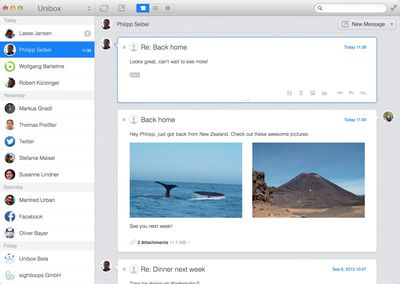
uniboxemail1

Unibox is a people centric email client that organizes your messages by person. In contrast to the tedious to-do list that email is today, Unibox allows you to concentrate on actual communication and makes email fun again. Once you got used to it you'll never want to go back.

Emails are composed within a single window, eliminating the concept of separate compose windows utilized by existing apps like Mail. Received attachments are readily available, displayed in a grid view, and the app also supports additional features like simple account switching and multiple aliases.

Unibox supports all IMAP accounts and works with both Mountain Lion and Mavericks. It can be downloaded from the Mac App Store for $9.99. [Direct Link]


Top Rated Comments

168 months ago
Just what the industry needed. Enforce the use of e-mail as an IM client.
Score: 2 Votes (Like | Disagree)
spazzcat Avatar
168 months ago
Cool way to look at email, but not $10 cool...
Score: 2 Votes (Like | Disagree)
168 months ago
Love Unibox

I was in the beta test and bought my $10 copy. They're trying something really hard-- rethinking email -- and in my case, the reorientation to people, and not conversation threads, works really well to keep in mind who I'm communicating with over the day.
Score: 1 Votes (Like | Disagree)
kmpoboy2 Avatar
168 months ago
This is what I have:

Thanks for that man, I've been trying to set it up since i got the app a while back and it never occurred to me to set it up as exchange.
Score: 1 Votes (Like | Disagree)
c0ppo Avatar
168 months ago
After Sparrow I've switched to AirMail. One 8GB account, and one at 5GB. Everything works like a charm. AirMail is fast, beautiful and with a lot of features.

At 2$ its a no brainer for me :)
Score: 1 Votes (Like | Disagree)
168 months ago
My problem with these third party email clients is that yes, they provide quite good features, but if you have a large mailbox, they bog down really quickly.

I loved Sparrow, but it was pretty much unusable most of the time. Whilst there are features that I'd love in the native Mavericks mail app - it's the only Mac mail client I've been able to find which can cope with my 15GB mailbox.
Score: 1 Votes (Like | Disagree)

Popular Stories

8 CarPlay Features in iOS 27 Feature

Which iOS 27 CarPlay Features Actually Work in Your Car?

Thursday September 17, 2026 4:17 am PDT by
In iOS 27, available now, CarPlay gets its biggest update in years, but some features depend on what type of car you have rather than your iPhone model. Some of the biggest additions won't do anything in the vast majority of vehicles on the road today. Here's how the new features pan out. Works in Any CarPlay Vehicle Custom widgets: In iOS 27, CarPlay is no longer limited to Apple's handful ...
Apple Watch New Charging Puck

Here's Why a New Apple Watch Charging Puck Was Just Released

Wednesday September 16, 2026 8:53 am PDT by
The new Apple Watch Series 12 and Apple Watch Ultra 4 have hardware changes that allow for faster charging, but you will need to use the new version of the Apple Watch Magnetic Fast Charger included in the box in order to achieve this boost. If you need extra ones for your own charging stands or travel or so forth, Apple released the new version of the charger on its online store last week, with...
ios272anniversary

iOS 27.2 Could Save Your Marriage

Wednesday September 16, 2026 1:32 pm PDT by
The iOS 27.2 beta that Apple released today adds a feature that reminds you it's your anniversary when you call someone, as long as you've added the date in the Contacts app. On the date of your anniversary, when you go to call the person, you'll see a reminder that it's an important day so you don't forget to say something. The anniversary alert uses Call Context, a feature Apple added in...