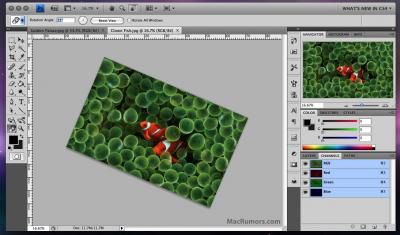
Previously unpublished Mac Photoshop CS4 screenshot, click for larger
Adobe seems to be hard at work at Adobe Creative Suite 4*. In May, they released public betas of CS4 versions of Dreamweaver, Fireworks, and Soundbooth. Existing CS3 owners are able to continue to use these applications beyond the initial 48 hour window.
One of the most obvious changes in the new CS4 applications is the user interface, and this change will also be carried over into the next version of Adobe's Photoshop. This decision is described in detail by Adobe's John Nack. Nack describes how Adobe has been trying to make the interfaces on their apps more consistent and shows off a screenshot of the new Mac Photoshop "application frame". This application frame contains both user interface elements as well as documents themselves. Despite expressing his own initial resistance, Nack explains the advantages to the consolidated window:
- It facilitates N-up (2-up, 3-up, etc.) document layouts that adapt as you adjust the interface. Think "live window tiling"--great for comparing, compositing, etc.
- It makes it easier to move the entire application and its contents, including from one monitor to another.
- It prevents documents from getting obscured by panels (palettes).
- It blocks out the contents of the desktop, minimizing visual clutter. (A number of Mac users have requested this option for many years. I've known quite a few people who open a small blank document, hit F to put it into full-screen mode, and then put it into the background to hide the desktop. Willingness to live with that kind of hack demonstrates some genuine desire for a real fix.)
For Mac users resistant to the change, Nack assures readers that the new interface is optional, and users can easily disable the consolidated view, or you can use choose to use elements of both methods.
There's been no public timeframe for the release of this next version of Adobe's Photoshop, but there were some contested claims of an October release target. The next Mac version of Photoshop has been announced to remain a 32-bit application. 64-bit support is expected on the subsequent version for the Mac.
* Note that Adobe has objected to labeling this next version of Creative Suite as "Creative Suite 4" or "CS4", but for consistency's sake with the rest of the world, we are using that designation until Adobe officially announces otherwise.
Update: Video of the new interface in action.