iOS 14.5: How to Use AirPlay 2 With Apple Fitness+ - MacRumors
Skip to Content

iOS 14.5: How to Use AirPlay 2 With Apple Fitness+

by

With the release of watchOS 7.4 and iOS 14.5, Apple has added AirPlay 2 support to the Apple Fitness+ app. That means Apple Fitness+ workouts can be streamed to ‌‌AirPlay‌‌ 2-compatible television sets from an iPhone or iPad, allowing workouts to be viewed on a larger screen without requiring an Apple TV.

fitness plus
‌AirPlay‌ 2-enabled TVs are available from a variety of brands, including Samsung, Sony, LG, and Vizio. Roku TVs sold by brands like TCL, Sharp, and Hisense also support ‌AirPlay‌ 2, or users can connect a Roku streaming stick to their existing smart TV via the HDMI port as a cost-effective way of streaming Apple Fitness+ workouts via ‌AirPlay‌ 2.

One thing to bear in mind when using Apple Fitness+ with ‌AirPlay‌ is that Apple Watch metrics aren't displayed on the screen as they are when using the service with an ‌Apple TV‌, iPhone, or ‌iPad‌. Activity rings, calories burned, workout time remaining, and burn bars won't show on your TV, but you can still glance at your connected Apple Watch and iPhone or ‌iPad‌ to view that info.

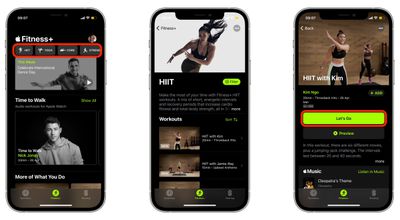
  1. Turn on your AirPlay-compatible television set and launch the Apple Fitness app on your iPhone or ‌iPad‌.
  2. Select a workout type, choose a workout type, then hit the green Let's Go button.
    fitness

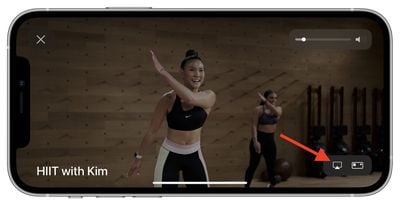
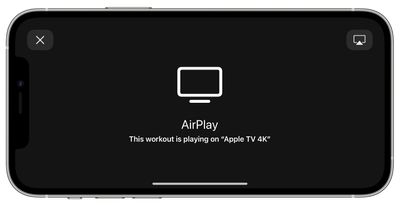
  3. Tap the ‌AirPlay‌ icon in the bottom-right corner of the workout loading screen and select your TV from the list of ‌AirPlay‌ options.
    fitness

  4. Continue following the workout on your television, and remember to check your Apple Watch for real-time metrics.
    airplay

For more helpful articles about the new features in iOS 14.5, be sure to check out our dedicated guide.


Top Rated Comments

FasterQuieter Avatar
70 months ago
I tried to like Apple Fitness+, but the forced smiles the instructors constantly wear near killed me. They'll need to hire some scowling Russians to draw me back in.


Score: 6 Votes (Like | Disagree)
70 months ago
I'm sure I'm not the only one who is annoyed by this, but why can't they have the metrics that are able to show up if you're using an Apple TV to show up when you're doing AirPlay? I'm sure there's some reason why, but I just don't understand why such a feature is being omitted if you're doing AirPlay as opposed to using an Apple TV for Fitness+...
Score: 2 Votes (Like | Disagree)
70 months ago
Why isn’t there an Apple fitness+ app for Apple TV?
Score: 2 Votes (Like | Disagree)
70 months ago
Now if only I could AirPlay it to my macbook or better yet, just access Fitness+ workouts on it natively.
Score: 1 Votes (Like | Disagree)
70 months ago
How happy the instructors look. LOL
Score: 1 Votes (Like | Disagree)
70 months ago

Why isn’t there an Apple fitness+ app for Apple TV?
There is. This feature is for those that do not have an Apple TV but have a compatible airplay device. certain smart TVs have airplay 2 etc
Score: 1 Votes (Like | Disagree)

Popular Stories

Apple iCloud Plus expansion hero

iCloud+ Now Includes Apple TV, Apple Arcade, and Curated Apple Music Stations in Over 100 Countries

Tuesday September 15, 2026 1:43 am PDT by
Apple today announced a new subscription initiative that turns paid iCloud+ subscriptions into a broader services bundle in more than 100 countries. In select countries, Apple says every paid iCloud+ plan, including the cheapest 50GB tier, now includes Apple TV and Apple Arcade "at no additional cost," while family sharing extends the storage, TV and Arcade access to up to five people....
Everything New Your iPhone Can Do on iOS 27 Feature 1

50 New Things Your iPhone Can Do in iOS 27 - Out Now!

Monday September 14, 2026 10:48 pm PDT by
Apple released iOS 27 this week, and despite the company's focus this year on refining its flagship operating system and nixing bugs, there are still many additional features to explore, not least of which is Apple's new context-aware Siri, re-tooled for the generative AI era. Which iPhones Support Every iOS 27 Feature? This year's major iPhone software update isn't all about AI, though,...
iOS 27 Icon iPhone

iOS 27 Available Now With These 8 New Features

Monday September 14, 2026 9:00 am PDT by
Update — 10 a.m. Pacific Time: Apple has released iOS 27. During its iPhone 18 Pro and iPhone Duo event last week, Apple announced that iOS 27 will be released widely on Monday, September 14. iOS 27 should be available around 10 a.m. Pacific Time / 1 p.m. Eastern Time today via the Settings app, under General → Software Update. Below, we have highlighted eight new features and...