iOS 16: How to Make Siri Announce Notifications Through Your iPhone's Speaker - MacRumors
Skip to Content

iOS 16: How to Make Siri Announce Notifications Through Your iPhone's Speaker

by

In iOS 16, Apple has made iterative improvements to its built-in Siri voice assistant, including expanded offline support, the ability to hang up calls using ‌Siri‌, and new accessibility features.

iOS 16 Siri Guide Feature
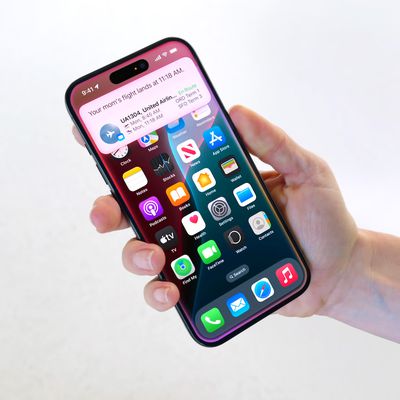
One of these new accessibility enhancements is an option to have ‌Siri‌ announce notifications and incoming calls through your iPhone's speaker.

Previously in iOS 15, ‌Siri‌'s announce notifications option only works if you are wearing compatible AirPods or Beats headphones, so this is a handy improvement, plus it also now works with hearing aids that are Made for iPhone.

To set you iPhone to announce calls and notifications through the device's built-in speaker, follow the steps below.

  1. Open the Settings app on your iPhone.
  2. Scroll down and select Accessibility.
  3. Scroll down to the "General" section and select Siri.
  4. Scroll down to the "Spoken Responses" section and toggle on the switch next to Announce Notifications on Speaker.
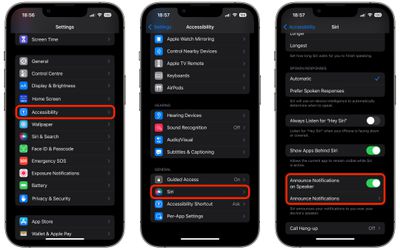
settings

Once you've enabled Announce Notifications on Speaker, a new Announce Notifications menu will appear where you can independently select which apps ‌Siri‌ should announce notifications from.

This additional menu also includes options to Announce When Connected to Headphones, as well as an option that allows ‌Siri‌ to send replies to notifications that support them without first reading back the message for you to confirm (Reply Without Confirmation).

Popular Stories

apple intelligence black

Apple Briefly Posts China Guide for Connecting Siri to Qwen AI

Monday August 10, 2026 5:21 am PDT by
Apple briefly published a support guide in China explaining how Mac users can connect Alibaba's Qwen AI to Siri and Writing Tools, before pulling it entirely less than a day later. Reuters first spotted the Chinese-language guide on Apple's support site on August 8, which explained how eligible Mac users in mainland China could connect Qwen, Alibaba's family of generative AI models, to Siri...

ios 27 siri voice

Latest iOS 27 Beta Expands Siri AI Voice Customization

Monday August 10, 2026 11:57 am PDT by
With the fifth beta of iOS 27, Apple has expanded the voice customization options for Siri AI. Pace and Expressivity can now be adjusted for more of the available voice options instead of just the two American voices. There are seven American voice options and four British voices to choose from, all of which can be customized with different Pace and Expressivity settings. Pace changes...
ios 27 b5 icons

iOS 27 Beta 5 Brings New Icons for Siri, Safari, Settings and More

Monday August 10, 2026 12:18 pm PDT by
In the fifth beta of iOS 27, Apple is continuing to make design tweaks. There are updated Liquid Glass icons for Safari, the Siri app, Settings, Remote, App Store, and Preview. The Safari icon is a brighter blue with more detailed compass lines and arrows, while the Siri icon looks more like the actual Siri bubble that's displayed when Siri is activated. The App Store app icon is more...