

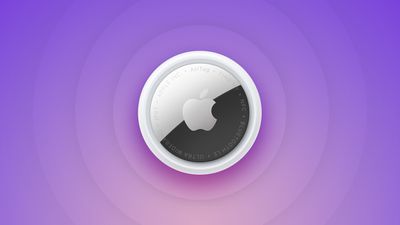
Apple first introduced the AirTag in April 2021, and then followed it up with a second-generation version in January 2026. The small circular AirTag is designed to be attached to items like keys and wallets to allow these accessories to be tracked using Bluetooth or Ultra Wideband (UWB) right alongside Apple devices in the Find My app.
AirTag Price
A single AirTag is priced at $29, and a package of four AirTags can be purchased for $99. Prices have not changed after the release of the AirTag 2.
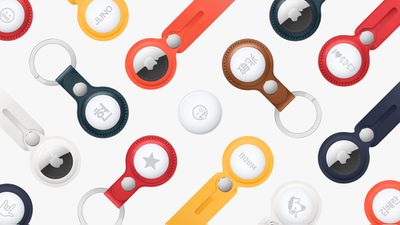
AirTags are available directly from Apple, and that price point does not include the accessories needed to attach the AirTag to an item. Apple sells AirTags accessories separately, and there are also several third-party options.
Third-party retailers like Amazon and Best Buy are also offering AirTags for sale, and there can sometimes be good deals available.
AirTags Design
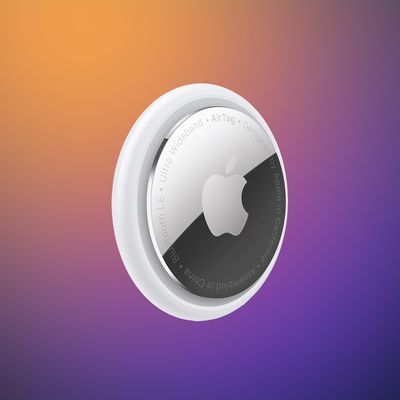
The AirTag is a small, button-shaped tracking device with a glossy white front that can be customized with an engraving and a silver backing. AirTags are designed around the CR2032 batteries that are inside, and need additional accessories to attach to an item.
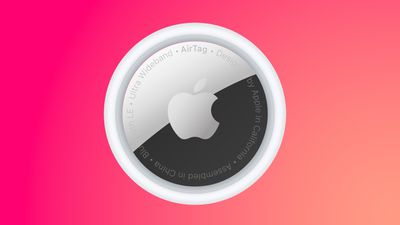
There have been no notable design changes between the original AirTag and the second-generation model, and the overall look is the same. The text on the back of the AirTag is now capitalized, plus it mentions IP67 waterproofing, which is one way to tell the first and second models apart.
AirTag measures in at 1.26 inches in diameter, and it has a height of 0.31 inches, or 8mm. The original AirTag weighs 0.39 ounces (11 grams), while the AirTag 2 weighs 0.42 ounces or 11.8 grams.
AirTags Engraving
Each AirTag can be engraved with up to four letters or emoji characters, though there are some restrictions on multiple emoji due to size limitations. There are also limitations on some emoji strings and phrases due to Apple's content filtering.

You can't, for example, pair a horse emoji with the pile of poo emoji, nor can you use curse words.
2021 AirTag vs. 2026 AirTag 2
The second-generation version of the AirTag features a second-generation Ultra Wideband chip and updated Bluetooth, both of which improve tracking range. Precision Finding, which lets you find an AirTag's specific location with your iPhone, works from 1.5x further away.
Apple added a louder speaker in the AirTag 2, and the speaker is also more firmly secured to make it harder to remove.
If you have an original AirTag, there's no real reason to upgrade, but if you're buying a new one, you'll want to make sure you have the updated model.
AirTags Features
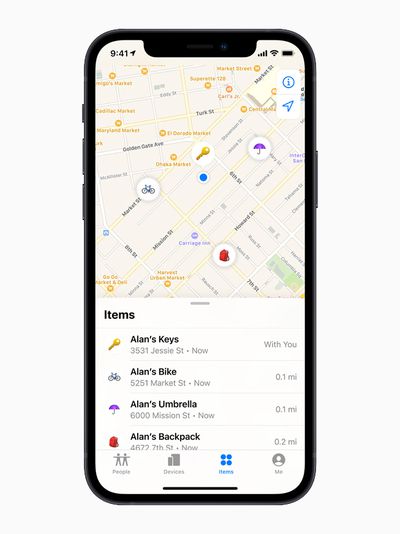
AirTags are added and managed in the Find My app under the "Items" tab. Like other Apple devices, each AirTag is displayed on a map in the Find My app so you can see its location. AirTags connect to your iOS and macOS devices over Bluetooth. The second-generation AirTags have upgraded Bluetooth with connectivity improvements.
The original AirTag features an Ultra Wideband U1 chip, while the AirTag 2 has an upgraded U2 chip. With Ultra Wideband, you can see the AirTag's precise location indoors or outdoors if it's nearby, or see its last known location if it is not.
The second-generation UWB chip allows Precision Finding to work from 1.5x further away than before, which is the major upgrade the AirTag 2 offers over the original model.
There are built-in speakers to play a sound to find a lost AirTag in the house, and you can either play a sound through the Find My app or ask Siri to find an AirTag with a sound. The AirTag 2's speaker is up to 50 percent louder than the speaker in the original AirTag, which makes it easier to find.
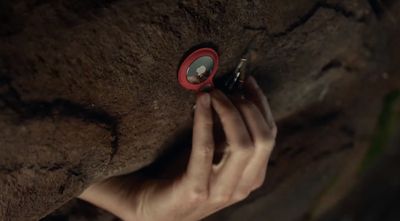
If an AirTag is lost or stolen, the Find My network can help you find it. The Find My network takes advantage of hundreds of millions of iPhone, iPad, and Mac devices to help you locate an AirTag, with the AirTag showing up on a map when it is located by someone else's device.
In Lost Mode, an AirTag will automatically send out a notification when it's detected by someone in the Find My network, and you can add your contact info so someone who finds your item can get in touch with you.
Apple is able to regularly update the AirTags firmware and has done so several times since the AirTags launched.
Precision Finding
iPhones with a U1 or U2 chip can take advantage of Precision Finding, a feature that lets you see specific instructions on how to get to your lost AirTag. Precision finding combines AR, sound, and haptic feedback to help you out. Precision Finding works on the iPhone 11 and later.
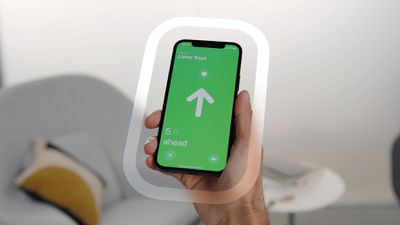
For the AirTag 2, Precision Finding also works on the Apple Watch Series 9 and later and the Apple Watch Ultra 2 and later, because these watches have UWB chips. Precision Finding on Apple Watch is not available for the original AirTag.
Returning a Lost AirTag
If you come across a lost AirTag, or if someone comes across your lost AirTag, it can be scanned with any smartphone that's equipped with NFC to bring up contact information.
This works on iPhones and Android devices, so if you find an item, give it a scan to locate the owner. If in Lost Mode, the AirTag will also relay its location back to the owner through the Find My network.
Separation Alerts
AirTag separation alerts are designed to let you know if you leave an Apple device, a device attached to an AirTag, or a Find My-enabled third-party device behind.
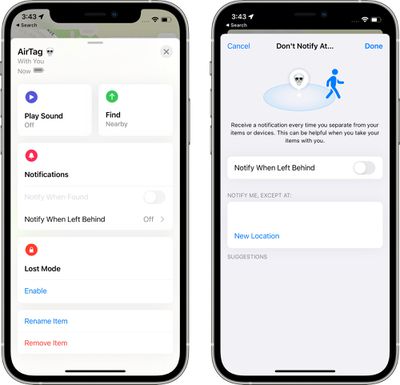
You can set up Separation Alerts in the Find My app, so if you want to make sure your iPhone is always with you or that you don't leave the house without the keys, this is the feature to use.
AirTags Battery
Both versions of the AirTag use a replaceable CR2032 battery that's designed to last about a year before it needs to be replaced. The batteries are user replaceable, and to swap out a battery, you can press and twist on the back panel of the AirTag to pop it off. If your AirTag is low on battery life, you'll get a notification that the battery needs to be replaced.
AirTags Charging
There is no need or way to charge an AirTag because Apple designed them with user replaceable CR2032 batteries.
AirTags Water Resistance
The AirTag features an IP67 water and dust resistance rating, which means it can withstand immersion in water up to one meter (3.3 feet) for 30 minutes in laboratory conditions. That means the AirTag will hold up well to liquid exposure from rain or accidental spills.
AirTags Setup
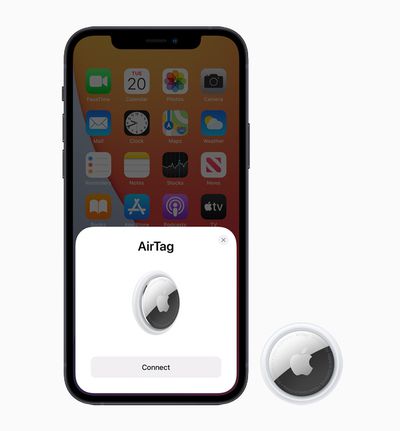
As with AirPods, setting up an AirTag can be done with a one-tap gesture after it's unboxed. Each AirTag can be customized with a name and an item description.
AirTag Ownership Limits
Each Apple ID can be associated with up to 16 AirTags, so you can keep track of 16 items at one time.
AirTags Privacy and Security
Each AirTag you own is linked to your Apple ID and no one else can track it. Location data and location history are not stored on the AirTag, and devices that relay the location of a lost AirTag stay anonymous and location data is encrypted every step of the way.
You may see where your lost AirTag is on a map if it's picked up by someone else's device, but you won't know the identity of the person that helps find it. Apple also does not see where AirTags are located because of the end-to-end encryption.
AirTags have unique Bluetooth identifiers that rotate frequently, a feature that ensures you're never tracked from place to place.
AirTags Stalking
Apple has built in security restrictions that are designed to prevent an AirTag for being used for unwanted and secretive tracking purposes.
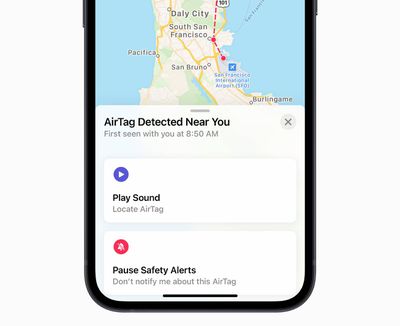
If an AirTag that someone else owns is in your belongings and has been traveling with for you a while, your iPhone will send you an alert about an AirTag being detected near you, which will prevent someone from tracking you with a planted AirTag. You will get an alert on an AirTag that's with you when you return to your home address or to a location that's frequently visited.
When this happens, you'll see a notification that says "AirTag Detected," which you can tap to disable the AirTag. If the AirTag is attached to an item you're borrowing, you can choose to turn off "AirTag Detected" notifications for one day. If it's an item from a family member, you can turn off Safety Alerts for those who are in your Family Sharing group.
AirTag Detected alerts are only triggered when an AirTag is separated from its owner, so you don't need to worry about friends or family members with nearby AirTags. An AirTag away from its owner for 8 to 24 hours will play a sound to alert you to its presence, letting you know if someone has illicitly stuck an AirTag in your belongings.
There have been multiple news stories about AirTags being used for vehicle theft, stalking, and other nefarious purposes, which has led Apple to make several updates to how AirTags work to prevent criminals from taking advantage of them.
When setting up an AirTag, Apple will show warnings to thwart malicious use. The warning makes it clear that the AirTag is linked to an Apple ID, that using it to track people is a crime, and that law enforcement can request identifying information about the owner of the AirTag, which Apple will readily provide.
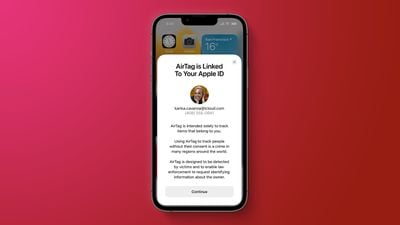
To prevent stalking, Apple has added safety features that include Precision Finding and improved display alerts, and louder sounds that are designed to make AirTags more difficult to use for people-tracking purposes. The second-generation AirTag was also designed with anti-stalking in mind, with Apple increasing the sound.
- Precision Finding - iPhone owners who have a device with a U1 or U2 chip and who receive an unwanted tracking alert can locate an unknown AirTag with precision, similar to the Precision Finding feature that's available to AirTag owners. The feature will provide the distance and direction to an unknown AirTag when it is in range, making it easier to locate.
- Display alert with sound - When an AirTag separated from its owner plays a sound to alert those nearby, it also displays an alert on an iPhone, iPad, or iPod touch so that it can be tracked down by sound or Precision Finding if the feature is available. Apple says that this feature will help if the AirTag sound is hard to hear or if the speaker has been tampered with.
- Updated unwanted tracking alerts - Apple updated its alert system to notify users earlier that an unknown AirTag or Find My network accessory may be traveling with them.
Sharing AirTags
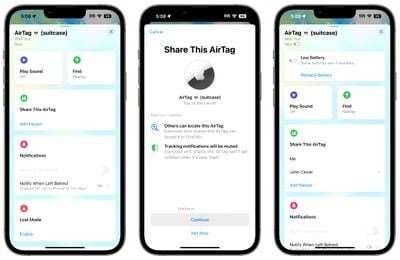
It is possible for family members to share an AirTag as long as everyone in the family has iOS 17 or later installed. You can "Share" any of your AirTags with family members using the Find My app.
Tracker Detect for Android
In December 2021, Apple released "Tracker Detect" in the Google Play Store, with the app designed to allow Android users to scan for AirTags and other Find My-enabled items.
With this app, Android users can make sure that no AirTags or Find My-enabled accessories are being used to track them. The app will locate any nearby AirTags, and Android users will be able to cause the AirTag or Find My-enabled accessory to play a sound so it can be located. The app also provides instructions on how to disable an AirTag by removing the battery.
Apple and Google worked together for an item tracking standard that allows unknown Bluetooth item trackers traveling with a person to send an alert regardless of the person's operating system. This means tracking alerts from unknown AirTags show up on iPhones and Android devices.
Traveling With AirTags
If you're planning to use an AirTag while traveling, there are certain limitations that you should be aware of. Precision Finding, for example, won't work in certain countries like Russia, Indonesia, and Argentina.
Tracking Pets and Children
Apple designed AirTags to track items, and Apple does not recommend that they be used to track pets or children. For keeping tabs on children, Apple recommends an Apple Watch that uses Family Setup.
AirTag NFC Shortcuts
The built-in NFC chip in the AirTag can be used by Apple Shortcuts to trigger automations. Users can create a shortcut that triggers by tapping the top of an NFC-enabled iPhone on the white plastic side of the AirTag.
AirTags How Tos
Everything you need to know about using an AirTag is available in our list of how tos below.
- How to Add an AirTag to Find My on Your iPhone
- How to Locate an AirTag in Find My on iPhone
- How to Play a Sound on an AirTag
- How to Put an AirTag in Lost Mode
- How to Use Precision Finding to Locate an AirTag
- How to Change an AirTag's Battery
- How to Check an AirTag's Battery Life
- How to Factory Reset an AirTag So Someone Else Can Use It
- 'AirTag Found Moving With You' - What it Means and What to Do
- How to Turn Off AirTag Item Safety Alerts
- What to Do If You Find an AirTag Making a Sound
- How to Check Your AirTags Firmware Version
Guide Feedback
Have questions about AirTags or want to offer feedback on this guide? Send us an email here.








































![Apple Watch Ultra 3 Hits New Low Price With Amazon's $299 Discount [Updated]](https://images.macrumors.com/t/BXKI27vT0hWfumJQpYzf41rH3Mw=/112x112/article-new/2026/10/apple-watch-ultra-3-milanese.jpeg)





