How to Check Your AirTags Firmware Version - MacRumors
Skip to Content

How to Check Your AirTags Firmware Version

by

Like most Apple products, AirTags are able to be updated with new software over the air, with Apple able to push new firmware when required.
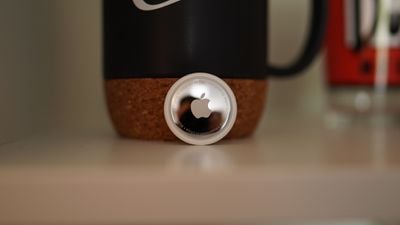
airtag with cup
Apple in June 2021 released the first AirTags firmware update with anti-stalking security enhancements that decreased the intervals in which an AirTag separated from its owner will play a sound. Additional firmware updates have been released since that time.

Here's how to check your firmware version:

  1. Open up the Find My App.
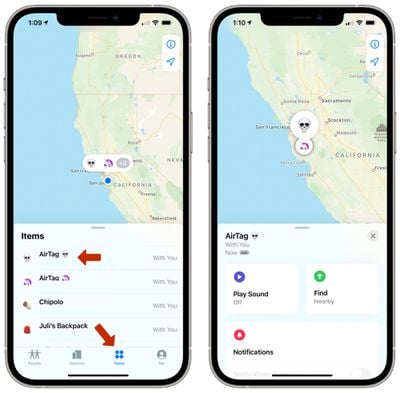
  2. Tap on the "Items" tab. airtag items tab
  3. Tap on the ‌AirTag‌ that you want to check in the list.
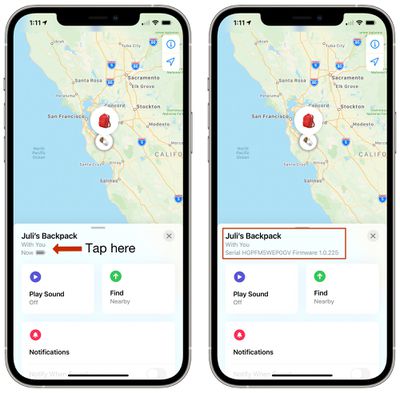
  4. In this view, tap on the name of the ‌AirTag‌ to see the current firmware version. airtags firmware version

The AirTags launched with firmware version 1.0.225, and Apple has rolled out updated firmware versions every few months since, usually on a staggered basis.

There is no way to force an ‌AirTag‌ update, as it's something that's done over the air through your iPhone. To ensure the update happens, you can make sure that the ‌AirTag‌ is in range of your iPhone, but you have to wait for the firmware to roll out to your device.

Related Roundup: AirTag
Buyer's Guide: AirTag (Buy Now)

Top Rated Comments

lovehateapple Avatar
67 months ago
Apple needs to invent golf balls with a Find My U1 chip in it, 😉 Would definitely speed up play if all golfers could easily find their errant shots. Who's with me on this? 😂
Score: 13 Votes (Like | Disagree)
SteveClark1000 Avatar
63 months ago

Anyone able to explain why my AirTag is on firmware 1.0.291?
Could it be because that is the most current version? Hmmmmm
Score: 6 Votes (Like | Disagree)
Apple_Robert Avatar
67 months ago

Mine updated. Magic.
Pic or it didn't happen. :P
Score: 5 Votes (Like | Disagree)
RalfTheDog Avatar
67 months ago

Pic or it didn't happen. :p
Give me about 30 minutes and I will Photoshop a 227.
Score: 4 Votes (Like | Disagree)
djcerla Avatar
63 months ago

LOL both of mine are still on .276!
Ok so it looks like 1.0.291 is the newest version released about 15 hrs ago.
Score: 3 Votes (Like | Disagree)
DenniSundaY Avatar
67 months ago

Apparently we are thinking it wrong. I would have figured 24 hours in a solid wifi signal area, and sitting on top of the iPhone ON THE CHARGER would be the secret sauce. And, nope...

I haven't tried the warriors pose with perpendicular pointed feet. Hmm...
Minimize Bluetooth connections and Staying in close proximity to the AirTag while precisely hitting the ‘play sound’ button so the chirp from the AirTag matches the high notes in Sia’s Chandelier also didn’t work.

Weird, because that worked for me with my AirPods the last time. Only it was a bit different, I had to open and close the lid rapidly to match the part in the opening theme from Friends where they stomp on the floor really fast…
Score: 3 Votes (Like | Disagree)

Popular Stories

Apple TV Thumb 3

Everything Coming in the 2026 Apple TV 4K

Wednesday July 8, 2026 4:51 pm PDT by
The Apple TV 4K hasn't been updated since 2022, and it's due for a refresh. An update is planned for 2026, but Apple is likely going to wait to launch it after Siri AI launches in iOS 27. Design Apple TV design updates don't happen often, and that's not changing. The next Apple TV is going to have the same squircle shape as the current model, and it'll continue to be made from a black...
iphone 16 teal

'Siri AI' Lawsuit Update: Apple to Pay Owners of These iPhone Models

Thursday July 9, 2026 7:08 am PDT by
In May, Apple agreed to pay $250 million to settle a U.S. class action lawsuit over Siri AI's delayed launch, and eligible iPhone users could receive up to a $95 payout. This week, the California court overseeing the case held a hearing regarding preliminary approval of the settlement, but the judge has not yet issued a ruling. It will likely be at least a few more months before eligible...
apple wallet drivers license feature iPhone 15 pro

Apple Says iPhone Driver's Licenses Will Expand to These 6 U.S. States

Thursday July 9, 2026 7:29 am PDT by
In select U.S. states, residents can add their driver's license or state ID to the Apple Wallet app on the iPhone and Apple Watch, and then use it to display proof of identity or age at select airports and businesses, and in select apps. To set up the feature, open the Wallet app on the iPhone and tap on the plus sign in the top-right corner. Next, tap on Driver's License and ID Cards,...