

iOS 27 Brings These Five New Features to Your iPhone Lock Screen - MacRumors
Skip to Content

iOS 27 Brings These Five New Features to Your iPhone Lock Screen

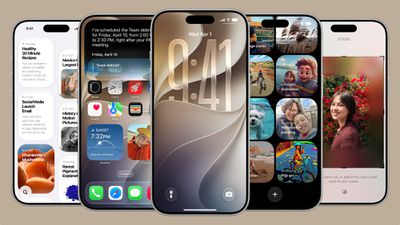
Apple released iOS 27 on Monday, September 14, and while the headline-grabbing Siri overhaul has received the most attention, the Lock Screen has picked up several refinements that you may not have heard about.
ios 27
Some are brand-new additions, while others are tweaks to features Apple introduced in iOS 26, but together they give you more control over how your Lock Screen looks and behaves.

Here are five to try right after you update your iPhone (supported models) to iOS 27. You can download the update now in the Settings app, via General ➝ Software Update.

Extend Your Wallpaper
extend wallpaper ios 27
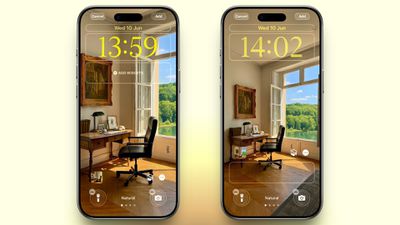
A new wallpaper extension feature in iOS 27 uses Apple Intelligence to automatically expand a photo beyond its original boundaries so it fills the entire Lock Screen more naturally. If a photo is cropped too tightly, doesn't match your iPhone's aspect ratio, or it leaves empty space when positioned on the Lock Screen, iOS 27 can generate additional image content around the edges with the "Extend" option. It will analyze the existing image and create matching background details that blend with the original photo, so there's no need for aggressive cropping. The Extend option can also be found in the Photos app.

Make the Clock Tiny
lock screen
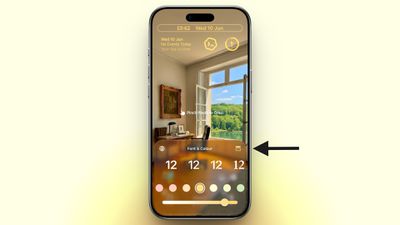
A new compact clock mode is available as a new Lock Screen layout option in iOS 27. Found in the top-right corner of the Font & Color panel, the option moves the time from its traditional large, centered position to a much smaller format alongside the date and widgets at the top of the screen. It's a nice option to have if you like a cleaner Lock Screen look that shows off your wallpaper more fully, and it's the complete opposite effect introduced in iOS 26 that stretches the clock down the screen.

Generate Wallpapers With AI
playground
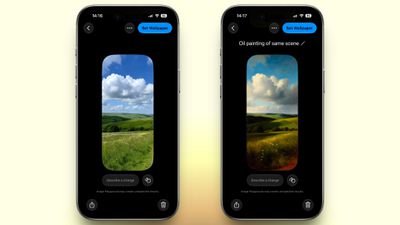
iOS 27 also expands Image Playground with support for AI-generated Lock Screen wallpapers. You can create custom backgrounds using text descriptions, and the app will generate entirely new images tailored to your preferred style, subject matter, or aesthetic, allowing you to set it directly as your Lock Screen wallpaper.

Change Liquid Glass Opacity
settings
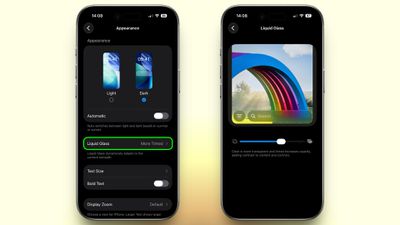
In iOS 27, Apple added a full Liquid Glass slider under Settings ➝ Appearance ➝ Liquid Glass. It changes the translucency of Liquid Glass elements, and you can choose a clear version of Liquid Glass that allows some of the background to show through, select a more opaque, tinted version that improves the legibility of text, or choose something in between. Granted, it's more of a system-wide customization feature than a Lock Screen-exclusive feature, but it directly impacts the look of your clock setup, buttons, widgets, and notifications.

New Siri Interface
ios 27 siri animation
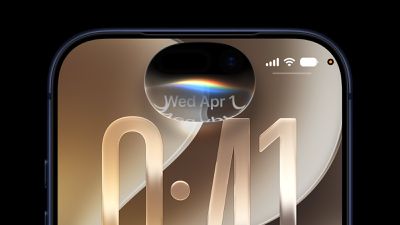
To go with Apple's tentpole "Siri AI" chatbot-style overhaul, iOS 27 introduces a redesigned Siri experience. Instead of the glowing light effect that previously traced the edges of the display, a swirling Siri orb now expands and animates within the Dynamic Island. Siri requests and responses are also now presented in a more compact interface surrounding the Dynamic Island, so interactions should feel more focused rather than completely taking over your Lock Screen.

Related Roundups: iOS 27, iPadOS 27
Related Forum: iOS 27

Popular Stories

iOS 27 Next to iPhone

Here's When iOS 27 Rolls Out Today in Every Time Zone [Update: It's Out]

Sunday September 13, 2026 3:00 am PDT by
Update 10:04 a.m.: iOS 27 is rolling out now, though it may take a bit for all users to see it, so keep checking! Apple is about to release iOS 27, which will finally deliver more advanced Siri AI capabilities as well as a variety of other refinements, improvements, and new features to iPhones. It's Apple's biggest software update of the year, and Apple announced at Wednesday's iPhone event...
iPhone Handoff Feature

iOS 27 Introduces New 'iPhone Handoff' Feature

Wednesday September 2, 2026 12:35 pm PDT by
Apple has added a new "iPhone Handoff" feature to iOS 27 that will allow you to switch between two iPhones while using the same phone number on each device. This functionality was briefly mentioned during the WWDC 2026 keynote in June, on a slide that listed hundreds of new features coming in iOS 27 and corresponding software updates, but Apple never shared any further details at the time. ...
iOS 27 Icon iPhone

iOS 27 Available Today With These 8 New Features

Monday September 14, 2026 9:00 am PDT by
Update: Apple has released iOS 27. During its iPhone 18 Pro and iPhone Duo event last week, Apple announced that iOS 27 will be released widely on Monday, September 14. iOS 27 should be available around 10 a.m. Pacific Time / 1 p.m. Eastern Time today via the Settings app, under General → Software Update. Below, we have highlighted eight new features and changes coming with iOS...

Top Rated Comments

14 weeks ago
Only 2 out of 5 features are genuine lock screen enhancements. The other 3 are either wallpaper tools (which already exist in the Photos app) or system-wide customisation features.

Score: 7 Votes (Like | Disagree)
14 weeks ago
How about displaying the time with seconds. Much more useful than the rubbish on offer.
Score: 6 Votes (Like | Disagree)
sw1tcher Avatar
14 weeks ago

Anyone manage to extract this image, would make a nice watchOS background!
No need to extract it when you can just go to Tim Cook's tweet about it from September 9, 2024 and get it there.


View post on X

https://pbs.twimg.com/media/GW-RG4QbQAAfihG.jpg


A wider (desktop?) version can be found here:

https://www.macrumors.com/2026/03/29/apples-50th-anniversary-finale-revealed/
Score: 3 Votes (Like | Disagree)
Dr McKay Avatar
14 weeks ago
I wish I could make it more closely match the font for the date. Also I can’t measure because I’m not at my computer but I feel like the clock is a few pixels higher than the date 😅

Hoping that’s not the case and it’s just the difference in font type playing tricks on me.


Attachment Image
Score: 2 Votes (Like | Disagree)
14 weeks ago
A feature to change just the current wallpaper would be great. I've setup my lock screen widgets the way I want them, but having to redo them just to pick a new wallpaper is annoying.

I hope I'm not missing a setting somewhere, but even the settings pane have that little animation switching between lock screens. I don't want an entire lock screen just to change the wallpaper.
Score: 2 Votes (Like | Disagree)
Small White Car Avatar
14 weeks ago
What I really want is the ability to pick a photo album as a source of backgrounds and have my lock screen reference it as I make changes in the future.

I can do this on my Apple TV screensaver. I have an album on my phone and I can add or remove photos at any point and the screensaver will reflect that in the future.

But for some reason on my iPhone lock screen it’s a big hassle to add and remove photos from my rotating photo gallery. It’s a completely separate process and it never checks photo albums again after you import the photos.

This would be far more useful than anything listed in this article.
Score: 2 Votes (Like | Disagree)








































