

Apple's AirTag item trackers are designed to be attached to personal items such as keys, wallets, bags, and so on, so that the owner can keep tabs on said items and track them down using their iPhone or iPad, should they be misplaced.

Once an AirTag is set up on Apple's Find My network, only the owner is able to keep track of it using their iOS device. Apple has also implemented an anti-stalking system whereby if an unknown AirTag appears to be moving with you, you'll receive a notification letting you know that its owner can see your location.
At the same time, Apple recognizes that in some instances users may want to share their AirTag-tracked item (a set of keys for example) with a friend or family member. For this reason, if an AirTag is being shared with someone in the owner's Family Sharing, safety alerts can be paused or disabled to prevent the family member's iPhone from detecting it as "unwanted tracking."
Additionally, in cases where an AirTag is being borrowed by an individual not in Family Sharing, the borrower can still choose to pause item safety alerts for their iOS device or disable them completely. The following steps show you how to do the latter.
Before you proceed, bear in mind that for as long as Item Safety Alerts are disabled, the owner of an unknown item will be able to see your location and you will no longer receive notifications when an unknown item is found moving with you.
- Launch the Find My app on your iPhone or iPad.
- Tap the Me tab in the bottom-right corner of the screen.
- Toggle off the switch next to Item Safety Alerts.
- Tap Disable to confirm.

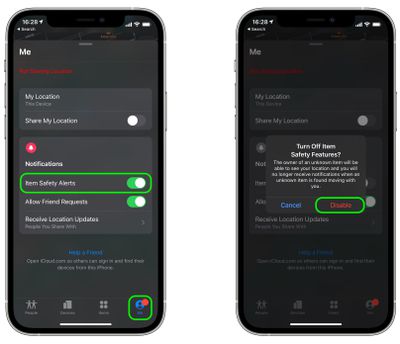
Note that this setting only affects the device you're currently using, so if you don't want to receive safety alerts on another device, you'll need to repeat the steps on that device.



















