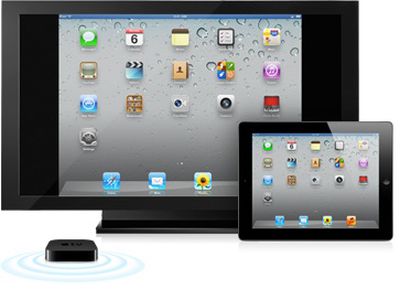
One of the new iOS 5 features quickly touched on by Apple yesterday in its iOS 5 introduction was AirPlay Mirroring for the iPad 2, enabling users to wirelessly transmit the on-screen content of the device to an Apple TV for display on a television. The iPad 2 currently supports display mirroring via a Digital AV Adapter that provides a wired connection to a TV via HDMI.
One of the criticisms of the wired mirroring has been the cumbersome nature of the dongle and cable hanging off of the end of the device, particularly when it comes to games and other apps that require movement of the device for input purposes. Consequently, AirPlay Mirroring should be a significant boon to those looking to display their iPad content on the larger screen, especially if lag is minimal.
While the AirPlay Mirroring is a fairly basic concept in principle, this YouTube video is still an interesting look at the functionality:
">
And while the video does not directly address how much lag there is, the poster notes that the feature "works beautifully".
One of the major rumors for iOS 5 that failed to materialize at Apple's WWDC keynote yesterday was new voice features from Nuance and Siri. The rumors had pegged iOS 5 as receiving significant integration of voice recognition capabilities, potentially handing off much of the processing for that functionality to its new North Carolina data center.
Apple's keynote was of course devoid of any talk of voice recognition features in iOS 5 or any other Nuance-related announcements, leading to questions about where things stand with the rumor. TechCrunch now revisits its earlier claims, noting that such a deal may still be in the works for iOS 5 but that it simply wasn't ready to go in time for WWDC.
We're still looking into this, but here's the latest we're hearing. At least three of our original sources on this were "very surprised" not to hear anything during the keynote today. One noted that leading up to the last minute, they were sure new, elaborate voice features in iOS 5 were going to be announced on stage. It didn't happen. Apple has been known to pull things at the last second. But this may go deeper.
The report goes on to speculate about whether public disclosure of the Nuance-Apple negotiations may have derailed things somewhat, given the reputations of Apple and Nuance both as hard negotiators.
In suggesting that the Nuance integration may still be in the works, the report also points to a few circumstantial pieces of evidence, including the presence of Nuance's chief mobile platform architect at the WWDC keynote and a brief on-stage demo from Apple's Roger Rosner, who is believed to be heading up the Nuance/Siri work at Apple and who may have had a last-minute change in topic after the Nuance integration was deemed not ready for public consumption.
Update: As noted by several readers, Apple's slide showing a host of iOS 5 features that were not prominently discussed during the keynote does make mention of several features related to VoiceOver and text-to-speech: "Option to speak text selection", "VoiceOver item chooser", and "VoiceOver action support". It is unclear if these are the rumored Nuance features or if the integration is truly a more substantial effort, which should include speech recognition beyond that already utilized in Voice Control on iOS.
Magellan today released an update to its RoadMate North America and RoadMate USA apps for the iPhone, bringing an overhauled user interface, lifetime traffic and maps, and integration with Yelp and Google Local Search.
Magellan today announced a new version of its RoadMate North America App for iPhone is now available on the App Store. With major user interface enhancements designed for mobile routing, it is the first navigation app to integrate the popular Yelp! user-reviewed business listings. The new app also features Google local search and maps of the United States, Canada, and Puerto Rico, comes with free Lifetime map updates, and includes Magellan's Lifetime Traffic service that provides live traffic information and suggests alternate routes.
We had a brief chance to test out the new version and found the user interface revamp to be a pleasant one, offering a fair amount of customizability in terms of the data shown on-screen, while also providing a good perspective view of the route.
As for actual navigation, RoadMate did have some difficulties in our testing, attempting to direct us to a left turn across a raised median and unable to find a prominent local store through its POI database. Even when finding the store through the integrated Google Local Search, the app could only direct us to a point on a freeway in the general vicinity of the store, a route that would likely have left someone unfamiliar with the store's actual location confused and unable to find the store. To be fair, some of our other GPS apps struggled with the same left turn issue and lack of store listing in their POI databases, although several were able to plot correct routes to the store once the address was found via Google Local Search.
We were unable to put the app through a full battery of tests given a tight timeline ahead of the release, so it is unclear whether the issues we experienced were anomalies or symptomatic of broader issues with navigation in the Magellan system. But given some of the similar difficulties seen on other apps, it's fair to say that at least some experience with navigation issues is par for the course on turn-by-turn GPS navigation apps.
But navigation issues aside, we did find the new interface to be pleasing and informative, integrating trip distances and times with travel speed, speed limits, lane guidance, and traffic delays while still being able to display a solid map view, all on the iPhone's 3.5-inch screen that now checks in at smaller than the typical 4-inch or 5-inch display found on today's standalone GPS units.
RoadMate USA is priced at $49.99, while RoadMate North America adds coverage of Canada for an additional $10.
Alongside yesterday's high-profile developer seeds of OS X Lion Developer Preview 4, the first iOS 5 beta, and several iCloud-related betas including iTunes 10.5 and iPhoto 9.2, Apple also provided developers with a developer preview version of Safari 5.1 for both Mac and Windows. According to an announcement on Apple's developer portal, Safari 5.1 brings a number of enhancements to the company's flagship browser and will be available to the public sometime this summer.
Safari and Mac Developer Program members can download Safari 5.1 Developer Preview and take advantage of new technologies, including support for full-screen webpages, media caching with the HTML5 application cache, and better graphics acceleration on Windows.
A number of new APIs supporting Safari Extensions are also included in the update, which will presumably be made available to the public alongside the release of OS X Lion.
A separate Safari 5.0.6 release is available for developers to test on Mac OS X Leopard systems.
Yesterday, we noted that Apple had begun promoting availability of iTunes 10.3 on its main iTunes site but that the actual download page was still serving up iTunes 10.2.2 and that Software Update had yet to begin offering the new version to users.
A few hours later, iTunes 10.3 did in fact become available for download, bringing compatibility with some early iCloud features making their way to iOS devices.
What's new in iTunes 10.3
Introducing iTunes in the Cloud beta. The music you purchase in iTunes appears automatically on all your devices. You can also download your past iTunes purchases. Where you want, when you want.
- Automatic Downloads. Purchase music from any device or computer and automatically download a copy to your Mac and iOS devices.
- Download Previous Purchases. Download your past music purchases again at no additional cost. Your purchases are available in the iTunes Store on your Mac or in the iTunes app on your iPhone, iPad, or iPod touch. Previous purchases may be unavailable if they are no longer on the iTunes Store.
iTunes 10.3 also adds Books to the iTunes Store, where you can discover and buy your favorite books on your computer and automatically download them to iBooks on your iPhone, iPad, or iPod touch.
This version also allows you to use Automatic Downloads with apps and books or download previously purchased apps and books from your computer or iOS device.
iTunes 10.3 is available in a Mac version for systems running Mac OS X Leopard or later, as well as in 32-bit and 64-bit versions for Windows.
A separate iTunes 10.5 release will ultimately bring full support for iCloud and iOS 5 later this year, and an initial beta of that version has been seeded to developers for testing alongside the other forthcoming software offerings.
DigiTimes reports that both OmniVision Technologies and Sony have won orders to supply an 8-megapixel camera sensor for the next-generation iPhone, with Apple's existing supplier OmniVision reportedly set to handle 90% of the load.
OmniVision has grabbed a majority of total CMOS image sensor (CIS) orders placed by Apple for the fifth-generation iPhone, market sources have claimed. Meanwhile, power amplifier (PA) supplier Avago Technologies has landed orders for the WCDMA version of the device for its first time, according to the sources.
About 90% of the CIS orders for Apple's new iPhone will be supplied by OmniVision, while Sony takes up the remainder, the sources said. The upcoming device will feature a built-in 8-megapixel camera, the sources added.
Sony's potential role in supplying camera sensors for the fifth-generation iPhone has a rather long history, dating all the way back to an April 2010 analyst report claiming that the company had been selected by Apple to supply an 8-megapixel component, although that report suggested that Sony would be the sole, or at least primary, supplier.
By this February, another analyst had reported that OmniVision would most likely be the exclusive provider of the image sensor for the next iPhone, although Sony could take a small portion of the orders.
And in April of this year, Sony CEO Howard Stringer reportedly made comments strongly suggesting that his company is indeed sending image sensors to Apple, although some follow-up reports suggested that Stringer's comments had been misinterpreted.
This video shows the first setup of iOS 5 simply using your Apple ID, demonstrating one of the big new features of iOS 5 termed "PC Free".
With iOS 5, you no longer need a computer to own an iPad, iPhone, or iPod touch. Activate and set up your device wirelessly, right out of the box. Download free iOS software updates directly on your device. Do more with your apps — like editing your photos or adding new email folders — on your device, without the need for a Mac or PC. And back up and restore your device automatically using iCloud.
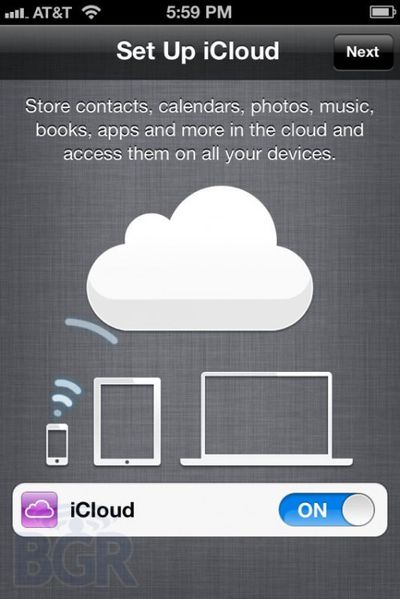
The video shows a user first setting up their iPhone by entering their Apple ID and password. iOS 5 then asks the user to set up iCloud and Find My iPhone, after which the iPhone is restored from backup with Apps being redownloaded in the background.
When Steve Jobs told the crowd at Moscone that iTunes In The Cloud would be "available today", lots of iPhone and iPad users were very excited to begin using Automatic Downloads, Purchased Content Listings, iTunes in the Cloud and all the rest.
However, one group of users -- those owning a Verizon iPhone, to be precise -- can't participate in the fun, like the losing team at the World Series watching the champagne spray all over the winning pitcher. It's true, CDMA iPhones are stuck at 4.2.8, and iTunes in the Cloud only works on iOS 4.3.3 or later. It's buried in the fine print at the bottom of the iCloud Features page:
Available in beta now in the U.S. only and requires iOS 4.3.3 on iPhone 3GS, iPhone 4 (GSM model), iPod touch (3rd and 4th generation), iPad, or iPad 2, or a Mac or PC with iTunes 10.3. Previous purchases may be unavailable if they are no longer in the iTunes Store.
• Preference to open pages in Safari in a new page or in background (amazing!). • More alert choices for emails, calendar, and the ability to buy more. • Ability to create keyboard shortcuts (autotext) to replace custom phrases. The default entry is “omw” which is replaced with, “On my way!” • Software update option in settings to check for the latest OS. • Sync now button to wireless sync to iTunes • Ability to customize how notifications in Notification Center look — you can customize how many recent ones to show, 1, 5 or 10, if it’s showed in the lock screen, if it’s in Notification Center, and also the alert style, banner or alert style.
iOS 5 is due for general release in the fall, and is presently available for download for registered iOS developers.
Apple today announced iMessage, a new messaging service for iOS 5 users called. The service promises unlimited SMS-esque messaging between iOS users on iPod touch devices, iPhones and iPads. iMessages can be text, photos, videos, locations or include contact data.
If it sounds like BBM, RIM's BlackBerry Messaging service, that's because, well, it sounds a lot like BBM actually -- and increases device lock-in as well. Users of iPads and iPod touch devices will get built-in text and picture messaging, unlimited and free, which is nice for parents who don't want to splurge on an iPhone for little Timmy, but still want him to be able to keep in touch with friends.
For iPhone users, iMessage will be built in to the standard text message window, so using it should be pretty seamless. Other features include group messaging, delivery and read receipts, typing notification and secure encryption. Of course, keeping with the sync via iCloud theme, users will be able to start a conversation on one device and finish it on another. No word yet if iMessage will be included in iChat for OS X Lion as well, but I wouldn't be surprised if it makes an appearance there as well.
While Apple's new iCloud service doesn't fully launch until the fall alongside iOS 5, the company has already rolled out a few small portions of the service to existing users. Among the additions are automatic downloads and listings of purchased content for easy redownloading.
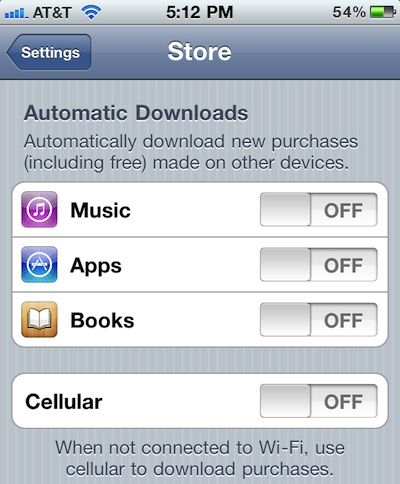
Automatic downloads allow users to set preferences to have newly-purchased content such as music, apps, and books automatically pushed to other devices. Users have individual control over the three different media types and can also specify whether or not content pushing should be limited to Wi-Fi connections only in order to save cellular bandwidth. Settings are available within the "Store" menu of the Settings application in iOS 4.3.
Facilitating the re-download of previously purchased content are new "Purchased" listings found in the iTunes, App Store, and iBooks applications for iOS devices. The new listings provide users with easy access to listings of all items purchased on a given Apple ID, whether or not that content is currently on the device. Users can then easily obtain the previously-purchased content not currently installed.
Apple is also in the process of releasing iTunes 10.3 for Mac OS X and Windows, an update that should bring the new iCloud capabilities to the Mac side of things. The new version is being advertised on Apple's iTunes site, but the actual download page is still showing iTunes 10.2.2 and Software Update is not yet offering the new version.
Apple today posted a new support document outlining the transition from the company's existing MobileMe service to the new iCloud service announced today. According to the document, Apple has automatically extended all MobileMe subscriptions active as of today through June 30, 2012 free of charge.
Effective June 6, 2011, if you had an active MobileMe account, your service has been automatically extended through June 30, 2012, at no additional charge. After this, the MobileMe service will no longer be available.
When iCloud rolls out later this year, MobileMe users will be able to keep their me.com email addresses and shift all of their mail, contacts, calendars, and bookmarks to the new service.
In anticipation of the forthcoming transition, Apple is no longer offering free MobileMe trials and no longer supporting MobileMe upgrades to Family Packs or storage capacity. For those users who have MobileMe activation codes that have yet to be applied, Apple has also posted information on how to request a refund.
Thanks to iCloud, with the introduction of iOS 5 this fall, iPod Touch/iPhone/iPad users no longer need to connect their devices to a Mac or PC in order to use them.
Apple is calling the new feature PC Free, and it allows users to activate their devices wirelessly, right out of the box. Future iOS updates can be downloaded over-the-air and iCloud will enable backups of photos, music, contacts, calendars and more -- and allow users to simply type in their AppleID and password to restore a new device from an iCloud backup. That should make Genius Bar device swaps much more convenient as well, not to mention easier and quicker Personal Setup on new iOS devices at Apple Stores.
This is a long-needed feature that should further expand the reach of Apple's devices. Tech-savvy youngsters can buy products for their parents and grandparents without needing to teach them about syncing or for them to even need any other device. The vaunted "digital hub" that Apple introduced with the original iPod nearly 10 years ago, which had the Mac at the center of your digital world with other devices surrounding it, is gone.
Now, Apple's (free!) iCloud service will be the center of everything.
Just an hour after the end of the keynote at its Worldwide Developers Conference, Apple has already posted a video of the event.
Apple did not broadcast the event live, so the video as an opportunity for viewers to see for the first time Apple's presentations that saw the introduction of OS X Lion, iOS 5, and iCloud.
After giving the stage over to Phil Schiller and Scott Forstall for much of today's WWDC keynote, Steve Jobs himself introduced iCloud to the world.
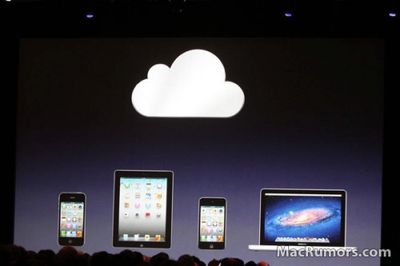
Noting that devices have changed over the past decade, with people now using photos and videos on the go, the PC should no longer be the hub for your digital life, with all media hosted on the computer. "Keeping these devices in sync is driving us crazy," Steve told the crowd.
To address the new reality, Apple has moved the digital hub to the cloud. All devices can talk to the cloud whenever they want, with instant propagation to all other devices. With iCloud, users get 5GB of free storage for mail, documents and backups; purchased music, apps and books don't count.
"Some people think a cloud is just a hard disk in the sky," Steve told the crowd. "We think it's way more than that." iCloud stores content (think contacts, calendar, photos, music), with wireless push to all devices. And with APIs providing developers with hooks into iCloud, all apps can take advantage of the service.
iCloud completely replaces MobileMe. Mail, contacts, and calendar are all free. Contacts and calendars will be updated across devices, just like they currently do, but there are several new components to iCloud.
First is the App Store. Users can see purchase history on all devices. Second, iBooks. Books and progress will be synced across devices. Once daily, "a lot of your important content" will be uploaded to the cloud, making it super easy to buy a new iOS device. Just type in your AppleID and password, and all your information will be automatically loaded up: music, apps, books, camera roll, device settings and app data.
Apple has added documents to iCloud as well. Users can edit a document in iWork on a Mac, and it gets instantly pushed to iCloud, where it can be accessed on an iPad. All data is saved and backed up in the cloud. This functionality is built in to Pages, Numbers and Keynote. File transferring seems totally automatic and effortless. Tweak an existing document in Pages on a Mac, and it immediately gets saved to iCloud and changes are immediately pushed to an iPad.
Apple has been working for 10 years to get rid of the file-storage system. It started with iOS, and has made its way to the Mac. iCloud entirely removes the concept of file-storage. Apps manage presentation of its own documents. Apps can store documents in iCloud, documents pushed automatically, with automatic updates on all devices when content is changed anywhere.
For developers, Apple has provided iCloud storage API's, giving easy access to iCloud features for developers -- this is a developer's conference after all, and the dev's love it.
Photo Stream, previewed earlier this year, is part of iCloud too. Photo Stream works just like documents, but your camera roll gets uploaded to the cloud, then sent to everything else. Users can import photos as well, and upload to the cloud. Steve stressed that all these features were built into apps, invisibly, "so there's nothing new to learn." On the Mac, Photo Stream is built in to iPhoto. Apple TV supports Photo Stream as well.
Only the last 1,000 photos are stored in the cloud will be downloaded to iOS devices, but all photos will be stored on the Mac/PC side. Only 30 days of photos are stored on iCloud, so iCloud doesn't save all your data, it just makes sure that everything is synced up properly.
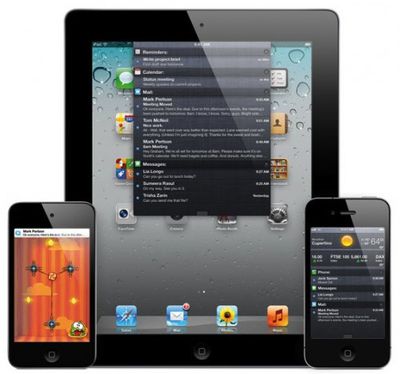
Apple today announced iOS 5, the much-anticipated major update to Apple's operating system for the iPhone, iPod touch, and iPad today at the WWDC keynote event. The new major features include a completely revamped notifications system, over-the-air software updates and activation for new devices, and iTunes library syncing over Wi-Fi.
"iOS 5 has some great new features, such as Notification Center, iMessage and Newsstand and we can't wait to see what our developers do with its 1,500 new APIs," said Steve Jobs, Apple’s CEO. "Perhaps iOS 5's paramount feature is that it's built to seamlessly work with iCloud in the Post PC revolution that Apple is leading."
Of the many new features discussed:
• Notifications will see a major overhaul as rumored most recently by TechCrunch. The new Notification Center in iOS 5 will aggregate all notifications, accessed by swiping down from the status bar at the top of the screen. New notifications will appear at the top of the screen and will be less obtrusive overall. Notifications will also be displayed on the lock screen along with weather and stock alerts. Tapping on a notification will automatically open the related app.
• iOS 5 will be "PC free" allowing new device activation and iOS updates over the air. Also, iTunes library syncing will be possible wirelessly via Wi-Fi. While an iOS device is being charged, it will automatically find the associated iTunes library and sync automatically.
• AirPlay Mirroring will also be possible to wirelessly mirror an iPad's display to a television connected to an AppleTV.
• Also as rumored, Twitter will be integrated into iOS and several apps including Camera, Photos, Maps, and Safari. Contacts can also be updated automatically with Twitter handles.
• As reported by This is my next... earlier today, Apple introduced a new unified messaging service between iOS users called iMessage. iMessage will allow iOS users to send text and multimedia messages over Wi-Fi and 3G with read and delivery receipts and real-time typing indication. Messages will be pushed to all iOS devices a user owns.
• Game Center will be enhanced with profile avatars, friend recommendations, and the ability to purchase new games within Game Center.
• Mobile Safari will also get several new features including tabbed browsing and a Safari Reader feature where users can save articles for later reading in the Reading List, which will be synced across multiple iOS devices for easy access.
• A new Reminders app will offer task tracking in iOS 5 with geolocation capabilities to trigger reminders based on user location.
• Camera will get a shortcut from the lock screen for quicker access. New features include optional grid lines for better framing and on-device editing like cropping and rotating plus red-eye reduction. The volume up button can also be set to trigger the shutter.
• Mail will also see some signification changes including rich text formatting, message flagging, draggable addresses.
• Other new system-wide features include a dictionary that can be accessed by any app and keyboard enhancements to modify the on-screen keyboard.
• A new app called News Stand is also coming to the App Store with iOS 5. It will be a counterpart to iBooks featuring newspapers and magazines and will download new issues automatically in the background.
iOS 5 will be available in the fall and will support the iPhone 3GS, iPhone 4, 3rd- and 4th-generation iPod touch, and iPad and iPad 2. Developers will be able to access a seed today.
Today, in addition to Lion, iOS 5 and the other iCloud features, Apple rolled out iTunes in the Cloud. The service is free for songs purchased through the iTunes Store, while a new "iTunes Match" service priced at $24.99/year extends the program to ripped music.
iCloud will attempt to ease the burden of syncing -- at least for songs purchased through iTunes. Previously-purchased songs will show up in a purchase history and any music purchased can be re-downloaded to any device at no additional charge. According to Steve Jobs, this is the "first time we've seen this in the music industry."
Using the new Automatic Downloads feature, content purchased via iTunes is pushed (not streamed) to mobile devices and vice versa. Users will consequently have all of their songs, automatically, wherever they are, on up to ten devices. The service is free for songs through the iTunes Store.
As far as ripped music, iTunes has 18 million songs in the music store and Apple will use a feature called iTunes Match to give users the same benefits on ripped songs matched to iTunes songs, as with purchased tracks. A user's library is scanned and matched and any songs that remain unmatched can be uploaded for syncing. Songs that are matched are upgraded to 256KBps, AAC, DRM-free, with all the benefits above, including push syncing and all the rest.
iTunes Match is priced at a flat rate of $24.99 per year, even for "20,000 songs."
Mac OS X has been around for 10 years now, built on a solid UNIX foundation. Phil Schiller said in the keynote that OS X has "evolved", and is great "not because of hardware, but because of software."
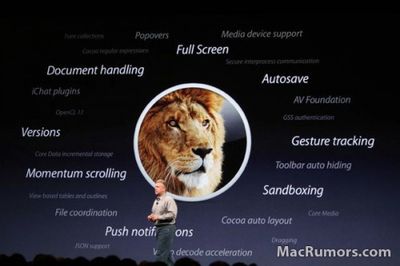
Apple today showed off ten of the 250 new features in Mac OS X Lion, revisiting some of the features that had been highlighted previously and showing off some that are brand new. Some of the new features include Windows Migration Assistant, a new version of FileVault, built-in FaceTime and more. OS X Lion Server isn't a totally separate installation, just additional apps that can be run on top of Lion. Server will be available for $49.99 through the App Store.
Lion will be priced at $29.99 and available only on the Mac App Store as a 4 GB download, allowing users to pay once and install it on all of their machines, just like all Mac App Store apps. Apple did not announce specific release date for Mac OS X Lion, but narrow down the launch window to the month of July. Customers who purchase a Mac between today and the Lion launch in July will get the upgrade free from the App Store.
"New" features, most of which we have seen before -- but Apple feels they are important enough to demo:
1. Multi-touch gestures, very similar to iOS: Taken everything they've learned from iOS and applying that to Lion. Swipe, pinch, etc. Scrollbars disappear when not in use.
2. Full Screen Applications: "Really important for notebooks." Lion has a standard method for full screen apps. A swipe gesture allows you to get back to the desktop, and users can have more than one full screen app running at once, with a swipe gesture to switch between them.
3. Mission Control: The "best feature of Lion" according to Phil Schiller, is a combination of Spaces, Expose and an App Switcher. Spaces are managed through Mission Control, allowing them to be deleted and added on the fly.
4. Enhanced Photo Booth: This is a big feature for the teen crowd. Head into any Apple Store on a Friday or Saturday evening and you'll see many teenagers playing with Photo Booth and uploading pictures to Facebook. The new and improved Photo Booth can follow your face and make "targeted facial enhancements", such as making just your eyes huge.
5. Mac App Store: In the past 6 months, the Mac App Store has become the #1 software channel for Mac applications. Some developers have more than doubled their revenue by offering their software in the Mac App Store. New additions to the App Store in Lion will be in-app purchases, push notifications and application sandboxing for increased security.
6. Launchpad: Imagine the iOS home screen, with rows of app icons, on a Mac. That's Launchpad. It will make finding and organizing apps much, much easier for the average user (think, your Mom). You can even make folders, yet another iOS feature) within Launchpad. It's initiated by a gesture.
7. Resume: Instantly resume where you were in an application when you quit it -- just like iOS. There seems to be a trend popping up here. Works system wide, when you reboot, all of your windows and apps return how they were. Lion auto-saves everything. It makes for easy versioning, and reverting to past changes, much like Time Machine does now, but on a file-by-file basis. Every change is logged -- though it only stores the difference between revisions, making it very space efficient.
8. AirDrop: A new document sharing method. Lion will find other users running AirDrop and display all the machines it can see in the Finder. Sending files is as easy as dragging and dropping an icon on the AirDrop logo. The recipient gets a prompt, confirms they want the file, and it downloads to their computer. It sounds simple, but it should be very handy. BOOM.
9. Mail: Mail has been completely redesigned, with lots of inspiration from the iPad Mail client. Search looks much more intelligent, and there is a new conversation view apparently inspired by Gmail.


 One of the major rumors for iOS 5 that failed to materialize at Apple's WWDC keynote yesterday was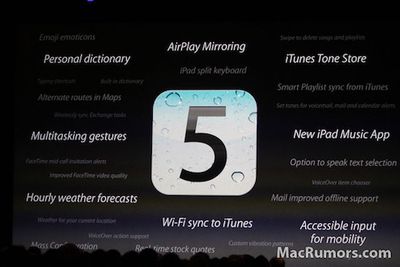


 Alongside yesterday's high-profile developer seeds of OS X Lion Developer Preview 4, the first iOS 5 beta, and several iCloud-related betas including iTunes 10.5 and iPhoto 9.2, Apple also provided developers with a developer preview version of Safari 5.1 for both Mac and Windows. According to an
  Yesterday, we