Apple released iOS 18.4 beta 2 today, and it has even more new features than the first beta of iOS 18.4. There are updated emoji characters, a new app, and a bunch of other, smaller additions.
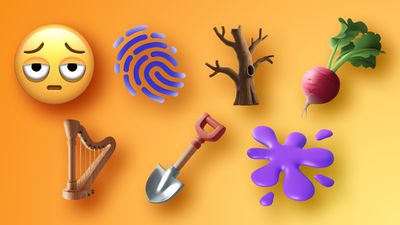
New Emoji
There are new emoji characters in iOS 18.4, including bags under eyes, fingerprint, leafless tree, root vegetable, harp, shovel, and splatter.
Prioritize Notifications
In beta 1, Apple added a Prioritize Notifications feature. In beta 2, Priority Notifications can be set up on a per-app basis, and it is no longer an all on or all off setting. Priority Notifications are highlighted in a separate section on the Lock Screen, so you see them first.
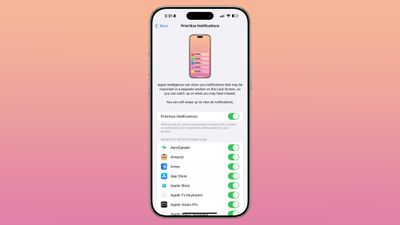
Apple uses Apple Intelligence to determine which notifications are important and should be shown with the priority label, but you can still swipe up to see all of your notifications in Notification Center.
Vision Pro App
If you have a Vision Pro headset, you'll see a Vision Pro app on your iPhone after installing iOS 18.4. The Vision Pro app helps you discover and download content on the Vision Pro.
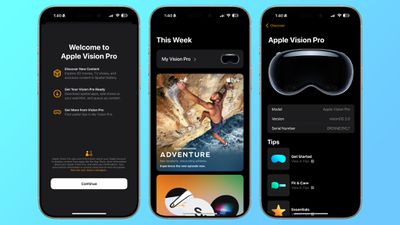
There are dedicated sections for Immersive Video, 3D movies, and more, with options to download apps directly to the Vision Pro without having to use the headset.
Apple also added a dedicated My Vision Pro section with a user guide and tips for using the device.
Control Center Apple Intelligence Section
In the Control Center, there's now an Apple Intelligence section. It includes the Type to Siri option that was in the now-removed Siri section, along with new options for activating Siri and using Visual Intelligence.
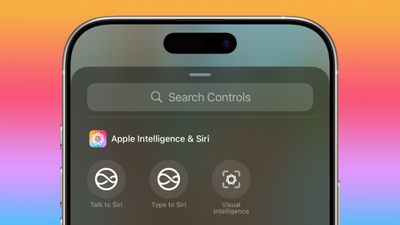
Visual Intelligence Action Button
Apple added a new Action Button option that activates Visual Intelligence, and it can be used as an alternative to the Camera Control button for Visual Intelligence on the iPhone 16 models.
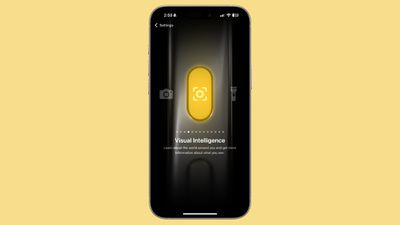
Visual Intelligence for iPhone 15 Pro Models
Visual Intelligence is now available on the iPhone 15 Pro and iPhone 15 Pro Max, marking the first time that Apple has made the feature available on an iPhone that's not an iPhone 16.

Since the iPhone 15 Pro models do not have a Camera Control button, Visual Intelligence can be activated via the Control Center or with the Action Button.
Pause App Store Downloads
When you download an app from the App Store, you can now pause the download right from the update list in the App Store rather than having to do it from the Home Screen icon for the app. Before now, you could only stop and restart an installation entirely from the App Store, with no option for stopping it entirely.
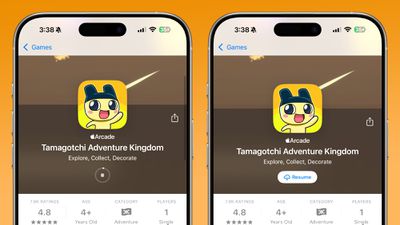
Pausing and resuming works for both new downloads and app updates.
Shortcuts Actions
There are multiple new actions for Apple apps in the Shortcuts app, most of which are for changing app settings.
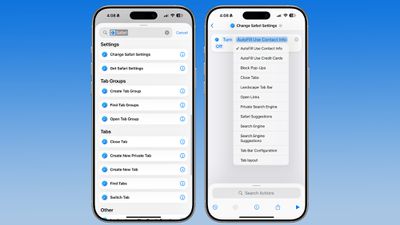
In Maps, for example, there are actions for things like avoid busy roads, avoid tolls, volume level, directions on radio, and more. In Safari, you can use AutoFill information, toggle on pop-up blocking, close tabs, change search engine, and change the tab bar configuration, among other options.
There are Settings actions for Maps, Safari, Reminders, Calendar, Apple TV, Books, Notes, Voice Memos, and Weather.
Photos
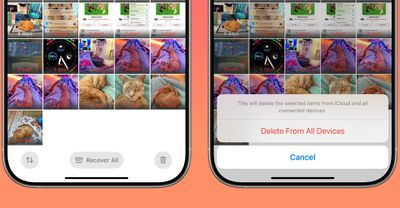
The Recently Deleted section of the Photos app now has one-tap options to delete all photos and to recover all photos.
Wallet
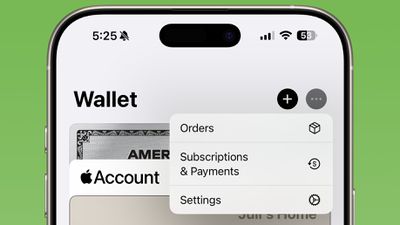
In the Wallet app, there is a new menu that includes Orders, Settings, and Subscriptions and Payments. It can be accessed by tapping on the three dots in the upper right corner, which used to be just for package tracking.
Apple Maps EV Updates
Based on code in iOS 18.4, it looks like Apple plans to add support for using the North American Charging System (NACS) with the Apple Maps EV routing option. Apple Maps EV routing is only supported by a couple of Ford models and the Porsche Taycan, so it's limited.
On those vehicles, there should soon be an option to route to NACS chargers in addition to CCS charging stations. Tesla Superchargers are NACS chargers, for example, but right now the Apple Maps EV feature does not support them.
iPhone 16e Support
iPhone 16e users can download and install the iOS 18.4 beta starting with beta 2, as Apple has added iPhone 16e support.
iPhone 12 Support
With iOS 18.4 beta 1, the update was bricking some iPhone 12 models, so Apple pulled it. That prevented anyone with an iPhone 12 from installing the beta. With beta 2, Apple has fixed the issue, so iOS 18.4 is once again available on the iPhone 12.
There is also now an iPadOS 18.4 beta 2 update available for iPads that had the same issue, including the eighth-generation iPad, fourth-generation iPad Air, and all M2 iPad Air models.
Release Date
iOS 18.4 will be released to the public in early April.