

Apple Releases watchOS 7.1 With Mac Unlocking Fix, Headphone Audio Warnings, ECG in Korea and Russia - MacRumors
Skip to Content

Apple Releases watchOS 7.1 With Mac Unlocking Fix, Headphone Audio Warnings, ECG in Korea and Russia

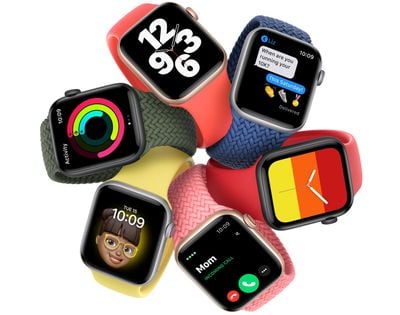
Apple today released watchOS 7.1, the first major update to the watchOS 7 operating system that was released back in September. watchOS 7.1 follows watchOS 7.0.2 and watchOS 7.0.3, which were bug fix updates.
applewatchse
‌‌watchOS 7.1‌‌ can be downloaded for free through the dedicated Apple Watch app on the iPhone by going to General > Software Update. To install the new software, the Apple Watch needs to have at least 50 percent battery, it needs to be placed on a charger, and it needs to be in range of the ‌‌‌iPhone‌‌‌. Apple has also released watchOS 6.2.9 and watchOS 5.3.9 updates for older devices.

Today's update brings hearing health protections that lets the Apple Watch send a notification when connected headphones are playing music that's too loud and has the potential to damage the ears. The update also brings the ECG app to South Korea and Russia. Apple's full release notes for watchOS 7.1 are below:

watchOS 7.1 contains new features, improvements, and bug fixes.
- Adds the ability to be notified when your headphone audio level could impact your hearing
- Adds support for the ECG app on Apple Watch Series 4 or later in the Republic of Korea and Russia
- Adds support for irregular heart rhythm notifications in the Republic of Korea and Russia
- Resolves an issue that prevented some users from unlocking a Mac with Apple Watch
- Fixes an issue where the screen may be dark on wrist raise for some Apple Watch Series 6 owners.

Like watchOS 7, watchOS 7.1 is compatible with the Apple Watch Series 3 and later. For more on what's included in watchPS 7, make sure to check out our watchOS 7 roundup.


Related Roundups: watchOS 26, watchOS 27
Related Forum: Apple Watch

Popular Stories

General visionOS watchOS and tvOS Betas Feature Redux

Apple Releases Second watchOS 26.6, tvOS 26.6 and visionOS 26.6 Betas

Monday June 15, 2026 10:06 am PDT by
Apple today provided developers with the second betas of upcoming watchOS 26.6, tvOS 26.6, and visionOS 26.6 betas for testing purposes. The software comes three weeks after Apple seeded the first betas. The software updates are available through the Settings app on each device, and because these are developer betas, a free developer account is required. There's no word on what's in the...
watchos 27

Apple Seeds watchOS 27 Beta 2 to Developers

Tuesday June 23, 2026 11:18 am PDT by
Apple today seeded the second beta of watchOS 27 to developers, with the update coming two weeks after the launch of the first beta. The beta can be downloaded through the Watch app on the iPhone with a free developer account. The Apple Watch will need to be on the charger, connected to Wi-Fi, and have a battery level of 50 percent or above for new software to be installed. The beta is...
General visionOS watchOS and tvOS Betas Feature Redux

Apple Releases Third watchOS 26.6, tvOS 26.6 and visionOS 26.6 Betas

Monday June 29, 2026 10:08 am PDT by
Apple today provided developers with the third betas of upcoming watchOS 26.6, tvOS 26.6, and visionOS 26.6 betas for testing purposes. The software comes two weeks after Apple seeded the second betas. The software updates are available through the Settings app on each device, and because these are developer betas, a free developer account is required. There's no word on what's in the...

Top Rated Comments

74 months ago
Won’t install on series 3 again due to lack of space. This is silly having to unpair watch to install an update.
Score: 6 Votes (Like | Disagree)
jonnysods Avatar
74 months ago
Hey... my watch hadn't been unlocking my mac - great to see this could be fixed up.

Score: 4 Votes (Like | Disagree)
74 months ago
Bring back the force touch menus.

#keepsdreaming
Score: 4 Votes (Like | Disagree)
Patriks7 Avatar
74 months ago
I hope it also fixes the Stand function. Mine has been crazy inaccurate since watchOS 7.
Score: 3 Votes (Like | Disagree)
chrfr Avatar
74 months ago

Instead of unparing, why don't you free up space by removing music, photos, applications. That would be the first thing I'd consider before unpairing and re paring the watch.
Deleting all that stuff is more work than unpairing and re-pairing, and still won't free up enough space on the non-cellular Series 3.
Score: 2 Votes (Like | Disagree)
74 months ago

Won’t install on series 3 again due to lack of space. This is silly having to unpair watch to install an update.
Instead of unparing, why don't you free up space by removing music, photos, applications. That would be the first thing I'd consider before unpairing and re paring the watch.
Score: 2 Votes (Like | Disagree)








































