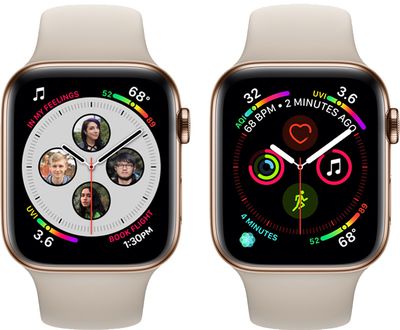
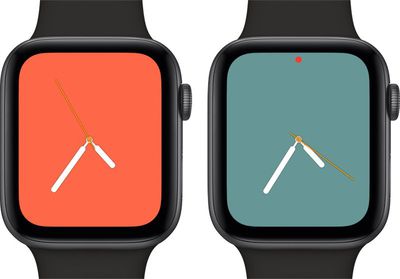
Once the proper configuration profile has been installed from the Apple Developer Center, the new watchOS beta can be downloaded through the dedicated Apple Watch app on the iPhone by going to General --> Software update.
To install the update, the Apple Watch needs to have at least 50 percent battery, it must be placed on the charger, and it has to be in range of the iPhone.
watchOS 5.1 includes support for Group FaceTime, with Group FaceTime calls able to be answered in an audio-only capacity on the Apple Watch. Group FaceTime allows you to chat with up to 32 people at one time.
The watchOS 5.1 update also brings a full-screen new "Color" watch face option for the Apple Watch Series 4, with users able to choose between multiple shades. There's also a filled-in circular color option for older Apple Watch models that joins the standard Color clock face.
Should additional new features be found in the second beta of watchOS 5.1, we'll update this post.
Wednesday September 9, 2026 9:10 am PDT by Jordan Golson
Apple's "Surprise and Shine" event kicks off today at 10:00 a.m. Pacific Time, where we're expecting to see the foldable iPhone Duo, the iPhone 18 Pro and Pro Max, Apple Watch Series 12 and Ultra 4 models, new AirPods 5 earphones, and perhaps some other announcements.
Apple is providing a live video stream on its website, on YouTube, and in the company's TV app across various platforms. We...
Tuesday September 8, 2026 10:24 am PDT by Tim Hardwick
Apple's biggest event of the year is almost here, and all eyes are on Cupertino. With the first foldable iPhone expected to headline Apple's "Surprise and Shine" event on Wednesday, September 9, at 10:00 a.m. Pacific Time, the rumor mill has been running full throttle, fuelled by the biggest single design change in the life of the iPhone.
To get you up to speed, here's a quick reference...
Ahead of the announcement of the Apple Watch Series 12 and Ultra 4 later this week, code in the watchOS 27 and iOS 27 betas points to a series of new features for the product line.
The information comes from a new post from MacRumors forums member "pdfu." The findings include:
New "Readiness" app: An all-new separate Watch app referred to in code as "Readiness," distinct from the...
The new “Infograph” and “Infograph Modular” Watch Series 4 faces which support the having the highest number complications at once — also have the smallest selection of complications that can be displayed on those faces... thereby making them useless for me. Many of the native complications on the Watch cannot be displayed anywhere on those faces.
Even if they’re just icons to launch the apps, “Messages” and “Now Playing” (among other native complications) are indispensable for me on my watch face.
Why does Apple limit which complications I can put on which faces? I am far from alone in this disappointment.
I don't understand why the new infograph watch faces on my Series 4 allow you to have shortcuts to Music, Exercise, Weather, Walkie Talkie, etc but don't let you shortcut to Messages, Radio, Apple TV Remote, HomeKit, etc. It's bizarre. A lot of third party apps don't work with them either, but for some reason work with the older faces.
The specific reason is that those complications on the new watch faces are actually DIFFERENT than the ones available before S4 and watchOS 5. Third party developers have to port their old ones to that new format. Some have, some will do it eventually.
The issue is, when will Apple? watchOS 5.1? watchOS5.2? watchOS 6?
It's very frustrating that they did not do it out of the gate.
Apple's first foldable iPhone, with a book-style design featuring a 5.4-inch outer display and a 7.6-inch inner display with a minimal crease down the middle.