HomePod Hands-On: Unboxing and Overview - MacRumors
Skip to Content

HomePod Hands-On: Unboxing and Overview

Today's the official launch day of the HomePod, Apple's new Siri-powered smart speaker. As of now, the HomePod is available in all three launch countries -- the United States, UK, and Australia.

The first orders have gone out to customers who purchased a HomePod starting on January 26, and Apple retail stores also have plenty of supply for walk-in purchases.

We picked up a couple of HomePods this morning, and MacRumors videographer Dan has spent the last few hours testing out the sound quality, the Siri integration, the HomeKit controls, the touch gesture integration, and more.


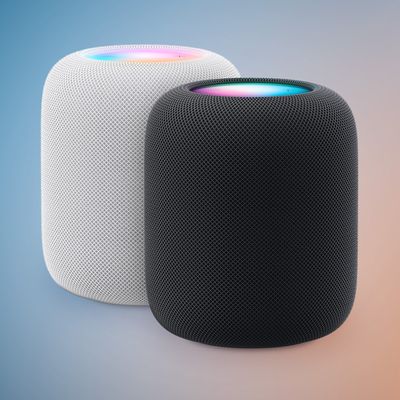
Design wise, the HomePod is deceptively small, but it's also heavy and has a solid build. It's covered in a soft, pliable mesh material meant to enhance sound, and there's a fabric-covered cable at the back.

After a bit of a snafu with the setup process, which appears to be related to HomeKit and iCloud keychain and is something we'll need to investigate further, we had the HomePod up and running with an alternate Apple ID.

Sound, as previous reviews and impressions have suggested, is incredible. Music is crisp and clear, with the HomePod highlighting and separating every element of a song. Even if you're not an audiophile, you're going to notice the high-quality sound of the HomePod right away.

We tested HomePod with Apple Music, which is how HomePod is meant to be used, but you can also play music from other third-party music services like Spotify using AirPlay.

HomePod's voice detection works impressively well, with Siri able to pick up a "Hey Siri" command from across the room even with music playing loudly. Siri is useful for playing content from Apple Music and controlling your HomeKit devices, but if you're used to something like Amazon Alexa, you're going to notice a few shortcomings.

Siri on HomePod is basically like Siri on the iPhone, and the personal assistant has almost the same feature set on both devices. Apple didn't make major improvements to Siri for the HomePod, and that's definitely one of the most disappointing aspects of the device.

For HomePod owners out there, how are you liking the HomePod so far? Let us know in the comments. Make sure to check out our HomePod roundup if you're new to HomePod or planning to purchase one -- it's got everything you need to know about HomePod along with a running list of our HomePod how tos.
Related Roundup: HomePod
Buyer's Guide: HomePod (Caution)

Popular Stories

HomePodandMini feature green

iOS 27 Brings New Functionality to HomePod

Wednesday June 10, 2026 3:02 am PDT by
With the launch of iOS 27 and HomePod Software 27, Apple is adding support for AutoMix, Apple's AI-powered Apple Music feature that blends songs using matching key and tempo. Apple says it has improved AutoMix's underlying algorithms to generate new transition types, making for more seamless blends between tracks, so this should also benefit the newly introduced feature for HomePod....
Apple Event Logo

Apple to Release These 15 New Products Later This Year

Friday June 12, 2026 7:45 am PDT by
Apple's annual WWDC developers conference is drawing to a close, but there is still a lot to look forward to in the second half of the year. Apple is expected to release at least 15 more products later this year. Now that the more intelligent and personal version of Siri has finally arrived in beta, a full two years after Apple first previewed it at WWDC 2024, we should begin to see some new ...
iCloud iPhone 17 Pro

iPhone Users Who Pay for iCloud Storage Get Two New Perks on iOS 27

Tuesday June 9, 2026 11:29 am PDT by
If you pay for extra iCloud storage on your iPhone, beyond the 5GB included for free, you might receive two more perks on iOS 27 at no additional cost. First, Apple said there will be daily usage limits for some of the new and enhanced Apple Intelligence features on iOS 27, including image generation. However, the company noted that "increased access" is available with "most" iCloud+ storage ...

Top Rated Comments

thisisnotmyname Avatar
109 months ago
The bigger annoyance to me is that you have to say “Hey, Siri” then wait for it to wake up, THEN issue a command. With my echo, I can just say “Alexa, play music” with no pause. Far better solution.
no you don't.
Score: 59 Votes (Like | Disagree)
109 months ago
I’m totally loving mine, first product in an age from Apple I can categorically say I love love love. This is Apple of old. Pure engineering genius mixed with an ability to make something extremely simple, easy to use and while still looking and feeling amazing.
Score: 29 Votes (Like | Disagree)
109 months ago
The bigger annoyance to me is that you have to say “Hey, Siri” then wait for it to wake up, THEN issue a command. With my echo, I can just say “Alexa, play music” with no pause. Far better solution.
This is not true, and I also believe it's the reason "Sound When Using Siri" is Off by default - they're trying to break people of this behavior. You do not need to wait. Say whatever you need to and it'll pick it up.
Score: 28 Votes (Like | Disagree)
hot ham water Avatar
109 months ago
I have a collection of completely ridiculous (and frankly inexcusable) things Siri has done. Sure, HomePod sounds great, and sure, software updates will come, but Apple has had years to make Siri even the slightest bit dependable and now has released a $350 speaker that runs only via Siri.
https://twitter.com/singersteve/status/956157955736522752
https://twitter.com/singersteve/status/958921256606281728
Score: 21 Votes (Like | Disagree)
109 months ago
The bigger annoyance to me is that you have to say “Hey, Siri” then wait for it to wake up, THEN issue a command. With my echo, I can just say “Alexa, play music” with no pause. Far better solution.
Have not experienced that with mine.

I don't even need the "," pause after Hey Siri. For example, just: Hey Siri play sneaker pimps.

Score: 18 Votes (Like | Disagree)
109 months ago
The bigger annoyance to me is that you have to say “Hey, Siri” then wait for it to wake up, THEN issue a command. With my echo, I can just say “Alexa, play music” with no pause. Far better solution.

That's false. With any iOS device or Homepod you can do not have to pause at all after saying Hey Siri, just like with Alexa. On non Homepod devices there is typically a ding, so people sometimes erroneously assume they have to wait but you do not. Simply try it right now on your HomePod or iOS device of which I assume you have otherwise you wouldn't be providing the information.
[doublepost=1518218117][/doublepost]
i just wanna know just because you can shout across room and siri to respond, why would you even want to do that?

It can happen, but why would you do it anyway away?
One the good features of HomePod is that you don't have to shout. I have an Echo and Homepod. With Echo, if music is playing you have to shout for it to hear the commands, which ironically are typically lower the volume. If the music is very loud Echo has almost no chance of hearing you. With HomePod was able to play max volume, and talk at a normal voice and it heard. Even tried speaking very quietly and heard. That being said was able to get it to not hear on a few occasions, but 100% better than Echo in this department, though this speaker is more expensive, so imagine Amazon will improve on this. That all being said, Siri has shown her dumbness time and time again compared to Alexa since getting the HomePod today.
Score: 17 Votes (Like | Disagree)