Apple Begins Selling D-Link's HomeKit-Enabled 'Omna' HD Camera With 180º Lens - MacRumors
Skip to Content

Apple Begins Selling D-Link's HomeKit-Enabled 'Omna' HD Camera With 180º Lens

by

D-Link today announced that its new Omna 180 Cam HD camera, unveiled at CES 2017 last month, is now available to purchase at Apple.com for $199.95.
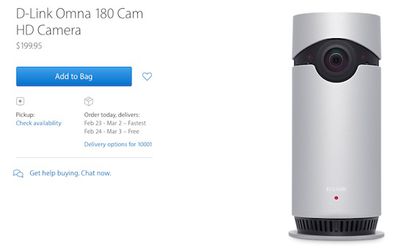
d link omna apple store
The cylindrical Omna 180 Cam HD features a 1080p camera with a 180-degree field of view, a built-in microphone and speaker with two-way audio, infrared night vision up to 16 feet, and motion detection with the option to record motion-triggered video clips directly to a microSDXC card up to 128GB with no subscription costs.

HomeKit support enables users to control the Omna 180 Cam HD with an iPhone or iPad through Apple's Home app on iOS 10. When the camera detects motion, users can receive Lock screen notifications to get a snapshot of what's happening in their homes. The camera can also trigger Scenes with other HomeKit products.

D-Link said the Omna 180 Cam HD camera will also be available to purchase at Apple retail stores around the world later this month.
Top Rated Comments

macduke Avatar
123 months ago
Sounds like a great uncle.

I'm also looking for an outside camera so I'll give that doorbell thing a look see. Thanks.
Yes, and was a good dad. His youngest was still in high school. He didn't get to use the thing very long, but it seemed good. He was very platform agnostic, switching between phones depending on the day (iOS, Android, Windows Phone) and had Windows and Mac machines. So I always heard from him a good, well rounded opinion—and most of the time, especially in the last several years, he tended towards Apple stuff. Especially for tablets and watches. He would have made a good tech blogger, actually, but he was always so busy hanging out with his boys that he never tried. My dad and I stopped speaking over a year ago, so he had slowly become more of a father figure to me. IDK why I'm talking about this on here, but I think of him all the time, and that post reminded me of one of the last things we spoke about.
Score: 2 Votes (Like | Disagree)
123 months ago
Can it be mounted outside?
Exactly, I want deterance to start outside... where are the HomeKit outdoor cameras? Please release some!
Score: 2 Votes (Like | Disagree)
marklemac Avatar
122 months ago
New firmware available this morning to v1.01 as well as the app update late last week. Not sure what firmware addressed...
Brilliant, I have been checking the firmware daily. I'll update it when I get home.
Score: 1 Votes (Like | Disagree)
marklemac Avatar
123 months ago
Can you elaborate on this process? I can't seem to duplicate these instructions and create this on/off scene. Has anyone else been successful?

Thanks
You can't, I did mention this earlier.
Score: 1 Votes (Like | Disagree)
marklemac Avatar
123 months ago
[doublepost=1487273528][/doublepost]

Ok great to hear your feedback on thia short notice. About the motion sensor; could you check in the myHome+ app (free in appstore) or Elgato Eve app if the internal motion sensor of the Omna camera is added is a seperate sensor. That way you could trigger that sensor to turn Off when for example entering your house and turn it back on when leaving your house all based on location.
[doublepost=1487273725][/doublepost]


One question about the live feed. The preview in the Home app you talked about, is that a still image or really a video playback? And is it possible to select zones for the motion sensor in the Omna app, for example front or backdoor?
In the Eve app, you can see the Sensor as separate, but you have no control over it.

I'll download the myHome+ app later and give that a go.

Live Feed. It's a still image (taken that very second) until you touch it, then it goes full screen live. (with audio)
[doublepost=1487278447][/doublepost]
Hmmm so if someone breaks in and steals the camera , there's no cloud based footage ?
That's the way I see it. And you can't really hide the camera, as it won't see enough of the room. I've placed mine in-between some large candles, so it doesn't really 'stick out'
Score: 1 Votes (Like | Disagree)
marklemac Avatar
123 months ago
Can see the camera on my watch too.
[doublepost=1487249940][/doublepost]More observations.

Yes it records onto a memory card. However, what happens if I get burgled and they take the camera ?

I loose the footage from the camera. ?

Attachment Image
Score: 1 Votes (Like | Disagree)

Popular Stories

nanoleaf ceiling light

Nanoleaf's New $80 Smart Ceiling Light Works With Matter and HomeKit

Tuesday June 30, 2026 4:16 pm PDT by
Nanoleaf today launched the Smart Multicolor Ceiling Light, an affordable Matter-compatible lighting product. With a dual-sided design, there's a main downlight and an upward backlight for a layered lighting glow. Each side can be controlled individually for bright light or an ambient lighting option. The light has 196 LEDs inside, with up to 2600 lumens. White light ranges from 2200K to...
Apple Store App Liquid Glass Feature

Two Apple Stores in U.S. Are Moving Soon

Friday July 10, 2026 3:15 pm PDT by
Two of Apple's retail stores in the U.S. will be relocating later this month, although they will only be a short distance from their existing locations. Apple Renaissance at Colony Park Apple Queens Center in Elmhurst, New York is moving to a temporary location in the shopping mall on Friday, July 17 at 10 a.m. local time, presumably to allow for renovations to be completed at the existing...
Tap to Pay on iPhone Wix

Apple Stores to Expand Use of 'Tap to Pay on iPhone'

Sunday July 12, 2026 9:11 am PDT by
In 2022, Apple began rolling out Tap to Pay on iPhone, a system that allows small business owners and other merchants to accept contactless payments on an iPhone, with no point-of-sale hardware required. The feature allows customers to pay by simply tapping their iPhone or Apple Watch, credit card or debit card, or other contactless payment option on the merchant's iPhone. Payment is securely...