

As expected, Apple today released OS X Yosemite 10.10.3, the first significant feature-rich update the operating system has received. OS X 10.10.3 was first seeded to developers in February, and was provided to public beta testers in March.
The OS X 10.10.3 update can be downloaded through the Software Update mechanism in the Mac App Store. OS X Yosemite Recovery Update 1.0 is also available to improve the reliability of Yosemite Recovery when restoring from a time machine backup.
The OS X Yosemite 10.10.3 update includes the new Photos app and improves the stability, compatibility, and security of your Mac.
The update also includes the following improvements:
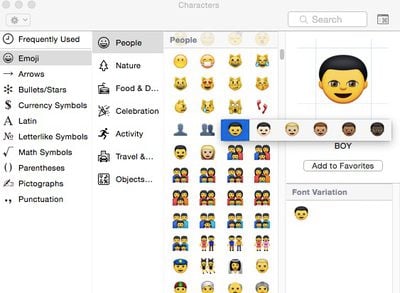
- Adds over 300 new Emoji characters
- Adds Spotlight suggestions to Look up
- Prevents Safari from saving website favicon URLs used in Private Browsing
- Improves stability and security in Safari
- Improves WiFi performance and connectivity in various usage scenarios
- Improves compatibility with captive Wi-Fi network environments
- Fixes an issue that may cause Bluetooth devices to disconnect
- Improves screen sharing reliability
Earlier Yosemite releases, including OS X 10.10.1 and 10.10.2, brought mostly under-the-hood bug fixes and reliability improvements to the operating system, but OS X 10.10.3 includes major new features, like the Photos for OS X app.
Designed to be a replacement for Aperture and iPhoto, Photos for OS X was first announced during the 2014 Worldwide Developers Conference, where Apple promised it would see an "early 2015" release. The Photos for OS X app takes on Yosemite-style design elements, with an emphasis on flatness and translucency, and it integrates with both iCloud Photo Library and the Photos for iOS app.
Reviews of the Photos for OS X app have suggested that while it's a suitable replacement for iPhoto, with speed improvements and better tools than were found in iPhoto, it lacks many power features that professional users have become accustomed to in its current incarnation, like plug-ins, a loupe, brushable adjustments, and custom metadata fields.
Along with the new Photos for OS X app, OS X 10.10.3 brings a new emoji picker that consolidates emoji into a single scrollable page with clear labels, new diversified emoji and emoji skin tone modifiers, additional flag emoji and updated emoji for the iPhone, iMac, and Apple Watch.
There's also support for Google 2-step verification when setting up accounts in System Preferences, doing away with the need for app specific passwords, and there are Force Touch APIs for developers, which will let them incorporate Force Touch gestures into their apps.
As noted by MacRumors reader Joe, the Memory section of the Activity Monitor app has been redesigned to make memory usage more clear to users. The App Memory, Wired Memory, and Compressed sections are now listed as part of "Memory Used" rather than listed separately.





/https://forums.macrumors.com/proxy.php%3Fimage=http://media.tumblr.com/tumblr_lnuv9ntXx91qdk3i5.png&hash=e7d8b1d2b1b054c25697040b6b2aaa10)

















