

OS X 10.10.3 Beta Adds Support for Google 2-Step Verification on Internet Accounts - MacRumors
Skip to Content

OS X 10.10.3 Beta Adds Support for Google 2-Step Verification on Internet Accounts

In addition to a new Photos app and emoji improvements, yesterday's developer release of the first OS X 10.10.3 beta also includes new direct support for Google's 2-Step Verification when setting up Google services in the Internet Accounts section of System Preferences.

2-Step Verification is an optional security setting that requires users to enter not only their account password but also a unique code sent by Google via phone app, text message, or voice call to a previously registered device or phone number, greatly enhancing account security.

Not all devices and apps support Google's 2-Step Verification, however, and as a backup Google also allows users to generate app-specific passwords to register a unique password for that device or app. The app-specific password can be revoked at any time by logging into the user's Google account for another time, making it easy to disable access on a device that has been lost or stolen.

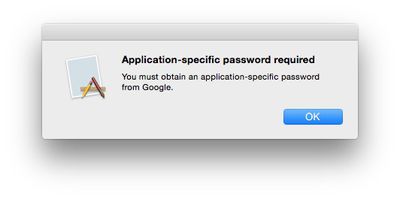
On OS X 10.10.2 and earlier, users setting up their machines to access Google accounts with 2-Step Verification enabled have had to use this app-specific password option. Users trying to log in with their standard Google account passwords are met with error messages informing them they need to use this option.
yosemite_2fa_reject

OS X 10.10.2 requiring an app-specific password for a Google account protected with 2-Step Verification

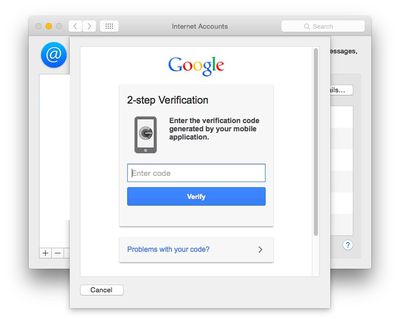
But as noticed by developer Jonathan Wight, the new OS X 10.10.3 beta now fully supports 2-Step Verification, allowing users to log in with their standard passwords and unique verification codes.
yosemite_google_2step

OS X 10.10.3 requesting verification code after logging in with standard password

The change makes logging in with 2-Step protected accounts much simpler and increases security by making sure the user attempting to log in has a secondary trusted device to provide the verification code.

(Thanks, Sean!)
Related Forum: OS X Yosemite

Popular Stories

M5 Vision Pro Thumb 2

Apple Has Given Up on the Vision Pro After M5 Refresh Flop

Wednesday April 29, 2026 11:31 am PDT by
Apple has all but given up on the Vision Pro after the M5 model failed to revitalize interest in the device, MacRumors has learned. Apple updated the Vision Pro with a faster M5 chip and a more comfortable band in October 2025, but there were no other hardware changes, and consumers still weren't interested. The Vision Pro has been criticized for its high price tag and its uncomfortable...
Four iPhone 18 Pro Colors Mock Feature

iPhone 18 Pro to Launch in September With These 10 New Features

Tuesday April 28, 2026 9:35 am PDT by
While the iPhone 18 Pro and iPhone 18 Pro Max are not launching until September, there are already plenty of rumors about the devices. It was initially reported that the iPhone 18 Pro models would have fully under-screen Face ID, with only a front camera visible in the top-left corner of the screen. However, the latest rumors indicate that only one Face ID component will be moved under the...
airpods pro 3 design

'AirPods Ultra' Rumored to Feature a Major Upgrade Over AirPods Pro

Thursday April 30, 2026 8:40 am PDT by
In a social media post this week, Bloomberg's Mark Gurman reiterated that Apple is planning to release new AirPods with cameras "for Siri." Last month, Gurman said these AirPods will likely be priced above the current AirPods Pro 3, which Apple sells for $249. As a result, he said Apple is likely considering using "AirPods Ultra" branding for the camera-equipped AirPods. "AirPods Ultra"...

Top Rated Comments

AngerDanger Avatar
147 months ago
Please, you expect us to believe that anybody at Apple has been doing anything besides working on Emoji?
Score: 16 Votes (Like | Disagree)
gavroche Avatar
147 months ago
I have an Apple Airport Extreme router. After my iMac wakes from sleep, I often cannot connect to Wi-Fi, even with OSX 10.10.2. And yet my iPad and iPhone connect perfectly every time. What does this tell you? Apple gets it right with iOS, but they are no longer putting the resources into Macs and OSX. It shouldn’t take this many months to get the bugs out of a new OS.

Not to berate you, or knock your complaints... But not sure what this has to do with the article (2-Step Verification)...
Score: 8 Votes (Like | Disagree)
CrazyForApple Avatar
147 months ago
There should be a 2 step verification process for everything.
Score: 5 Votes (Like | Disagree)
DCstewieG Avatar
147 months ago
The "webpage-inside-a-sheet" look looks pretty lazy, but it is a beta.
I could be wrong but I think it needs to be that way to hand control over to Google to do the authentication. That's the same thing you'll see in any application that supports their 2-factor setup.
Score: 5 Votes (Like | Disagree)
147 months ago
The "webpage-inside-a-sheet" look looks pretty lazy, but it is a beta.

I have an Apple Airport Extreme router. After my iMac wakes from sleep, I often cannot connect to Wi-Fi, even with OSX 10.10.2. And yet my iPad and iPhone connect perfectly every time. What does this tell you? Apple gets it right with iOS, but they are no longer putting the resources into Macs and OSX. It shouldn’t take this many months to get the bugs out of a new OS.
It doesn't tell you anything. Everyone has different experiences...for me, iOS 8 is way buggier than OS X, especially Safari.
Score: 5 Votes (Like | Disagree)
viorelgn Avatar
147 months ago
I have an Apple Airport Extreme router. After my iMac wakes from sleep, I often cannot connect to Wi-Fi, even with OSX 10.10.2. And yet my iPad and iPhone connect perfectly every time. What does this tell you? Apple gets it right with iOS, but they are no longer putting the resources into Macs and OSX. It shouldn’t take this many months to get the bugs out of a new OS.
Score: 4 Votes (Like | Disagree)














