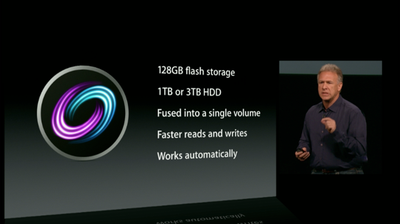
Amongst the many new products Apple introduced today, they also announced a new storage option called Fusion Drive. Apple's website describes how the drive works:
With Fusion Drive in your iMac, disk-intensive tasks — from booting up to launching apps to importing photos — are faster and more efficient. That’s because frequently used items are kept at the ready on speedy flash storage, while infrequently accessed items go to the hard drive. The file transfers take place in the background, so you won’t even notice.
Some thought the drive might be Apple's implementation of a Hybrid drive which uses SSD as a caching system, but it appears that Apple's system is distinct. The MacObserver digs into some details and clarifies:
To be clear, this is not a caching concept, at least not in the current use of the word. Cache would imply that the data on the SSD is duplicated, and it's not. If you have a 1TB mechanical drive paired with the 128GB SSD, you have a 1.12 TB storage platform. This truly is the fusion of all the space on two separate disks.
In a caching solution, like Intel's, files live on the hard disk drive and are temporarily mirrored to the SSD cache as needed. In an enterprise auto-tiering situation, and with Fusion Drive, the data is actually moved from one tier to another, rather than only being temporarily cached there.
The Mac Observer reports that there are two separate drives that appear as one logical partition. As a result, if your Hard Drive fails, it could be replaced with a 3rd party drive and reconfigured as a Fusion Drive.
Meanwhile, they note that all writes take place on the SSD drive, and are later moved to the mechanical drive if needed, resulting in faster initial writes. The Fusion will be available for the new iMac and new Mac mini models announced today.

Saturday February 7, 2026 9:26 am PST by Joe Rossignol
Apple today shared an ad that shows how the upgraded Center Stage front camera on the latest iPhones improves the process of taking a group selfie.
"Watch how the new front facing camera on iPhone 17 Pro takes group selfies that automatically expand and rotate as more people come into frame," says Apple. While the ad is focused on the iPhone 17 Pro and iPhone 17 Pro Max, the regular iPhone...
Monday February 9, 2026 6:24 am PST by Joe Rossignol
In select U.S. states, residents can add their driver's license or state ID to the Apple Wallet app on the iPhone and Apple Watch, and then use it to display proof of identity or age at select airports and businesses, and in select apps.
The feature is currently available in 13 U.S. states and Puerto Rico, and it is expected to launch in at least seven more in the future.
To set up the...
Tuesday February 10, 2026 6:33 am PST by Joe Rossignol
It has been a slow start to 2026 for Apple product launches, with only a new AirTag and a special Apple Watch band released so far. We are still waiting for MacBook Pro models with M5 Pro and M5 Max chips, the iPhone 17e, a lower-cost MacBook with an iPhone chip, long-rumored updates to the Apple TV and HomePod mini, and much more.
Apple is expected to release/update the following products...
Tuesday February 10, 2026 4:27 pm PST by Juli Clover
Apple is planning to launch new MacBook Pro models as soon as early March, but if you can, this is one generation you should skip because there's something much better in the works.
We're waiting on 14-inch and 16-inch MacBook Pro models with M5 Pro and M5 Max chips, with few changes other than the processor upgrade. There won't be any tweaks to the design or the display, but later this...
New MacBook Pro models with the M5 Pro and M5 Max chips could arrive as soon as Monday, March 2, according to Bloomberg's Mark Gurman.
In today's "Power On" newsletter, Gurman said that the release of new MacBook Pro models is tied to the release of macOS Tahoe 26.3. The launch is said to be slated for as early as the week of March 2. He added that the M4 Pro and M4 Max models on sale today...
Personally, an SSD boot drive and separate large HD seems more practical. No need to "fuse" them into one volume. Just seems like asking for trouble.
The fusion drive is just software to automatically handle that. Most consumers probably don't want to have to deal with having a boot drive and a data drive. Some things can be tricky to get onto an external drive, like iTunes and iPhoto libraries.