reminders iconIn iOS 14.5, Apple added a much-requested feature to the Reminders app that arguably should have been there from the get-to: The ability to print your reminders lists.

It's unclear why Apple left it so late to bring a printing option to its native reminders app, but what matters is that it's finally available.

Now you can make hard copies of your reminders to use as a backup, for convenience, or simply to experience the pleasure of ticking off to-dos with a real pen.

The following steps show you how to get printing in Reminders.

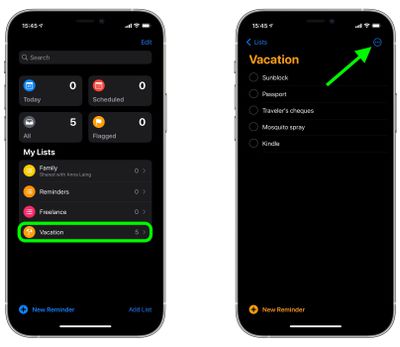
  1. Launch the Reminders app and using the main menu, select a reminders list or create a new one by tapping New Reminder.
  2. With your reminders list completed, tap the More icon (three dots in a circle) in the top-right corner of the screen.
    reminders

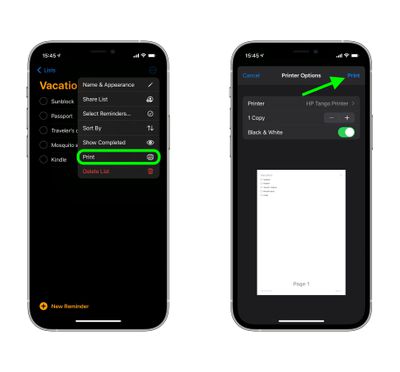
  3. Tap Print in the dropdown menu.
  4. Using the options, select the printer you want to use and the number of copies you want to print, and toggle the switch to select mono or color printing.
  5. If you're happy with the preview and chosen options, tap Print in the top-right corner of the screen.
    reminders

Bonus tip: iOS 14.5 introduces a new option to sort lists in Reminders by Due Date, Creation Date, Priority, or Title. You can access the Sort By option by tapping the same More icon you used to reveal the print option.


Related Forum: iOS 14

Top Rated Comments

Mrjetsondc Avatar
60 months ago

Does anyone else find Reminders too hard to use? I am very tech-savvy, but this app works best through Siri (which says something, as Siri is not the sharpest tool in the shed).

I have come to love Todoist ('https://todoist.com').
Listen buddy I don’t know what your malfunction is, but I’m a dog and even I know how to use the reminders app.
Score: 8 Votes (Like | Disagree)
campingsk8er Avatar
60 months ago

I remember when everyone was hoping for a decent quick and easy sync option for the notes app so we could get our groceries & to-do lists sync'd to & from our Macs. After spending years not doing that simple thing, Apple came out with this Reminders app instead, which made doing simple things as convoluted of a process as possible, got a lot of complaining about being confusing, and opened the door to developers to make sensible apps, albeit disconnected ones, once the App Store launched.

Every once in a while I think to ask someone if they're taking down our meeting in their reminders, and I always get a "I don't use that" or "I have no idea what that app is for". I have no idea what the user base numbers are of that app, and I'm sure there are die-hard devotees here, but I've never once encountered someone that indicates they use it, so it seems anecdotally like the least popular app they make. ...I'm sort of amazed every OS release that reminders continues to exist.
Just because *you* don’t use it or know anyone that does, doesn’t mean people don’t use it.

I use it almost daily. One of my homepods is in my kitchen and when I need groceries, I just say “hey Siri, add blank to my shopping list*. Then when I go shopping it’s automatically there.
Score: 4 Votes (Like | Disagree)
jz0309 Avatar
60 months ago
Really? Printing a reminders list? What a waste of ink and paper…
Score: 4 Votes (Like | Disagree)
countryside Avatar
60 months ago
Does anyone else find Reminders too hard to use? I am very tech-savvy, but this app works best through Siri (which says something, as Siri is not the sharpest tool in the shed).

I have come to love Todoist ('https://todoist.com').
Score: 4 Votes (Like | Disagree)
Deliro Avatar
60 months ago
I still don’t get why Apple removed reminders from the calendar.
Score: 3 Votes (Like | Disagree)
LeadingHeat Avatar
60 months ago

It's unclear why Apple left it so late to bring a printing option to its native reminders app, but what matters is that it's finally available.
Really? It’s a much requested feature? This seems a bit dramatic, or maybe just the strong opinions of the writer of this article. I hadn’t heard anything of people moaning that it didn’t have the print feature until now.
Score: 2 Votes (Like | Disagree)

Popular Stories

iOS 26

iOS 26.2 Coming Soon With These 8 New Features on Your iPhone

Thursday December 11, 2025 8:49 am PST by
Apple seeded the second iOS 26.2 Release Candidate to developers earlier this week, meaning the update will be released to the general public very soon. Apple confirmed iOS 26.2 would be released in December, but it did not provide a specific date. We expect the update to be released by early next week. iOS 26.2 includes a handful of new features and changes on the iPhone, such as a new...
AirPods Pro Firmware Feature

Apple Releases New Firmware for AirPods Pro 2 and AirPods Pro 3

Thursday December 11, 2025 11:28 am PST by
Apple today released new firmware designed for the AirPods Pro 3 and the prior-generation AirPods Pro 2. The AirPods Pro 3 firmware is 8B30, up from 8B25, while the AirPods Pro 2 firmware is 8B28, up from 8B21. There's no word on what's include in the updated firmware, but the AirPods Pro 2 and AirPods Pro 3 are getting expanded support for Live Translation in the European Union in iOS...
iOS 26

iOS 26.4 and iOS 27 Features Revealed in New Leak

Friday December 12, 2025 10:56 am PST by
Macworld's Filipe Espósito today revealed a handful of features that Apple is allegedly planning for iOS 26.4, iOS 27, and even iOS 28. The report said the features are referenced within the code for a leaked internal build of iOS 26 that is not meant to be seen by the public. However, it appears that Espósito and/or his sources managed to gain access to it, providing us with a sneak peek...
iOS 26

Apple Releases iOS 26.2 With Alarms for Reminders, Lock Screen Changes, Enhanced Safety Alerts and More

Friday December 12, 2025 10:10 am PST by
Apple today released iOS 26.2, the second major update to the iOS 26 operating system that came out in September, iOS 26.2 comes a little over a month after iOS 26.1 launched. ‌iOS 26‌.2 is compatible with the ‌iPhone‌ 11 series and later, as well as the second-generation ‌iPhone‌ SE. The new software can be downloaded on eligible iPhones over-the-air by going to Settings >...
Google maps feaure

Google Maps Quietly Added This Long-Overdue Feature for Drivers

Wednesday December 10, 2025 2:52 am PST by
Google Maps on iOS quietly gained a new feature recently that automatically recognizes where you've parked your vehicle and saves the location for you. Announced on LinkedIn by Rio Akasaka, Google Maps' senior product manager, the new feature auto-detects your parked location even if you don't use the parking pin function, saves it for up to 48 hours, and then automatically removes it once...
AirTag 2 Mock Feature

Apple AirTag 2: Four New Features Found in iOS 26 Code

Thursday December 11, 2025 10:31 am PST by
The AirTag 2 will include a handful of new features that will improve tracking capabilities, according to a new report from Macworld. The site says that it was able to access an internal build of iOS 26, which includes references to multiple unreleased products. Here's what's supposedly coming: An improved pairing process, though no details were provided. AirTag pairing is already...
macOS Tahoe 26 Thumb

Apple Releases macOS Tahoe 26.2 With Edge Light

Friday December 12, 2025 10:08 am PST by
Apple today released macOS Tahoe 26.2, the second major update to the macOS Tahoe operating system that came out in September. macOS Tahoe 26.2 comes five weeks after Apple released macOS Tahoe 26.1. Mac users can download the macOS Tahoe update by using the Software Update section of System Settings. macOS Tahoe 26.2 includes Edge Light, a feature that illuminates your face with soft...
iOS 26

15 New Things Your iPhone Can Do in iOS 26.2

Friday December 5, 2025 9:40 am PST by
Apple is about to release iOS 26.2, the second major point update for iPhones since iOS 26 was rolled out in September, and there are at least 15 notable changes and improvements worth checking out. We've rounded them up below. Apple is expected to roll out iOS 26.2 to compatible devices sometime between December 8 and December 16. When the update drops, you can check Apple's servers for the ...
maxresdefault

iOS 26 Code Leak Reveals Apple Smart Home Hub Details

Thursday December 11, 2025 4:02 pm PST by
Apple is working on a smart home hub that will rely heavily on the more capable version of Siri that's coming next year. We've heard quite a bit about the hub over the last two years, but a recent iOS 26 code leak provides additional insight into what we can expect and confirms rumored features. Subscribe to the MacRumors YouTube channel for more videos. Macworld claims to have access to an ...