iPhone 8: How to Hard Reset or Force Restart - MacRumors
Skip to Content

iPhone 8: How to Hard Reset or Force Restart

by

Apple in 2017 changed the method to force restart or hard reset an iPhone 8 or iPhone 8 Plus.

While rebooting an iPhone 7 or iPhone 7 Plus requires pressing and holding both the Sleep/Wake and Volume Down buttons for at least 10 seconds until the Apple logo appears, restarting an iPhone 8 or iPhone 8 Plus is a three step process that involves the Volume Up button, the Volume Down button, and the Side button on the device.
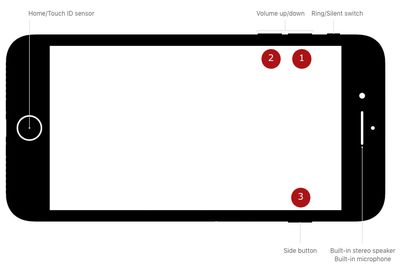
force hard reset iPhone 8 buttons

How to Force Restart (Hard Reset) iPhone 8

First, you need to press and quickly release the Volume Up button. Then, press and quickly release the Volume Down button. Finally, press and hold the Side button (aka power) until you see the Apple logo.

Powering off regularly still requires holding down the Side button for a few seconds until the "slide to power off" prompt appears. In iOS 11 and iOS 12, there's also a "Shut Down" option in the Settings app at the bottom of the General menu.

Apple made this change because on iPhone 8 and iPhone 8 Plus, pressing and holding the Side aka Sleep/Wake button and one of the Volume buttons now activates the Emergency SOS feature.


Top Rated Comments

goshya Avatar
113 months ago
What the...?

What was wrong with pressing the side button and volume button simultaneously?

Ridiculous combination.
Score: 31 Votes (Like | Disagree)
113 months ago
This feels like the Konami code of Apple.

Score: 23 Votes (Like | Disagree)
IG88 Avatar
113 months ago
What the...?

What was wrong with pressing the side button and volume button simultaneously?

Ridiculous combination.

It takes courage to take something simple and make it much more complicated.
[doublepost=1506188092][/doublepost]
This feels like the Konami code of Apple.
IPhone X procedure:
Vol up
Vol dn
Vol up
Vol dn
Side
Side
Wax on
Wax off
Sand floor
Paint fence
Sweep leg
Score: 22 Votes (Like | Disagree)
Mlrollin91 Avatar
113 months ago
Cuz it's too easy to accidentally do on the plus when you're trying to just press the power button when using one hand.
How is it to easy? You are not holding the buttons down for 10 seconds when trying to only lock your screen one handed. I have never once accidentally hard reset my device.
Score: 21 Votes (Like | Disagree)
113 months ago
With iOS 11 that activates the SOS mode.

https://support.apple.com/en-us/HT208076
I'm so confused. I thought pressing five times on the power button did that.

Or is that clicking the heels on your ruby slippers while chanting "There's no place like home"?

Oh wait, no, it's "You put your left foot in, you put your left foot out, you put your left foot in and you shake it all around, you do the hokey Pokey...". No that's not it either.

Damn you, Apple! :mad: It used to be so simple!
Score: 11 Votes (Like | Disagree)
simonmet Avatar
113 months ago
With iOS 11 that activates the SOS mode.

https://support.apple.com/en-us/HT208076
Pressing the sleep/wake button 5 times rapidly activates SOS on the 7 Plus.

The iPhone 7 and 8 have the same physical layout so why have they broken consistency?
Score: 11 Votes (Like | Disagree)

Popular Stories

Four iPhone 18 Pro Colors Mock Feature

iPhone 18 Pro Launching Later This Year With These 10 New Features

Tuesday May 26, 2026 6:32 am PDT by
While the iPhone 18 Pro and iPhone 18 Pro Max are not launching until September, there are already plenty of rumors about the devices. It was initially reported that the iPhone 18 Pro models would have fully under-screen Face ID, with only a front camera visible in the top-left corner of the screen. However, the latest rumors indicate that only one Face ID component will be moved under the...
Apple Watch Blood Glucose Monitoring Feature 2

Apple Watch for Diabetes: The Latest on Apple's Plans for Non-Invasive Blood Sugar Monitoring

Tuesday May 26, 2026 9:30 am PDT by
For many years now, it has been rumored that the Apple Watch will eventually gain non-invasive blood sugar monitoring capabilities, which would enable millions of people with diabetes to track their blood glucose levels without needing to prick their skin with a needle or wear a dedicated continuous glucose monitor. According to Bloomberg's Mark Gurman, Apple recently shifted oversight of...
apple wallet drivers license feature iPhone 15 pro

Apple Just Expanded iPhone Driver's License Feature to Arkansas

Wednesday May 27, 2026 9:41 am PDT by
In select U.S. states, residents can add their driver's license or state ID to the Apple Wallet app on the iPhone and Apple Watch, and then use it to display proof of identity or age at select airports and businesses, and in select apps. Starting today, the feature is available in Arkansas, which is the 14th state to offer it. However, it may take some time to roll out to all users. To...