iPhone 7: How to Hard Reset - MacRumors
Skip to Content

iPhone 7: How to Hard Reset

by

If your iPhone 7 or iPhone 7 Plus is acting up and needs a quick restart, you can follow these steps to force it to reboot without the need to shut it down.

The iPhone 7 and iPhone 7 Plus feature a haptic Home button rather than a physical Home button, so forcing a restart is different than on earlier devices. It's also different than restarting an iPhone 8 or later.
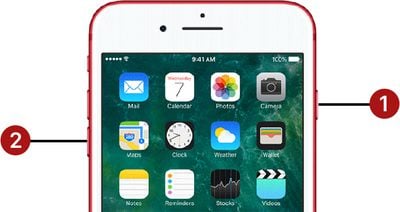
hard reset buttons iphone 7

How to Force Restart (Hard Reset) iPhone 7

To force restart an iPhone 7 or iPhone 7 Plus, follow these three simple steps.

  1. Hold down the Volume Down button on the left side of the device and the Sleep/Wake button on the right side of the device at the same time.
  2. Now, hold the buttons for approximately 10 seconds until the screen goes dark and an Apple logo appears on the screen.

  3. Release the buttons and wait while you iPhone restarts.

You can also hold down the Sleep/Wake or Side button on the device to bring up a screen that will let you shut down the iPhone entirely. The same option appears as part of the Emergency SOS screen if you press the Side button a total of five times.

Finally, if you open up the Settings app and go to the General section, you can scroll all the way to the bottom to find a "Shut Down" option.

Popular Stories

Four iPhone 18 Pro Colors Mock Feature

iPhone 18 Pro: Pre-Orders and Release Date

Sunday August 16, 2026 8:24 pm PDT by
Apple has yet to reveal when the iPhone 18 Pro and iPhone Ultra will be announced and released, but the dates usually follow a familiar pattern. As usual, the event is expected to take place in the first half of September. Labor Day falls on September 7 this year. The last time the holiday was on that day was in 2020, but the iPhone event that year was delayed until October due to the...


airpods camera leaked

Apple's Camera-Equipped AirPods Confirmed: See Them in Action

Monday August 17, 2026 6:21 pm PDT by
Apple is working on camera-equipped AirPods that appear to be nearly ready to launch, based on a video MacRumors found in the macOS Tahoe 26.7 release candidate. In a short demo, a man holds a book up so the camera in the AirPods can see the title. "With Visual Intelligence, your world becomes savable. See something you like? Just ask me to save it for later," says the voiceover text. Here ...
imac video apple feature

September 1 to Mark the End of an Era at Apple

Tuesday August 18, 2026 9:14 am PDT by
Apple in April announced that Tim Cook will be stepping down as CEO at the end of this month, after 15 years of leading the company. Cook has been Apple's CEO since 2011 Effective September 1, Apple's hardware engineering chief John Ternus will become the company's next CEO, while Cook will become executive chairman of Apple's board of directors. In his new role, Apple said Cook will assist...