Apple Seeds Fourth Beta of watchOS 7 to Developers [Updated]

Apple today seeded the fourth beta of an upcoming watchOS 7 beta to developers, two weeks after releasing the third beta and over a month after unveiling watchOS 7 at the Worldwide Developers Conference.
watchOS Beta
To install the watchOS 7 beta, developers will need to download the proper configuration profile from the Apple Developer Center. Once the profile is in place, the ‌watchOS 7‌ beta can be downloaded through the dedicated ‌Apple Watch‌ app on the iPhone by going to General > Software Update.

To update to the new software, the ‌Apple Watch‌ needs to have 50 percent battery life, it must be placed on the charger, and it must be in range of the ‌‌iPhone‌‌. It would be wise to install the beta on a secondary device rather than a primary device as this is an early version of the watchOS software that could have bugs that still need to be addressed.

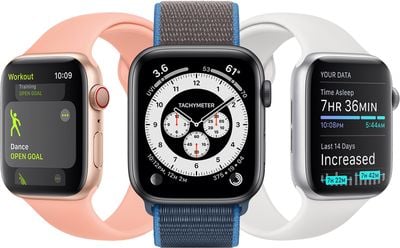
watchOS 7 brings a new watch face sharing feature that lets you share your watch faces with others through Messages or Mail, the App Store, through websites, or through social Media.
watchos7 1
There are new Chronograph Pro watch faces, plus a filter option for the Photos face and rich complications for the X-Large face. Developers can now offer more than one complication per app, and Apple has introduced new complications for Shortcuts, Moon phases, the World Clock, and more.

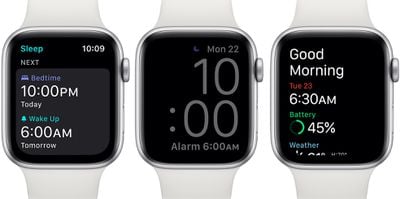
‌watchOS 7‌ introduces a new Sleep Tracking feature for the first time that uses the ‌Apple Watch‌'s accelerometer to detect small movements associated with breathing when asleep. Sleep Tracking provides information on sleep duration and offers a Wind Down feature for helping users get ready for bed to increase sleep times.
watchossleeptimewakeup
Putting the Apple Watch in Sleep Mode turns on Do Not Disturb and automatically darkens the watch screen while you're sleeping, while an alarm feature uses haptic feedback or gentle sounds to wake you up with a greeting and a weather report.

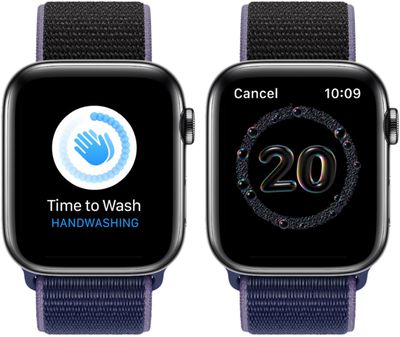
In addition to Sleep Tracking, Apple also added a new handwashing tracking feature to help people wash their hands for at least 20 seconds. There's a 20-second countdown timer that comes up whenever the ‌Apple Watch‌ detects handwashing motions and sounds, and the Health app will also show the frequency and duration of the user's handwashing.
applewatchhandwashing
Additional details on the other new features in watchOS 7 can be found in our watchOS 7 roundup.

Update: While watchOS 7 beta 4 is listed as available from the Apple Developer Center, there have been multiple reports from people who do not see the update at all, making it unclear what's going on with the update.

Related Roundup: Apple Watch 11
Buyer's Guide: Apple Watch (Buy Now)

Popular Stories

iOS 26

iOS 26.4 and iOS 27 Features Revealed in New Leak

Friday December 12, 2025 10:56 am PST by
Macworld's Filipe Espósito today revealed a handful of features that Apple is allegedly planning for iOS 26.4, iOS 27, and even iOS 28. The report said the features are referenced within the code for a leaked internal build of iOS 26 that is not meant to be seen by the public. However, it appears that Espósito and/or his sources managed to gain access to it, providing us with a sneak peek...
iOS 26

iOS 26.2 Coming Soon With These 8 New Features on Your iPhone

Thursday December 11, 2025 8:49 am PST by
Apple seeded the second iOS 26.2 Release Candidate to developers earlier this week, meaning the update will be released to the general public very soon. Apple confirmed iOS 26.2 would be released in December, but it did not provide a specific date. We expect the update to be released by early next week. iOS 26.2 includes a handful of new features and changes on the iPhone, such as a new...
iOS 26

Apple Releases iOS 26.2 With Alarms for Reminders, Lock Screen Changes, Enhanced Safety Alerts and More

Friday December 12, 2025 10:10 am PST by
Apple today released iOS 26.2, the second major update to the iOS 26 operating system that came out in September, iOS 26.2 comes a little over a month after iOS 26.1 launched. ‌iOS 26‌.2 is compatible with the ‌iPhone‌ 11 series and later, as well as the second-generation ‌iPhone‌ SE. The new software can be downloaded on eligible iPhones over-the-air by going to Settings >...
AirPods Pro Firmware Feature

Apple Releases New Firmware for AirPods Pro 2 and AirPods Pro 3

Thursday December 11, 2025 11:28 am PST by
Apple today released new firmware designed for the AirPods Pro 3 and the prior-generation AirPods Pro 2. The AirPods Pro 3 firmware is 8B30, up from 8B25, while the AirPods Pro 2 firmware is 8B28, up from 8B21. There's no word on what's include in the updated firmware, but the AirPods Pro 2 and AirPods Pro 3 are getting expanded support for Live Translation in the European Union in iOS...
macOS Tahoe 26 Thumb

Apple Releases macOS Tahoe 26.2 With Edge Light

Friday December 12, 2025 10:08 am PST by
Apple today released macOS Tahoe 26.2, the second major update to the macOS Tahoe operating system that came out in September. macOS Tahoe 26.2 comes five weeks after Apple released macOS Tahoe 26.1. Mac users can download the macOS Tahoe update by using the Software Update section of System Settings. macOS Tahoe 26.2 includes Edge Light, a feature that illuminates your face with soft...
AirTag 2 Mock Feature

Apple AirTag 2: Four New Features Found in iOS 26 Code

Thursday December 11, 2025 10:31 am PST by
The AirTag 2 will include a handful of new features that will improve tracking capabilities, according to a new report from Macworld. The site says that it was able to access an internal build of iOS 26, which includes references to multiple unreleased products. Here's what's supposedly coming: An improved pairing process, though no details were provided. AirTag pairing is already...
Apple Foldable Thumb

Leak Reveals Foldable iPhone Details

Monday December 15, 2025 9:09 am PST by
The first foldable iPhone will feature a series of design and hardware firsts for Apple, according to details shared by the Weibo leaker known as Digital Chat Station. According to a new post, via machine translation, Apple is developing what the leaker describes as a "wide foldable" device, a term used to refer to a horizontally oriented, book-style foldable with a large internal display....
ipados 26 1 slide over

Apple Releases iPadOS 26.2 With Multitasking Improvements

Friday December 12, 2025 10:09 am PST by
Apple today released iPadOS 26.2, the second major update to the iPadOS 26 operating system released in September. iPadOS 26.2 comes a month after iPadOS 26.1. The new software can be downloaded on eligible iPads over-the-air by going to Settings > General > Software Update. iPadOS 26.2 continues with the multitasking improvements that were added with iPadOS 26.1. You can now drag and...

Top Rated Comments

Braderunner Avatar
70 months ago

Excellent stability so far, beta 4 is running like a dream in early testing much like all of the watchOS 7 betas so far. Seems like Apple has a hit, I can’t wait to keep digging in to the new build. Complications look great, my watch faces all appear like they should, and notifications are flowing fluidly. Wow!
After 10 seconds of testing...o_O:D
Score: 7 Votes (Like | Disagree)
FishyFish Avatar
70 months ago
I am not even getting it in SW update on my watch or Watch app.
It showed up for me once my phone was upgraded to iOS 14 beta 4.
Score: 4 Votes (Like | Disagree)
asu1996 Avatar
70 months ago

Bugs and what not aside, can anyone confirm if messages still require individual deletion, or if the new watchOS has been updated with message selection or mass deletion?
Ha wishful thinking my man. I can’t stand messages on the watch. Can’t mass delete them and when I delete on my iPhone I still have them all showing on my watch and I have to delete them one at a time. It’s so counterproductive. If I delete from my phone I don’t need it also on my watch!! Can’t believe Apple hasn’t fixed this yet.
Score: 3 Votes (Like | Disagree)
Apple_Jae Avatar
70 months ago

Ha wishful thinking my man. I can’t stand messages on the watch. Can’t mass delete them and when I delete on my iPhone I still have them all showing on my watch and I have to delete them one at a time. It’s so counterproductive. If I delete from my phone I don’t need it also on my watch!! Can’t believe Apple hasn’t fixed this yet.
It is ABSOLUTELY maddening! If iCloud messages could be enabled for the watch and they deleted from the watch when they were deleted from the iphone, then fine, that would be okay. But to lack that option OR a mass deletion option is mind blowing! lol
Score: 3 Votes (Like | Disagree)
JCCL Avatar
70 months ago
Its seems is not out, whoever says that got it is just trolling :)
Score: 3 Votes (Like | Disagree)
Braderunner Avatar
70 months ago

How many are running this on their only watch? Stable?
The update was never released. It was only listed as available, with the build number, on the dev website.
Score: 2 Votes (Like | Disagree)