

Stop Your Recent Browser Searches Showing on iPhone - MacRumors
Skip to Content

Stop Your Recent Browser Searches Showing on iPhone

by

Apple in iOS 18.4 introduced a potentially privacy-compromising change to its Safari browser that puts your search history on full display when opening new tabs.
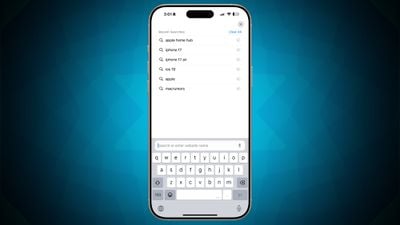
ios 18 4 safari search
Previously in iOS, opening a new tab and tapping the search field brought up the keyboard while continuing to display the personalized Safari home page. However, Apple's iOS 18.4 software update modified how Safari handles new tabs by automatically showing your recent search history whenever someone taps into the search field.

Privacy-conscious users are likely to raise eyebrows at the change, as it could expose previous searches in situations where users hand their devices to friends, family members, or colleagues – or just search for something when someone else is looking at their screen. A quick tap on the search field would immediately reveal what the device owner has been searching for online.

Fortunately, Apple added a toggle that reverts the new Safari tab behavior so that your recent searches are no longer on full view.

  1. Open the Settings app on your iPhone.
  2. Scroll down to the bottom and tap Apps.
  3. Find Safari in the alphabetical list and tap on it, then toggle off the switch called Show Recent Searches.
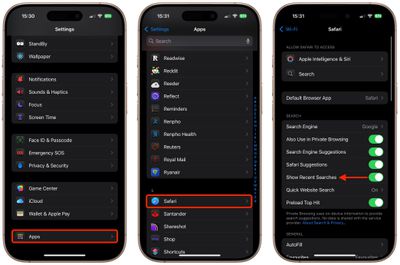
turn off safari recent searches

Of course, there's an upside to the change that you may appreciate. It makes frequently used search terms more conveniently accessible, potentially saving time if you often search for similar topics. But the convenience still comes with the tradeoff of reduced privacy, and that might be a step too far for some users.


Tag: Safari

Popular Stories

macOS 27 on MacBook Pro

macOS 27 Will Mark the End of an Era

Saturday April 18, 2026 6:45 am PDT by
During its Platforms State of the Union segment at WWDC 2025, Apple revealed that macOS 26 Tahoe is the final major macOS version for Intel-based Macs. The upcoming macOS 27 release will be compatible with Apple silicon Macs only, meaning that you will need a Mac with an M-series chip or a MacBook Neo with an A18 Pro chip in order to install the software update. macOS 27 should be available...
Aston Martin CarPlay Ultra Screen

Apple Says CarPlay Ultra is Coming to These Vehicle Brands

Saturday April 18, 2026 5:59 am PDT by
Last year, Apple launched CarPlay Ultra, the long-awaited next-generation version of its CarPlay software system for vehicles. Nearly a year later, CarPlay Ultra is still limited to Aston Martin's latest luxury vehicles, but that should change fairly soon. In May 2025, Apple said many other vehicle brands planned to offer CarPlay Ultra, including Hyundai, Kia, and Genesis. CarPlay Ultra...
Tim Cook Rainbow

Apple CEO Tim Cook Stepping Down, John Ternus Taking Over

Monday April 20, 2026 1:33 pm PDT by
Apple CEO Tim Cook is stepping down as Apple's chief executive officer, and hardware engineering chief John Ternus is set to take over, Apple announced today. Cook will continue on as Apple CEO through the summer, with Ternus set to join Apple's Board of Directors and take over as CEO on September 1, 2026. Cook is going to transition to executive chairman, and he will "assist with certain...













