Brydge Showcases New iPadOS 13.4 Trackpad Features in its New Pro+ Keyboard
Brydge has released a short YouTube video showcasing its Brydge Pro+ Keyboard with trackpad support. This comes just days after Apple announced its own Magic Keyboard with designated trackpad alongside both the new iPad Pro and new MacBook Air.
In the video, Brydge highlights some of the capabilities of its new Brydge Pro+ keyboard. The major new feature is full trackpad support in iPadOS 13.4. The trackpad can be used for precise text editing, bringing up the Dock from any app with a three-finger tap, opening App Exposé with a two-finger swipe, and more.
Preorders for the keyboard are available now. It is priced starting at $199.99 for the 11-inch iPad Pro and $229.99 for the 12.9-inch iPad Pro. Preorders placed today are currently showing an estimated mid-April shipping date.
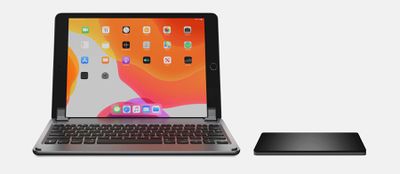
Brydge is still gauging interest for a standalone multi-touch trackpad for the iPad Pro that remains listed as "coming soon."
Apple's Magic Keyboard is priced at $299 for the 11-inch iPad Pro and $349 for the 12.9-inch iPad Pro. It is slated to release sometime in May.
Apple has also announced that iPadOS 13.4 with trackpad support will be launching next Tuesday, March 24th.
Popular Stories
Some Apple retail employees have been told to warn customers against visiting to purchase an iPhone Duo without a pre-order on Friday, October 23.
Apple Store employees told MacRumors that they have been advised that there will likely be no iPhone Duo stock available for walk-in purchases on launch day. Staff have been instructed to discourage customers without pre-orders from coming in...
Verizon plans to charge customers $10 per month for the iPhone Handoff feature that Apple added in iOS 27. iPhone Handoff allows one phone number to be shared across two separate iPhones.
Pricing was included in Verizon's iPhone Duo announcement today, with the carrier confirming iPhone Handoff will work with the iPhone Duo and the iPhone 18 Pro models.
Verizon will support iPhone Handoff,...
Apple has begun inviting selected members of the media to a product launch experience in Los Angeles on Wednesday, October 28, according to Bloomberg's Mark Gurman.
In a post on X, Gurman described the gathering as an "all-day product launch experience" for touchscreen MacBooks, a new iPad mini, and Macs equipped with M6 chips.
Gurman previously reported that Apple would introduce the...




















































