

iTunes Remote App Gains Dark Mode and macOS Catalina Support - MacRumors
Skip to Content

iTunes Remote App Gains Dark Mode and macOS Catalina Support

by

Apple today updated its iTunes Remote app with support for Apple Music and the Apple TV apps in macOS Catalina, enabling a feature that was first introduced earlier this week in macOS Catalina 10.15.2.

Following today's iOS update and the macOS 10.15.2 update, the iTunes Remote app can be used to control playback in the Music and TV apps in macOS Catalina.
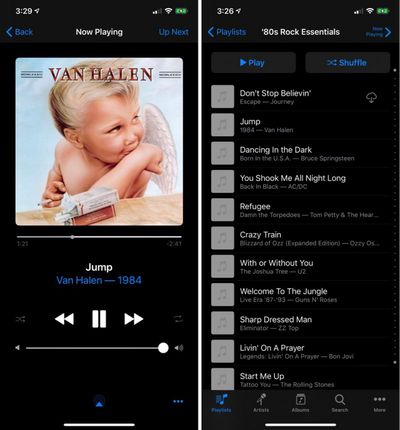
itunesremoteapp
The new version of the iTunes Remote app also supports Dark Mode in iOS 13 and later, enabling a darker theme when ‌Dark Mode‌ is turned on.

iTunes Remote is a free app for controlling music libraries and other content on the Mac with the iPhone. It can be downloaded from the iOS App Store. [Direct Link]

Top Rated Comments

gazwas Avatar
83 months ago
Van Halen - 1984

what a band and what an album!!!!
Score: 11 Votes (Like | Disagree)
Rychiar Avatar
83 months ago
who knew this still existed
Score: 8 Votes (Like | Disagree)
NickName99 Avatar
83 months ago

Van Halen - 1984

what a band and what an album!!!!
Agreed! My dad bought me that cassette tape back in 1985 or so. I had to hide it from my Christian conservative mom. Good memories!
Score: 5 Votes (Like | Disagree)
83 months ago
Correct, however they had broken it specially for Music/Catalina, (along with Album Art).
A more appropriate title would be, “iTunes Remote App Finally Fixed for Music/Catalina, and Gains Dark Mode”

Score: 5 Votes (Like | Disagree)
mikethemartian Avatar
83 months ago
Van Halen’s MCMLXXXIV is my favorite album of all time.
Score: 2 Votes (Like | Disagree)
anthonymoody Avatar
83 months ago

This is still the only way to play Apple Music from an iOS device to multiple speakers that do not have Airplay 2 support.

is it possible to search Apple Music now, or does it still require music to be added to the library first?
No. Unfortunately you still can't search Apple Music from Remote app. In fact you can't do anything related to Apple Music from the Remote app - play the stations, etc. Sucks. And they've removed the internet radio stations.



I still can't control Music with the remote app after the update! Tried disabling and enabling home share still no joy. Anyone manage to get it working?

It didn't work via HomeSharing for me despite it having worked that way previously. I had to add my iPhone as a remote in Music on my Mac by entering the 4 digit code on my phone.

Score: 2 Votes (Like | Disagree)

Popular Stories

Four iPhone 18 Pro Colors Mock Feature

iPhone 18 Pro Launching in September With These 10 New Features

Monday April 20, 2026 7:13 am PDT by
While the iPhone 18 Pro and iPhone 18 Pro Max are not launching until September, there are already plenty of rumors about the devices. It was initially reported that the iPhone 18 Pro models would have fully under-screen Face ID, with only a front camera visible in the top-left corner of the screen. However, the latest rumors indicate that only one Face ID component will be moved under the...


Tim Cook Rainbow

Apple CEO Tim Cook Stepping Down, John Ternus Taking Over

Monday April 20, 2026 1:33 pm PDT by
Apple CEO Tim Cook is stepping down as Apple's chief executive officer, and hardware engineering chief John Ternus is set to take over, Apple announced today. Cook will continue on as Apple CEO through the summer, with Ternus set to join Apple's Board of Directors and take over as CEO on September 1, 2026. Cook is going to transition to executive chairman, and he will "assist with certain...
iphone 17 ceramic shield

Leaker: Apple Downgrading iPhone 18 to Cut Costs

Monday April 20, 2026 9:12 am PDT by
Apple is downgrading the planned specifications of the standard iPhone 18 to cut costs, a leaker claims. In a new post on Weibo, the user known as "Fixed Focus Digital" said that the iPhone 18 features "certain manufacturing downgrades" that bring it more into line with the low-cost iPhone 18e model. The decision is said to be "a cost-cutting measure." Apple has apparently chosen to...



































