How to Disable Gesture-Based FaceTime Reactions - MacRumors
Skip to Content

How to Disable Gesture-Based FaceTime Reactions

by

In iOS 17 and iPadOS 17, Apple introduced Messages-like reactions to FaceTime that lighten up your video with visual effects. Rather than triggering them with words, they are triggered using physical hand gestures. For that reason, it's easy to trigger them unintentionally. Keep reading to learn how to turn them off.

ios 17 facetime effects
When you're on a ‌FaceTime‌ video call on an iPhone or iPad, it's possible to trigger on-screen effects like hearts, balloons, confetti, fireworks, and more, with the effects flooding the display over the ‌‌FaceTime‌‌ window.

‌FaceTime‌ reaction effects are great fun when chatting with friends and family, but there may be certain occasions when you don't want to be accidentally triggering reactions, such as when you're on a work call, or during a virtual appointment with your therapist. Fortunately, you can disable them manually by following these steps.

  1. Open ‌FaceTime‌ on your ‌iPhone‌ or ‌iPad‌.
  2. Swipe down from the top-right corner of the screen to invoke Control Center (swipe up from the bottom if you're on a device with Touch ID).
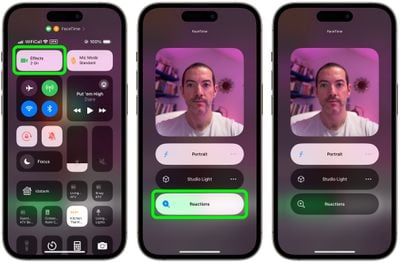
  3. Tap the Effects button in the top-left corner.
  4. Tap the Reactions button so that it is no longer illuminated.
  5. Swipe up twice to return to ‌FaceTime‌.

FaceTime

Disabling FaceTime Reactions on Mac

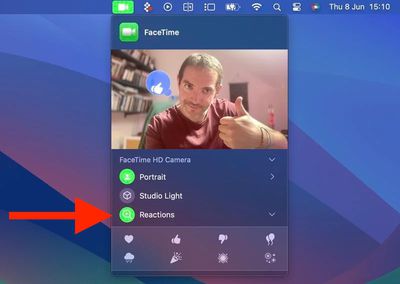
FaceTime‌ reactions work just the same in macOS Sonoma, but the video effects options have moved from the Control Center. Instead, they have a new home in a dedicated green ‌‌FaceTime‌‌ menu bar dropdown, which also includes a mini webcam view and clickable buttons to manually trigger Reactions.
FaceTime
To disable reactions on your Mac, simply click the Reactions button in the ‌FaceTime‌ menu bar dropdown so that it is no longer illuminated.
Popular Stories

WWDC26 MR Live Coverage Article

WWDC 2026 Apple Event Live Keynote Coverage: iOS 27, Revamped Siri, and More

Monday June 8, 2026 9:15 am PDT by
Apple's Worldwide Developers Conference (WWDC) starts today with the traditional keynote kicking things off at 10:00 a.m. Pacific Time. MacRumors is on hand for the event and we'll be sharing details and our thoughts throughout the day. We're expecting to see a number of software-related announcements today, headlined by a reset on Apple's push into AI that should see a significant overhaul...
macOS Golden Gate Mac

Apple Announces macOS 27 Golden Gate With New Siri and 'Tons' of Refinements

Monday June 8, 2026 10:19 am PDT by
Apple today announced that macOS 27 is named macOS Golden Gate. Much like Mac OS X Snow Leopard in 2009, Apple said it focused on improving macOS's performance and dozens of underlying technologies this year. Apple says macOS Golden Gate offers quicker AirDrop transfers, faster network file browsing, improved syncing in the Messages app, better Spotlight search suggestions, and other...
Aston Martin CarPlay Ultra Screen

Apple Says CarPlay Ultra is Coming to These Vehicle Brands

Thursday May 21, 2026 11:53 am PDT by
Last year, Apple launched CarPlay Ultra, the long-awaited next-generation version of its CarPlay software system for vehicles. Nearly a year later, CarPlay Ultra is still limited to Aston Martin's latest luxury vehicles, but that should change fairly soon. In May 2025, Apple said many other vehicle brands planned to offer CarPlay Ultra, including Hyundai, Kia, and Genesis. CarPlay Ultra...