If you have an iPhone 15 and either an Apple Watch Series 9 or second-generation Apple Watch Ultra, you can use your watch to find your iPhone with the help of Apple's Precision Finding feature. Keep reading to learn how it works.
The Apple Watch Series 9 and Apple Watch Ultra 2 share the same updated Ultra Wideband chip as can be found in the iPhone 15 series, so if you have one of the latest Apple Watch models you can use Precision Finding to ping your nearby iPhone 15 and get accurate directions to it.
The next time you misplace your iPhone in the home or office, here's how to find it easily with Precision Finding. On your Apple Watch, press the Side button to bring up the Control Center, then tap the Ping iPhone button.
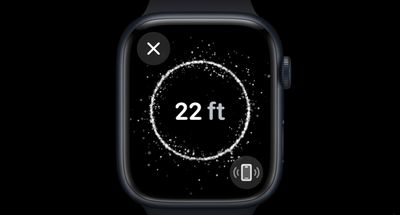
Your iPhone will play a sound and, if your Apple Watch Series 9 or Ultra 2 is within range, the screen will display a starry circle showing the distance to your iPhone. As you move, a visual guide will point your in the right direction and the distance will increase or decrease based on your location relative to your phone.
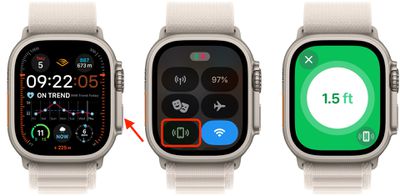
When you are closer to your iPhone, the starry circle will turn to white on a green background, and when you are very close, the circle will show a checkmark, indicating that your misplaced device is within reach. If you need a bit more help finding it, tap the button in the bottom-right corner of the screen to make your iPhone audibly ping again.




























![Apple Watch Ultra 3 Drops to Record Low $599.97 on Amazon [Updated]](https://images.macrumors.com/t/99z85mg_XjeuFDPW3me6tOe0oOw=/112x112/article-new/2026/09/apple-watch-ultra-3-new.jpeg)