Tim Hardwick

Tim is a Senior Editor at MacRumors and has been writing for the site since 2016. Formerly a magazine journalist, his work has appeared in over 30 newsstand print publications and online brands covering a range of topics, from the latest trends in technology to the mysteries of ancient history.
Based in the UK, Tim's current role at MacRumors involves editorial oversight and how tos, in addition to covering daily news and contributing occasional reviews. Tim can be reached at tim@macrumors.com, Telegram (@waxeditorial) or Twitter.
Based in the UK, Tim's current role at MacRumors involves editorial oversight and how tos, in addition to covering daily news and contributing occasional reviews. Tim can be reached at tim@macrumors.com, Telegram (@waxeditorial) or Twitter.
Tim Hardwick's Articles

Report: Apple Developing Apple Car Autopilot Function With South Korean Partner
Apple has developed the chip modules and packages for the autopilot functions of its rumored Apple Car with the help of an outsourced semiconductor assembly and test (OSAT) company based in South Korea, claims a new report today.
Apple Car concept by Vanarama based on patents filed by Apple
OSAT is a service that suppliers often provide to partners that involves semiconductor assembly,...
Read Full Article • 93 comments

Instagram Limits Users' Ability to Limit How Much Time They Spend in the App
Instagram has quietly removed the ability for its users to limit their daily usage of the app to less than 30 minutes, reports TechCrunch.
In 2018, Instagram introduced options in the app to set a daily time limit, with a reminder to be sent when that time limit is reached – useful for those who want to cut down on their social media usage. Originally, users were able to select a time...

Indie Developer Dogged By Scammy Clone Apps Again Highlights the Holes in Apple's App Store Review Process
Apps that copy concepts and features from other apps are nothing new in the App Store, but scammy like-for-like clones of genuine apps remain a perennial problem that Apple still hasn't resolved, as indie developer Kevin Archer recently discovered.
Archer is responsible for 2Stable's Authenticator App, a feature-rich app that stores and generates secure two-factor authentication tokens...
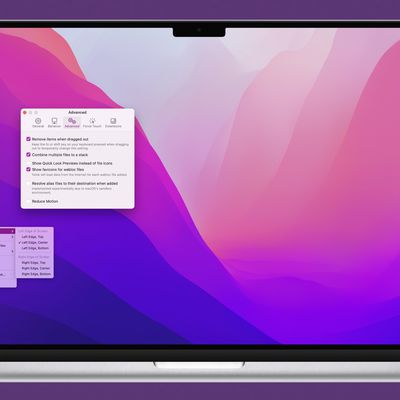
Popular Drag-and-Drop Mac App 'Yoink' Gains Configurable Clipboard History Widget and Browser
Popular Mac drag-and-drop app Yoink received a substantial update on Monday that brings back a much-improved Yoink clipboard history widget with several highly configurable features.
For those unfamiliar with the app, Yoink aims to simplify the action of dragging and dropping files and app-content on the macOS desktop by providing a temporary place for files to be dragged to. Yoink's shelf...
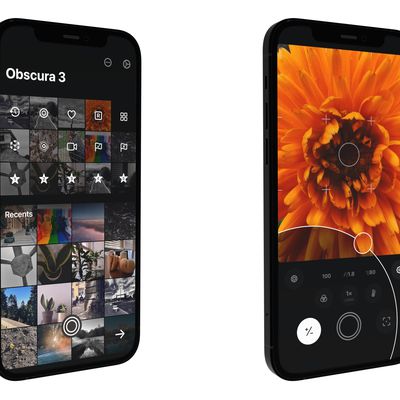
Obscura 3 Camera App Gains Overhauled Interface and New Capture Modes
Alternative iPhone camera app Obscura 3 has launched with several new camera features and an overhauled design that aims to make its various photography tools easier to access.
In the newly designed interface, the control wheel of the previous version has been replaced by an entirely gesture-based control system with haptic feedback, which the developer says improves single-thumb control and ...
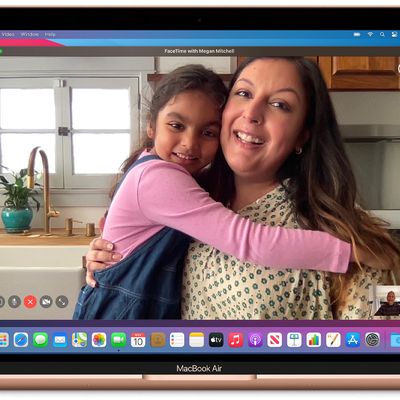
How to Enable Wide Spectrum Audio in FaceTime on Mac
In macOS Monterey, Apple brings several enhancements to its FaceTime video and audio calling platform, including new visual and audio effects to improve your call experience.
One of the audio features is Wide Spectrum mode. This microphone mode brings every single sound into your call, making it ideal for when you want the other person to hear everything that's happening in the space you're ...

How to Reduce Background Noise in FaceTime on Mac
In macOS Monterey, Apple has made its FaceTime video calling platform more appealing with several new features that aim to make it a viable alternative to rival video conferencing apps.
One of the new audio features is Voice Isolation mode for your microphone, which separates your voice from any distracting background noise that might be on the call. The feature uses machine learning to...

How to Turn Your Old Mac into a Chromebook
If you have an aging Mac lying around that struggles to run the latest macOS and has stopped receiving security updates from Apple, it's possible to give it a secure second life by installing software that essentially turns it into a Chromebook.
That's because Google has released an early access version of Chrome OS Flex, which offers a way to replace the operating system on older PCs and...
Google Wants to Turn Your Old Mac into a Chromebook With Chrome OS Flex
Google has announced early access to Chrome OS Flex, a method of replacing the operating system on older PCs and Macs "within minutes" to essentially turn them into Chromebooks.
The company is encouraging individuals, schools, and businesses to download Chrome OS Flex so they can "easily try modern computing with cloud-based management" while extending the lifespan of older devices, thereby ...

macOS: How to Use Live Text to Copy and Share Text in Images on Your Mac
In macOS Monterey, Apple introduced a feature called Live Text that can automatically recognize text when it appears in an image in Safari, Photos, Preview, Quick Look, and elsewhere, allowing you to easily copy or share it.
For example, if you have a picture in the Photos app of a storefront that displays a phone number, you can capture that number to add to your contacts. It's an incredibly ...
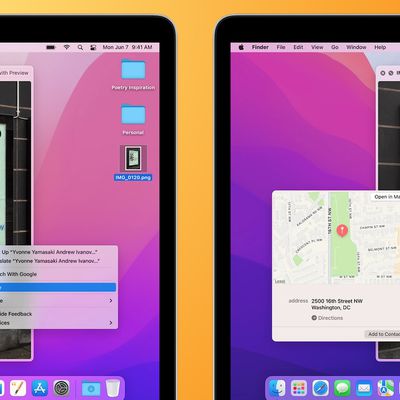
How to Turn Off Live Text on Mac
In macOS Monterey, Apple's Live Text feature can automatically recognize text when it appears in an image in Safari, Photos, Preview, Quick Look, and elsewhere, allowing you to copy or share it. If you find this text auto-detection a distraction, and you might prefer to turn it off. This article explains how.
How to Turn Off Live Text in macOS
Launch System Preferences from your Mac's Dock, ...

How to Disable Live Text on iPhone and iPad
In iOS 15 and iPadOS 15, Apple's Live Text feature can automatically recognize text when it appears in your camera's viewfinder, in a photo or screenshot you've taken, and in Safari, and let you copy or share it. Sometimes, however, the text auto-detection can become a distraction, and you might prefer to turn it off, either completely or just for the Camera app. This article explains how.
Ho...

How to Schedule Emails on iPhone and iPad
Unlike Apple Mail, Gmail lets users schedule emails to send later on iPhone and iPad. This article explains how it's done.
Have you ever tried to remember to email someone about something on a particular date in the not-so-distant future, but ended up forgetting to send it when the day eventually came around? If that sounds familiar, scheduling emails could be the perfect way to ensure it...

Apple to Unveil 13-inch M2 MacBook Pro With Unchanged Design Next Month, Claims Original MacBook Pro 'Notch' Leaker
Apple will next month debut its latest M2 Apple silicon processor in a refreshed 13-inch MacBook Pro model that will have no major design changes, according to a previously reliable source with close links to Apple's supply chain.
Based on the new information seen by MacRumors, the upcoming 13-inch MacBook Pro retains the same design as the current version, including the Touch Bar, but...
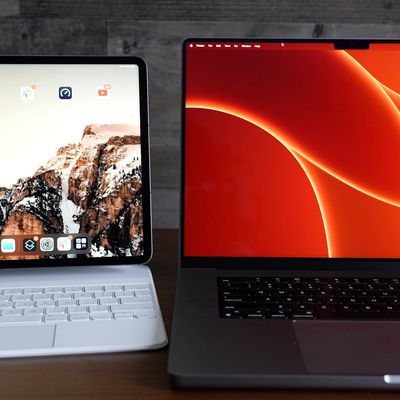
Universal Control Not Working? Here’s How to Fix It
In iOS 15.4 and macOS Monterey 12.3, Apple introduced Universal Control, a feature designed to allow you to control multiple Macs and iPads with a single trackpad/mouse and keyboard. This article offers solutions to the most common problems encountered when getting Universal Control to work.
With Universal Control, you can use your main Mac's trackpad and keyboard to control additional Macs...

How to Watch the 2022 Super Bowl on iPhone, iPad, and Apple TV
Super Bowl 2022 takes place on Sunday, February 13 at SoFi Stadium in Los Angeles, where the Cincinnati Bengals will take on the Los Angeles Rams. This article outlines some of the ways you can watch it for free on iPhone, iPad, Apple TV, and the web.
When does Super Bowl LVI Start?
Super Bowl LVI kicks off on Sunday, February 13 at 6:30 p.m. ET, or 5:30 p.m. Central, 4:30 p.m. Mountain,...
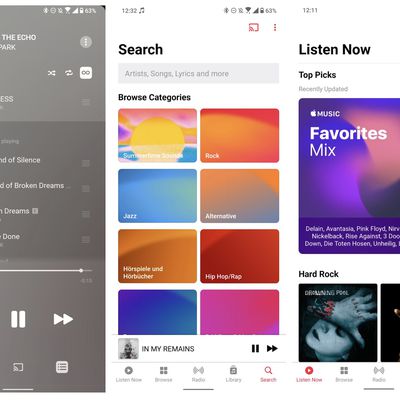
Android Apple Music Beta Code Refers to Unreleased 'Apple Classical' App
Apple's latest Apple Music beta app for Android may have revealed the name of the company's forthcoming app dedicated to classical music, suggesting a release might not be too far away.
Last year, Apple announced the purchase of classical music streaming service Primephonic, which features search and browse functionality specially optimized for classical music.
Apple said that the best...

Vivaldi 5.1 Adds Ability to Scroll Through Browser Tabs Horizontally in the Tabs Bar
Vivaldi for Mac received an update today that brings yet more new features to the highly customizable web browser, including a handy way of managing multiple tabs using horizontal scroll.
Most modern web browsers usually handle multiple tabs by shrinking the tabs into smaller and smaller segments to fit them all in on screen, but this can quickly look cluttered and make it progressively...

Apple's 'realityOS' for Rumored AR/VR Headset Referenced in Source Code
New references to "realityOS," the AR/VR operating system that will run Apple's rumored mixed reality headset, have been found in App Store upload logs and Apple open source code this morning.
Concept render based on purported leaked information by Ian Zelbo
Apple is working on at least two AR projects that include an augmented reality headset set to be released in late 2022 or 2023, followed ...
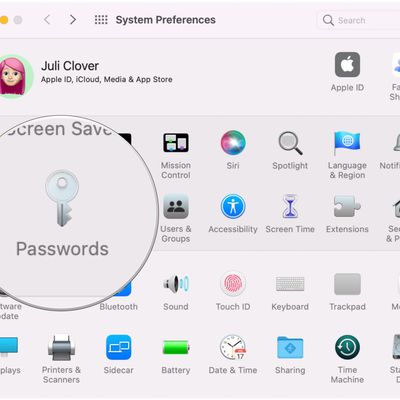
macOS 12.3: How to Add Notes to iCloud Keychain Entries
In macOS Monterey 12.3, currently in beta, Apple has added the ability for users to add notes to account entries in iCloud Keychain. This article explains how it's done.
Slowly but surely with each iteration of macOS, Apple has been improving iCloud Keychain to put it on equal footing with rival third-party password managers such as 1Password. And in macOS 12.3, it continues that...