macOS 12.3: How to Add Notes to iCloud Keychain Entries - MacRumors
Skip to Content

macOS 12.3: How to Add Notes to iCloud Keychain Entries

by

In macOS Monterey 12.3, currently in beta, Apple has added the ability for users to add notes to account entries in iCloud Keychain. This article explains how it's done.
passwords system preferences
Slowly but surely with each iteration of macOS, Apple has been improving ‌‌iCloud‌‌ Keychain to put it on equal footing with rival third-party password managers such as 1Password. And in macOS 12.3, it continues that tradition with a simple additional option: Account notes.

Adding notes to an account entry is a handy way to remind yourself of something unique and important to those credentials. For example, you might have a browser content blocker that needs to be disabled for you to access the account login page on a certain website, in which case you can add a note about that.

Here's how to add notes to an account entry in ‌‌iCloud‌‌ Keychain on a Mac running macOS 12.3.

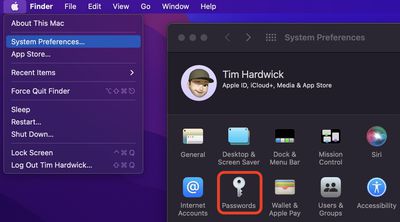
  1. Launch System Preferences from your Mac's Dock, from the Applications folder, or from the Apple menu bar ( -> System Preferences...).
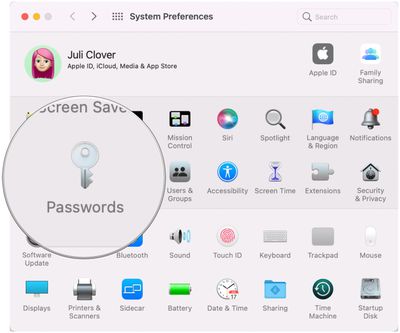
  2. Select Passwords in the preferences panel.
    sys-prefs

  3. Use Touch ID or enter your Mac password to unlock the passwords section of ‌iCloud‌ Keychain.
  4. Select an existing account entry from the alphabetical list (use the search field at the top if you like), then click Edit.... Alternately, click the + icon at bottom of the column to create a new entry, then enter a web URL, username, and password, and click Add Password. With the new entry selected, click Edit....
    sys-prefs

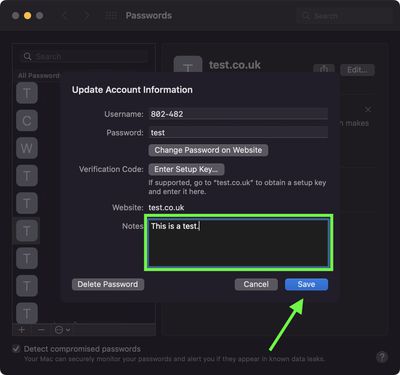
  5. Click inside the "Notes" field and enter your notes.
  6. Click Save.
    sys-prefs

Apple has also added the ability to add password notes to ‌iCloud‌ Keychain on iPhone and iPad. To learn how to add passwords in iOS 15.4, check out our dedicated how-to.


Related Forum: macOS Monterey

Popular Stories

Tim Cook Rainbow

Apple CEO Tim Cook Stepping Down, John Ternus Taking Over

Monday April 20, 2026 1:33 pm PDT by
Apple CEO Tim Cook is stepping down as Apple's chief executive officer, and hardware engineering chief John Ternus is set to take over, Apple announced today. Cook will continue on as Apple CEO through the summer, with Ternus set to join Apple's Board of Directors and take over as CEO on September 1, 2026. Cook is going to transition to executive chairman, and he will "assist with certain...

Four iPhone 18 Pro Colors Mock Feature

iPhone 18 Pro Launching in September With These 10 New Features

Monday April 20, 2026 7:13 am PDT by
While the iPhone 18 Pro and iPhone 18 Pro Max are not launching until September, there are already plenty of rumors about the devices. It was initially reported that the iPhone 18 Pro models would have fully under-screen Face ID, with only a front camera visible in the top-left corner of the screen. However, the latest rumors indicate that only one Face ID component will be moved under the...
macOS 27 on MacBook Pro

macOS 27 Will Mark the End of an Era

Saturday April 18, 2026 6:45 am PDT by
During its Platforms State of the Union segment at WWDC 2025, Apple revealed that macOS 26 Tahoe is the final major macOS version for Intel-based Macs. The upcoming macOS 27 release will be compatible with Apple silicon Macs only, meaning that you will need a Mac with an M-series chip or a MacBook Neo with an A18 Pro chip in order to install the software update. macOS 27 should be available...