

Skip to Content

How to Disable Live Text on iPhone and iPad

by

In iOS 15 and iPadOS 15, Apple's Live Text feature can automatically recognize text when it appears in your camera's viewfinder, in a photo or screenshot you've taken, and in Safari, and let you copy or share it. Sometimes, however, the text auto-detection can become a distraction, and you might prefer to turn it off, either completely or just for the Camera app. This article explains how.

ipados 15 live text

How to Disable Live Text on iPhone and iPad

  1. Launch the Settings app.
  2. Tap General.
  3. Tap Language & Region.
  4. Toggle off the switch next to Live Text.
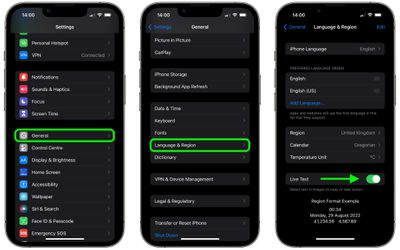
settings
After that's done, you'll no longer see the text recognition symbol or the Live Text contextual menu when interacting with images.

How to Disable Live Text in the Camera App

On the other hand, if you're happy to use Live Text in iOS but don't want it to interfere with your photography, you can turn off Live Text just in the Camera app by following these steps.

  1. Launch the Settings app on your iPhone or iPad.
  2. Scroll down and tap Camera.
  3. Toggle off the switch next to Show Detected Text. (Note: This option won't appear if you've already disabled Live Text systemwide.)
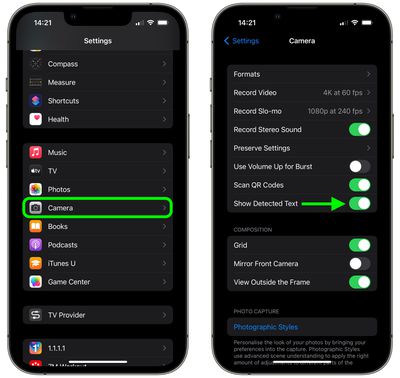
settings
Now your camera won't detect text if it appears in the image shown in the viewfinder.

If you'd like to learn more about how Live Text can be useful for a variety of purposes, be sure to check out our dedicated Live Text tutorial for iOS 15.


Popular Stories

MacBook Neo Feature Pastel 1

First MacBook Neo Benchmarks Are In: Here's How It Compares to the M1 MacBook Air

Thursday March 5, 2026 4:07 pm PST by
Benchmarks for the new MacBook Neo surfaced today, and unsurprisingly, CPU performance is almost identical to the iPhone 16 Pro. The MacBook Neo uses the same 6-core A18 Pro chip that was first introduced in the iPhone 16 Pro, but it has one fewer GPU core. The MacBook Neo earned a single-core score of 3461 and a multi-core score of 8668, along with a Metal score of 31286. Here's how the...

MacBook Neo Feature Pastel 1

Apple Announces $599 'MacBook Neo' With A18 Pro Chip

Wednesday March 4, 2026 6:15 am PST by
Apple today announced the "MacBook Neo," an all-new kind of low-cost Mac featuring the A18 Pro chip for $599. The MacBook Neo is the first Mac to be powered by an iPhone chip; the A18 Pro debuted in 2024's iPhone 16 Pro models. Apple says it is up to 50% faster for everyday tasks than the bestselling PC with the latest shipping Intel Core Ultra 5, up to 3x faster for on-device AI workloads,...
Multicolored Low Cost A18 Pro MacBook Feature

Apple Accidentally Leaks 'MacBook Neo'

Tuesday March 3, 2026 7:00 am PST by
Apple appears to have prematurely revealed the name of its rumored lower-cost MacBook model, which is expected to be announced this Wednesday. A regulatory document for a "MacBook Neo" (Model A3404) has appeared on Apple's website. Unfortunately, there are no further details or images available yet. While the PDF file does not contain the "MacBook Neo" name, it briefly appeared in a link...









































