Skip to Content

Apple Releases Fifth Public Betas of iOS 26 and More

Apple today released the fifth public betas of iOS 26, iPadOS 26, macOS 26, and tvOS 26, allowing the public to test the updates ahead of their September launch. The fifth public betas come a week after the fourth public betas, and the updates correspond with the eighth developer betas that were released earlier today.
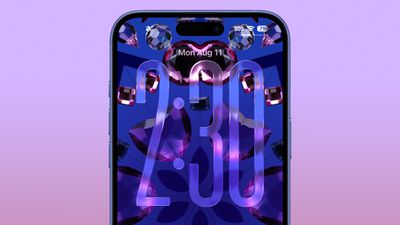
ios 26 liquid glass lock screen beta 6
Public beta testers that have registered on Apple's website can download the latest ‌iOS 26‌, ‌iPadOS 26‌, and macOS 26 public betas by opening the Settings or System Settings app, going to the General section, tapping on Software Update, and choosing the ‌iOS 26‌, ‌iPadOS 26‌, or macOS 26 Public Beta options.

‌iOS 26‌ and ‌iPadOS 26‌ feature Apple's Liquid Glass design, with a visual aesthetic that focuses on transparency. Icons, menu buttons, navigation bars, and more reflect and refract light with subtle animations. There are pop-out menus in some areas, tab bars shrink down, and everything has a more rounded look.
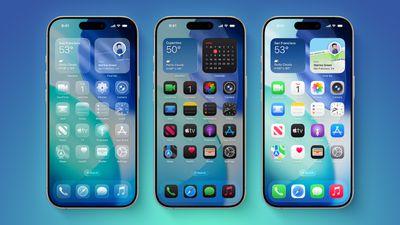
iOS 26 on Three iPhones
There are new Apple Intelligence features like Visual Intelligence for screenshots, updated order tracking in the Wallet app, new features in Reminders, and Live Translation for the Messages, Phone, and FaceTime apps. Image Playground has ChatGPT style options, and Genmoji supports mixing two or more emoji characters to make something new.
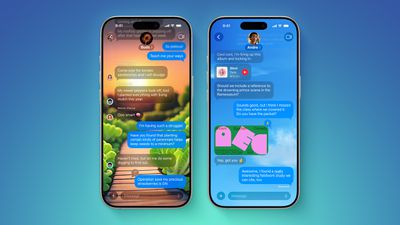
ten messages features
2D photos have a more 3D look with a Spatial Scene feature, and Safari has updated navigation. In the Phone app, there are new Call Screening and Hold Assist features that will save you time, while the Messages app supports customizable backgrounds and polls. Apple Music has a DJ-like AutoMix feature, CarPlay has an overhauled interface, there's a new Apple Games app, and Preview has come to the iPhone for the first time.
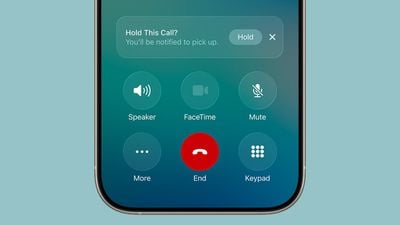
ios 26 call holding
macOS Tahoe has the same Liquid Glass design as ‌iOS 26‌, and it extends to app icons, folders, the Dock, in-app navigation, menus, the Control Center, and the Menu Bar. The Control Center and the Menu Bar are customizable, and you're also able to customize folders, app icons, and widgets.
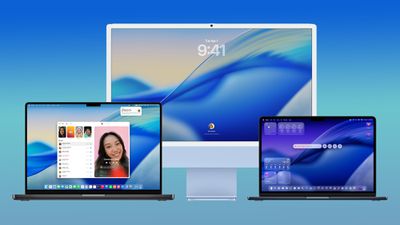
macos tahoe design
Safari has an updated tab design and a redesigned sidebar, and Apple has brought the Phone app to the Mac for making phone calls through Wi-Fi Calling. The Phone app supports the new Call Screening and Hold Assist features.

Spotlight has been overhauled with improved search and the ability to execute hundreds of actions without opening up an app. There's a new Games app with a Game Overlay feature, and developers have access to Metal 4.

More on what's new can be found in our iOS 26, iPadOS 26, and macOS Tahoe roundups. This is likely to be the final public beta of ‌iOS 26‌ before the release candidate and the launch version.

Related Roundups: iOS 26, iPadOS 26
Related Forum: iOS 26

Popular Stories

tim cook data privacy day

Tim Cook Warned by CIA That China Could Move on Taiwan by 2027

Tuesday February 24, 2026 4:03 am PST by
Apple CEO Tim Cook was among a handful of top tech executives who attended a classified CIA briefing warning that China could attack Taiwan by 2027, according to a sweeping investigative report by The New York Times ($). The previously unreported briefing was apparently held in a secure room in Silicon Valley in July 2023. The meeting is said to have been arranged at the request of the...
iphone fold text

iPhone Fold Crease Measurements Revealed as Device Hits Production

Wednesday February 25, 2026 5:37 am PST by
Apple has submitted production line orders for its upcoming foldable iPhone, effectively confirming that the device will launch this year, claims a Chinese leaker. According to the Weibo account "Fixed Focus Digital," assembly lines recently received the orders from Apple, which has apparently allowed the leaker to learn the crease measurements for the device's 7.8-inch inner display....
Apple Announces Special Event in New York Feature 1

Apple Reportedly Plans to Unveil at Least Five New Products Next Week

Sunday February 22, 2026 9:48 am PST by
In his Power On newsletter today, Bloomberg's Mark Gurman said Apple will have a three-day stretch of product announcements from Monday, March 2 through Wednesday, March 4. In total, he expects Apple to introduce "at least five products." Subscribe to the MacRumors YouTube channel for more videos. A week ago, Apple invited selected journalists and content creators to an "Apple Experience" in...

Top Rated Comments

27 weeks ago

Please tell me there's a quicker way of swapping tabs.
You can go into Settings > Safari and change the view from Compact to either Bottom or Top.
Score: 5 Votes (Like | Disagree)
iBreatheApple Avatar
27 weeks ago

Just updated to the beta for the first time. The first thing I noticed was you can't easily change safari tabs.

You need to press the 3 dots then swap tabs. Please tell me there's a quicker way of swapping tabs.
Swipe up on the address bar. I didn’t like it either but it’ll become second nature after a while. I don’t mind now.
Score: 5 Votes (Like | Disagree)
27 weeks ago
Thanks mate.worked a treat.
Score: 3 Votes (Like | Disagree)
27 weeks ago

Holy smokes, this just made "compact" usable. I was using "bottom" just for the tab switcher. Thanks!
You can also use the pinch gesture anywhere on the screen while in safari to show all tabs. I have found this the easiest way.
I didn’t know about the swiping up option!
Score: 3 Votes (Like | Disagree)
iBreatheApple Avatar
27 weeks ago

This has been the thing for me. The new features in the software (mainly those in the phone app) have outweighed my mild dislike of Liquid Glass.
It’s just the ICONS! I hate the “white outline”. Please remove it from them, Tim Apple, and all will be good!
Score: 3 Votes (Like | Disagree)
Robert.Walter Avatar
27 weeks ago

This has been the thing for me. The new features in the software (mainly those in the phone app) have outweighed my mild dislike of Liquid Glass.
Agree. Phone updates, other s/w adds and improvements outweigh the clunky UI (I mean, really, did we need a search window to be on display, or a big empty hot dog robbing space above the keyboard, such that useful, likely more used buttons, are buried inside a menu, sometimes 2 levels down in the menu?).

I'm increasingly getting the feeling that Apple didn't really know what they could improve in iOS feature-wise (and there are many opportunities for that) so they just decided "let's make it look differently" ...
Score: 3 Votes (Like | Disagree)