In iOS 26, Apple Maps has a feature called Visited Places that when enabled automatically logs where you've been, with the aim of making it easier to revisit your favorite spots or to share locations with friends.

iOS 26 Maps Glass
While it can be useful for tracking your travels, you might prefer to keep your location history private. Here's how to disable the feature and clear your history.

What Is Visited Places?

Visited Places keeps a record of locations you've visited, organizing them by category such as restaurants, shops, or transit stops. The feature is end-to-end encrypted, so Apple can't read your data, and it syncs across all your Apple devices signed into the same account.
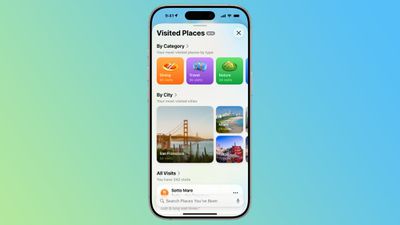
ios 26 maps app visited places overview
You can search your visited places by name, date, or category, add personal notes, and even save locations to custom guides. However, if you'd rather not have Maps tracking your movements at all, you can turn it off completely.

How to Turn Off Visited Places

When you upgrade to ‌iOS 26‌, the Maps app pops up an alert on first launch letting you know about the new Visited Places feature, so that you can opt in or opt out. If you opted in and now want to disable it, or you don't remember seeing the popup, here's what to do.

  1. Open the Settings app on your iPhone.
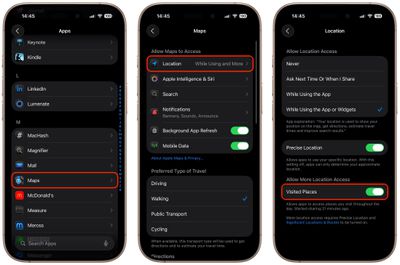
  2. Tap through to Apps ➝ Maps ➝ Location.
  3. Toggle off the Visited Places switch.

settings

With the toggle disabled, Maps will no longer track the places you visit. Note that you can also access the toggle by going to Privacy and Security ➝ Location Services ➝ Maps.

How to Clear Your Visited Places History

In the Maps app's Visited Places card, the Keep Visits buttons gives you options to change how long visits are kept (three months, one year, and forever). If you want to delete the entirety of location history, you can also clear it from within the Maps app.

  1. Open the Maps app on your iPhone.
  2. Tap Places, then tap Visited Places.
  3. Scroll to the bottom, tap Clear History, then tap Clear All.

Your visited places history will now be permanently deleted. You can also remove individual locations by tapping More (the three dots) next to any place card and selecting Remove.


Top Rated Comments

19 weeks ago
"Apple Maps may be doing exactly the thing it said it would do in the dialog where it asked if you wanted to enable the feature"
Score: 51 Votes (Like | Disagree)
vertsix Avatar
19 weeks ago
"You May Be Logging Places You Visit On Apple Maps – How to Disable"

Fixed it. There is a pop-up when you open Apple Maps for the first time on iOS 26 that gives you this option. It is opt-in. The author is making it seem like this is something malicious.
Score: 34 Votes (Like | Disagree)
orbital~debris Avatar
19 weeks ago

('https://www.macrumors.com/how-to/apple-maps-visited-places-disable/')
Article Link: Apple Maps May Be Logging Places You Visit – How to Disable ('https://www.macrumors.com/how-to/apple-maps-visited-places-disable/')
MacRumors, please consider writing posts with more ‘unbiased’ titles.

While the content is pretty fair, in that it describes the steps Apple have taken to keep this data private, encrypted etc., and that you can remove it, the title of the post is more likely than not to set readers into a particular frame of mind about the feature i.e. that it’s a bad thing that should be disabled.

I think Apple created the feature with good intentions, and it should be taken in that light.

The article could simply describe the feature, and then have a paragraph/heading about disabling if you wish to.
Score: 32 Votes (Like | Disagree)
turbineseaplane Avatar
19 weeks ago
I just can't stop laughing at this first image.

Just go ahead and make it totally transparent at this point - lmfao


Attachment Image
Score: 31 Votes (Like | Disagree)
19 weeks ago

Apple Maps is always worth uninstalling on Day 1 anyway.
Why, what's better? For my driving I've found it's as good as Google Maps -- sometimes better, sometimes worse, but overall similar. I've not found anything else clearly better than either.
Score: 29 Votes (Like | Disagree)
19 weeks ago
The headline here and framing is complete FUD. This is exactly the type of article my family will read and follow mindlessly out of fear.


In iOS 26, Apple Maps has a feature called Visited Places that when enabled automatically logs where you've been
It isn't doing it "automatically" - it's doing it when you enable it. It is opt-in and users are asked explicitly.


While it can be useful for tracking your travels, you might prefer to keep your location history private
Complete FUD - it is private and encrypted, as the article itself points out:

The feature is end-to-end encrypted, so Apple can't read your data,
Score: 25 Votes (Like | Disagree)

Popular Stories

M3 iPad Air

Apple's Next Two Products Are Coming Soon

Thursday February 12, 2026 11:17 am PST by
Apple plans to release an iPhone 17e and an iPad Air with an M4 chip "in the coming weeks," according to the latest word from Bloomberg's Mark Gurman. "Apple retail employees say that inventory of the iPhone 16e has basically dried out and the iPad Air is seeing shortages as well," said Gurman. "I've been expecting new versions of both (iPhone 17e and M4 iPad Air) in the coming weeks."...
Apple Sales Coach App

Apple Launching New 'Sales Coach' App

Friday February 13, 2026 2:01 pm PST by
Apple plans to launch a rebranded "Sales Coach" app on the iPhone and iPad later this month, according to a source familiar with the matter. "Sales Coach" will arrive as an update to Apple's existing "SEED" app, and it will continue to provide sales tips and training resources to Apple Store and Apple Authorized Reseller employees around the world. For example, there are articles and videos...
m5 macbook pro deal

Why You Shouldn't Buy the Next MacBook Pro

Tuesday February 10, 2026 4:27 pm PST by
Apple is planning to launch new MacBook Pro models as soon as early March, but if you can, this is one generation you should skip because there's something much better in the works. We're waiting on 14-inch and 16-inch MacBook Pro models with M5 Pro and M5 Max chips, with few changes other than the processor upgrade. There won't be any tweaks to the design or the display, but later this...
Coffee Burgundy and Purple iPhone 18 Pro Mock

Five iPhone 18 Pro Features Revealed in New Report

Friday February 13, 2026 8:43 am PST by
While the iPhone 18 Pro and iPhone 18 Pro Max are still seven months away, an analyst has revealed five new features the devices will allegedly have. Rumored color options for the iPhone 18 Pro models In a research note with investment firm GF Securities on Thursday, analyst Jeff Pu outlined the following upgrades for the iPhone 18 Pro models: Smaller Dynamic Island: It has been rumored...


macbook air prime day 2025

M5 MacBook Air: Release Date, Features, and Performance Predictions

Wednesday February 11, 2026 3:36 am PST by
The MacBook Air is Apple's most popular laptop – a thin, fanless machine that wields quiet power thanks to the efficiency of Apple silicon. While the M4 model isn't exactly old, attention is already turning to its successor. Apple doesn't telegraph new product launches ahead of time, but we can draw a surprisingly clear picture of what to expect by looking at Apple's silicon roadmap,...