Hands On With Apple's New M4 Mac Mini - MacRumors
Skip to Content

Hands On With Apple's New M4 Mac Mini

Apple launched the new Mac mini, iMac, and MacBook Pro models with M4 chips today, and because the ‌Mac mini‌ is the only one of the machines that got a design update, we thought we'd check it out to see how it compares to the prior version.


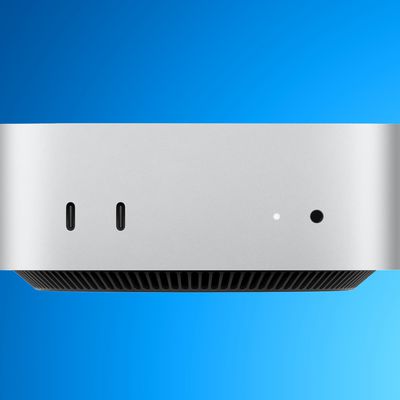
The 2024 version of the ‌Mac mini‌ is much smaller than the previous M2 model, so it takes up less space on a desktop. It's 5 by 5 inches, down from 7.75 by 7.75 inches, and you can really see a difference when they're side-by-side. There were rumors that the ‌Mac mini‌ could be as small as the Apple TV, but it's not that small.

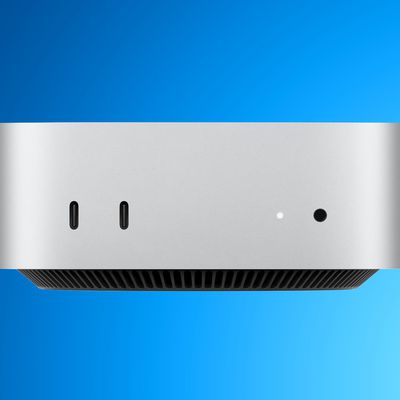
It's impressive to have a powerful M4 computer in such a small enclosure, and with so many available ports. There are two ports on the front and three on the back, all USB-C or Thunderbolt. If you have USB-A accessories, you'll need an adapter. There's also an HDMI port, a 3.5mm headphone jack, an Ethernet port, and a port for the power cable.

You can get the ‌Mac mini‌ with an M4 or an M4 Pro chip, and the M4 version has three Thunderbolt 4 ports at the back while the M4 Pro version has three Thunderbolt 5 ports that support faster transfer speeds. The M4 and the M4 Pro offer notable speed improvements over the prior ‌M2‌ and ‌M2‌ Pro chips. We've got the full array of benchmarks in the video, but CPU performance is up to 55 percent faster in the M4 Pro compared to the ‌M2‌ Pro. GPU performance is up significantly, and even the SSD is faster.

Apple is also selling the M4 Macs with 16GB RAM at a minimum, which is a major upgrade over the previous 8GB starting RAM for the base model.

The ‌Mac mini‌ is priced starting at $599, but that's because it doesn't come with a display or peripherals. You'll need to supply your own. It's a solid machine for home or work, and because it's so small, you can take it from one place to another if you have two setups with displays and accessories.

There is one downside to the ‌Mac mini‌. If you often turn your Mac off and on, you might be annoyed to find that the power button is on the bottom of the device. To access it, you'll need to lift the ‌Mac mini‌ up a bit. That's no big deal if you don't turn your computer off regularly, but if you do, just note there's a little bit of an extra hassle to deal with.

Did you get a new M4 Mac mini, or do you plan to? Let us know in the comments below.
Related Roundup: Mac mini
Buyer's Guide: Mac Mini (Caution)

Related Forum: Mac mini

Popular Stories

Mac mini vs Studio Feature Sans Text 1

Mac Mini and Mac Studio Facing Extreme Shipping Delays Amid Severe RAM Shortage

Monday April 6, 2026 7:12 am PDT by
Apple's online store in the U.S. is currently showing delivery estimates of up to 4-5 months for many Mac mini and Mac Studio configurations with upgraded amounts of RAM. The delays are occurring amid a severe global memory chip shortage driven by surging demand from companies building AI servers that require large amounts of RAM. For example, a Mac mini with an M4 Pro chip and 64GB of RAM...
Mac mini vs Studio Feature Sans Text 1

Apple Stops Accepting Orders for Some Mac Mini and Mac Studio Models

Saturday April 11, 2026 7:35 am PDT by
As noted by 9to5Mac, some Mac mini and Mac Studio configurations are now completely out of stock on Apple's online store in the U.S. as of this writing. Mac mini configurations with an upgraded 32GB or 64GB of RAM and Mac Studio configurations with an upgraded 128GB or 256GB of RAM are listed as "currently unavailable" on the storefront, meaning they can no longer be ordered at all. Other ...
perplexity personal computer

Perplexity Launches Personal Computer for Mac, Turning a Mac mini Into an Always-On AI Agent

Thursday April 16, 2026 1:03 pm PDT by
Perplexity today launched Personal Computer, an expansion of Perplexity Computer that integrates with local files and apps on a Mac. Personal Computer was announced in March and was available on a waitlist basis, but it is officially rolling out today for Max subscribers. Perplexity Computer came out earlier this year, and it's an all-in-one "digital worker" able to create and execute entire ...

Top Rated Comments

WarmWinterHat Avatar
19 months ago
I have zero use for a mini, but I really, really want one!
Score: 22 Votes (Like | Disagree)
cjsuk Avatar
19 months ago
Got mine. So so so happy.
Score: 13 Votes (Like | Disagree)
19 months ago

Don't be fooled, those from USB "3" ports on the front are the old 5.0 Gb/s variety. Not 10Gb/s like the 3.1 and 3.2 ones.
Wrong?

Attachment Image
Score: 10 Votes (Like | Disagree)
Chuckeee Avatar
19 months ago

So apparently the SSD is removable and upgradeable!
Well the SSD is removable and replaceable, it is not really more upgradable. It is a unique Apple design that allows the replacement of the SSD memory chips [with a unique Apple supplied replacement], not the entire SSD. To upgrade the SSD storage, you still need the skill and equipment to remove the surface mounted chips and to solder in new chips. Simialr to the SSD configuration found on the Mac Studio, allowing for repairs but not a simple means to increase SSD capacity.
Score: 9 Votes (Like | Disagree)
19 months ago
Apple knocked it out of the park with this one. The base model is such a great deal. Weird power button placement but no biggie for my particular use, I never turn off the mini anyways.
Score: 9 Votes (Like | Disagree)
19 months ago
Set up my new mini this afternoon with no issues migrating data from my 2019 MacBook Air. The only thing I don't like is the external speaker jack on the front of the machine. The install would look much cleaner if it was on the back so the speaker cable was hidden....
Score: 7 Votes (Like | Disagree)